Coding an Optical Sensor - Vex V5 Text Pro

yes, because this code

OpticalSensor.objectDetected(redball); 

means register the function redball as something that is called every time an object is detected, any object, no matter the color.
and you register that function everytime you see a red color, so you end up calling redball more and more the longer the code runs.

New simpler program without the objectDetected code, but now doesn’t run at all:

void usercontrol(void) { 
OpticalSensor.setLightPower(100, percent); 
OpticalSensor.setLight(ledState::on); 
TopMotor.setVelocity(100, percent); 
TopMotor2.setVelocity(100, percent); 


while (1) { 
 if(OpticalSensor.color() == red){ 
   TopMotor2.spinFor(fwd, -1300, degrees, false); 
   TopMotor.spinFor(fwd, 1300, degrees, false); 
 } 
 else if(OpticalSensor.color() == blue){ 
  TopMotor.stop();
  TopMotor2.stop();
 } 
 wait(20, msec); return; } }

try something like this.

vex::optical     Optical1(PORT11);

int main() {   
    while(1) {
        if( Optical1.color() == vex::red ) {
          Brain.Screen.printAt( 10, 20, "RED detected     ");
        }
        else
        if( Optical1.color() == vex::blue ) {
          Brain.Screen.printAt( 10, 20, "BLUE detected    ");
        }
        else {
          Brain.Screen.printAt( 10, 20, "no color detected");          
        }

        // Allow other tasks to run
        this_thread::sleep_for(10);
    }
}

you actually have a “return” statement inside your while loop, it will only run once.

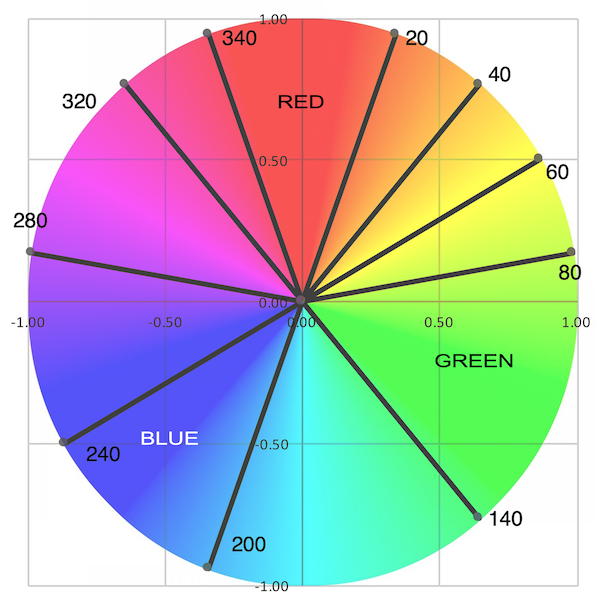
you may also find, depending on your lighting and environment, that our idea of “red” and “blue” doesn’t match what you are measuring. In that case, you will have to use hue() and determine what range of values should be red and blue.

This is the code as of right now, which seems to work pretty well. Thank you all so much

 while(1) {
       if( OpticalSensor.color() == vex::red ) {
      TopMotor2.spin(reverse);
      TopMotor.spin(fwd);
      waitUntil(LimitSwitchC.pressing() == false);
      TopMotor.stop();
      TopMotor2.stop();
      TopMotor.spinFor(fwd, 1000, degrees, false);
      TopMotor2.spinFor(reverse, 1000, degrees, false);
      waitUntil(TopMotor2.isDone());
    }
    else
    if( OpticalSensor.color() == vex::blue ) {
  
    }
    else {
      Brain.Screen.printAt( 10, 20, "no color detected");          
    }

    // Allow other tasks to run
    this_thread::sleep_for(10);
} 
}

and for reference, you can always check what hue the optical sensor is detecting by using the dashboard.

optical

This can be used while your program is running if needed.

The VEXcode SDK evaluates a range of hue as a color.

red is 340 (-20) to 20 degrees
green is 80 to 140 degrees
blue is 200 to 240 degrees.

If these don’t give the result you want, then call the hue() class member function and set a range of values that matches what you need.

Did you read the two year old thread you revived? (Please start new threads instead.)

It sure looks to me that this old thread covers what you need. There are also some example in VexCode. Click File then Open Examples to find some starting points.