End of Vex Change up 2020-21 season

Format your code using three ` before and after like this.

If you are going to try to convert motor ticks into inches use the actual PI instead of 3.14, it creates unecessary error.

To use pi put this at the top of the file you are doing conversions.

#define _USE_MATH_DEFINES
 
#include <cmath>

now instead of using 3.14 you can use ( M_PI * 4.125 )

EDIT: Be sure to use data type double instead of int, since PI is irrational.

/ *----------------------------------------------------------------------------* /
/*   <em>/
/</em>  PID Control Test code   <em>/
/</em>   <em>/
/</em> ---------------------------------------------------------------------------- <em>/
// ---- START VEXCODE CONFIGURED DEVICES ----
// Robot Configuration:
// [Name] [Type] [Port(s)]
// LeftDriveSide motor_group 1, 2
// RightDriveSide motor_group 3, 4
// Controller1 controller
// ---- END VEXCODE CONFIGURED DEVICES ----
#include “vex.h”
using namespace vex;
// A global instance of competition
competition Competition;
// define your global instances of motors and other devices here
/</em> --------------------------------------------------------------------------- <em>/
/</em>  Pre-Autonomous Functions   <em>/
/</em>   <em>/
/</em>  You may want to perform some actions before the competition starts.   <em>/
/</em>  Do them in the following function. You must return from this function   <em>/
/</em>  or the autonomous and usercontrol tasks will not be started. This   <em>/
/</em>  function is only called once after the V5 has been powered on and   <em>/
/</em>  not every time that the robot is disabled.   <em>/
/</em> ---------------------------------------------------------------------------*/
void pre_auton(void) {
// Initializing Robot Configuration. DO NOT REMOVE!
vexcodeInit();

LeftDriveSide.setPosition(0,degrees);
RightDriveSide.setPosition(0,degrees);
// All activities that occur before the competition starts
// Example: clearing encoders, setting servo positions, …
}
//settings
double kP = 0.0;
double kI = 0.0;//these are constants that never change
double kD = 0.0;//modify these numbers if needed
double turnkP = 0.0;
double turnkI = 0.0;//these are constants that never change
double turnkD = 0.0;//modify these numbers if needed
//Autonomous Settings
int inches;
inches/12.9525 *360 = degrees;
int desiredValue = inches;//this is the amount of degrees that you desire – change if needed
int desiredTurnValue = 0;
int error;// currentSensorValue - desiredValue, positional value -> speed -> acceleration ->jerk
int prevError = 0; //position 20 miliseconds ago
int derivative; //error - prevError = speed, calculates the speed needed to reach the end value/target without overshooting -
//if it is going too fast, the derivative will have a negative effect and slow it down and if too slow, it will speed it up (positive effect)
int totalError = 0; //totalError = totalError + error
int turnError;// currentSensorValue - desiredValue, positional value -> speed -> acceleration ->jerk
int turnPrevError = 0; //position 20 miliseconds ago
int turnDerivative; //error - prevError = speed, calculates the speed needed to reach the end value/target without overshooting -
//if it is going too fast, the derivative will have a negative effect and slow it down and if too slow, it will speed it up (positive effect)
int turnTotalError = 0; //totalError = totalError + error
bool resetDriveSensors = false;
//variables modified for use
bool enableDrivePID = true;//currently when it is true, that means it is enabled
int drivePID(){
while (enableDrivePID){


if (resetDriveSensors){
  resetDriveSensors = false;
  LeftDriveSide.setPosition(0,degrees);
  RightDriveSide.setPosition(0,degrees);
}


//get the position of both sides
int LeftDriveSidePosition = LeftDriveSide.position(degrees);
int RightDriveSidePosition = RightDriveSide.position(degrees);


//////////////////////////////////////////////////////////////////
//drive PID control
///////////////////////////////////////////////////////////////////
//get average of these 2 drive sides(motors)


int averagePosition = (LeftDriveSidePosition + RightDriveSidePosition)/2;
//Potential
error = averagePosition - desiredValue;
//Derivative
derivative = error - prevError;


 //integral
 //velocity -> position -> absement(postion * time) -- if pos doesnt change, then we need the absement to increase
 //totalError += error;
 double DriveMotorPower = error * kP + derivative * kD; // + totalError * kI     /12.0  you dont have to have it be divided by 12.0
 //////////////////////////////////////////////////////////////////////////////////////////
 //////////////////////////////////////////////////////////////////////////////////
 //turn PID control
 ////////////////////////////////////////////////////////////////////////////////
 //get average of these 2 drive sides(motors)


int turnDifference = LeftDriveSidePosition - RightDriveSidePosition;


//Potential 
turnError = turnDifference - desiredTurnValue;
//Derivative
turnDerivative = turnError - turnPrevError; 

 //integral
 //velocity -> position -> absement(postion * time) -- if pos doesnt change, then we need the absement to increase
 //turnTotalError += turnError;
 double TurnMotorPower = turnError * turnkP + turnDerivative * turnkD; // + turnTotalError * turnkI    /12.0  you dont have to have it be divided by 12.0
 ///////////////////////////////////////////////////////////////////////////////////
LeftDriveSide.spin(forward, DriveMotorPower + TurnMotorPower, voltageUnits::volt);
RightDriveSide.spin(forward, DriveMotorPower + TurnMotorPower, voltageUnits::volt);


prevError = error;
turnPrevError = turnError;
vex::task::sleep(20);
}
return 1;
}
/ *---------------------------------------------------------------------------* /
/*   <em>/
/</em>  Autonomous Task   <em>/
/</em>   <em>/
/</em>  This task is used to control your robot during the autonomous phase of   <em>/
/</em>  a VEX Competition.   <em>/
/</em>   <em>/
/</em>  You must modify the code to add your own robot specific commands here.   <em>/
/</em> ---------------------------------------------------------------------------*/
void autonomous(void) {
vex::task DrivePIDTask(drivePID);
resetDriveSensors = true;

desiredValue = 10;//this number is the number of inches the wheels will move
desiredTurnValue = 360;//the desired turn value to turn the robot – try negative turn values and see if it will turn the other direction
vex::task::sleep(1000);
resetDriveSensors = true;
desiredValue = 720;
desiredTurnValue = -360;
vex::task::sleep(1000);

}
/ *---------------------------------------------------------------------------* /
/*   <em>/
/</em>  User Control Task   <em>/
/</em>   <em>/
/</em>  This task is used to control your robot during the user control phase of  <em>/
/</em>  a VEX Competition.   <em>/
/</em>   <em>/
/</em>  You must modify the code to add your own robot specific commands here.   <em>/
/</em> ---------------------------------------------------------------------------*/
void usercontrol(void) {
enableDrivePID = false;
// User control code here, inside the loop
while (1) {


wait(20, msec); // Sleep the task for a short amount of time to
                // prevent wasted resources

}
}
//
// Main will set up the competition functions and callbacks.
//
int main() {
// Set up callbacks for autonomous and driver control periods.
Competition.autonomous(autonomous);
Competition.drivercontrol(usercontrol);
// Run the pre-autonomous function.
pre_auton();
// Prevent main from exiting with an infinite loop.
while (true) {
wait(100, msec);
}
}
1 Like

Ok, That makes sense. This is what I changed it to

//Autonomous Settings
#define _USE_MATH_DEFINES
#include
double inches;
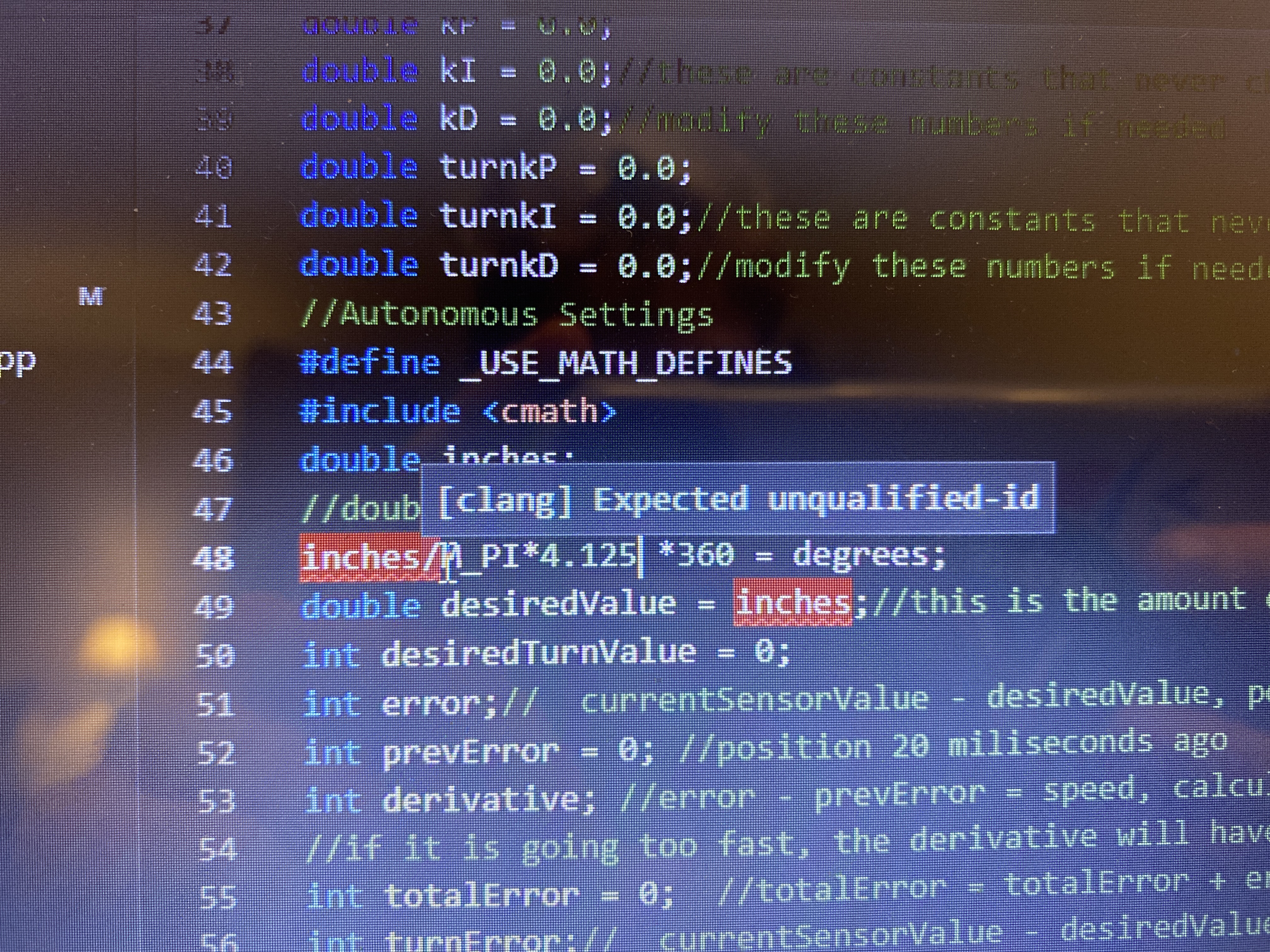
inches/(M_PI*4.125) *360 = degrees;
double desiredValue = inches;//this is the amount of degrees that you desire – change if needed

Thanks! This helped alot!

1 Like
//Autonomous Settings
#define _USE_MATH_DEFINES
#include
double inches;
inches/(M_PI*4.125) *360 = degrees;
double desiredValue = inches;//this is the amount of degrees that you desire – change if needed 

(formatted)

1 Like

So I just put this into code and it gives me errors for the double inches

My thoughts are changing the equation so that the inches is on the opposite side of the equal sign but idk how to do that.

Ok so I went back to using the PID with just using degrees instead but my code isn’t working, I uploaded it to the robot and the robot does nothing. I don’t know what to do to fix it so that I can get it to move? I don’t fully understand PID and I don’t know what to change in the code. This is my code:

/----------------------------------------------------------------------------/
/* /
/
PID Control Test code /
/
/
/
----------------------------------------------------------------------------*/

// ---- START VEXCODE CONFIGURED DEVICES ----
// Robot Configuration:
// [Name] [Type] [Port(s)]
// LeftDriveSide motor_group 1, 2
// RightDriveSide motor_group 3, 4
// Controller1 controller
// ---- END VEXCODE CONFIGURED DEVICES ----

#include “vex.h”

using namespace vex;

// A global instance of competition
competition Competition;

// define your global instances of motors and other devices here

/---------------------------------------------------------------------------/
/* Pre-Autonomous Functions /
/
/
/
You may want to perform some actions before the competition starts. /
/
Do them in the following function. You must return from this function /
/
or the autonomous and usercontrol tasks will not be started. This /
/
function is only called once after the V5 has been powered on and /
/
not every time that the robot is disabled. /
/
---------------------------------------------------------------------------*/

void pre_auton(void) {
// Initializing Robot Configuration. DO NOT REMOVE!
vexcodeInit();

// All activities that occur before the competition starts
// Example: clearing encoders, setting servo positions, …
}

//settings
double kP = 0.0;
double kI = 0.0;//these are constants that never change
double kD = 0.0;//modify these numbers if needed

double turnkP = 0.0;
double turnkI = 0.0;//these are constants that never change
double turnkD = 0.0;//modify these numbers if needed

//Autonomous Settings
int desiredValue = 200;//this is the amount of degrees that you desire – change if needed
int desiredTurnValue = 0;

int error;// currentSensorValue - desiredValue, positional value → speed → acceleration ->jerk
int prevError = 0; //position 20 miliseconds ago
int derivative; //error - prevError = speed, calculates the speed needed to reach the end value/target without overshooting -
//if it is going too fast, the derivative will have a negative effect and slow it down and if too slow, it will speed it up (positive effect)
int totalError = 0; //totalError = totalError + error

int turnError;// currentSensorValue - desiredValue, positional value → speed → acceleration ->jerk
int turnPrevError = 0; //position 20 miliseconds ago
int turnDerivative; //error - prevError = speed, calculates the speed needed to reach the end value/target without overshooting -
//if it is going too fast, the derivative will have a negative effect and slow it down and if too slow, it will speed it up (positive effect)
int turnTotalError = 0; //totalError = totalError + error

bool resetDriveSensors = false;

//variables modified for use
bool enableDrivePID = true;//currently when it is true, that means it is enabled

int drivePID(){

while (enableDrivePID){

if (resetDriveSensors){
  resetDriveSensors = false;
  LeftDriveSide.setPosition(0,degrees);
  RightDriveSide.setPosition(0,degrees);
}

//get the position of both sides
int LeftDriveSidePosition = LeftDriveSide.position(degrees);
int RightDriveSidePosition = RightDriveSide.position(degrees);

//////////////////////////////////////////////////////////////////
//drive PID control
///////////////////////////////////////////////////////////////////

//get average of these 2 drive sides(motors)

int averagePosition = (LeftDriveSidePosition + RightDriveSidePosition)/2;

//Potential 
error = averagePosition - desiredValue;

//Derivative
derivative = error - prevError;

 //integral
 //velocity -> position -> absement(postion * time) -- if pos doesnt change, then we need the absement to increase
 //totalError += error;


 double DriveMotorPower = error * kP + derivative * kD; // + totalError * kI     /12.0  you dont have to have it be divided by 12.0
 //////////////////////////////////////////////////////////////////////////////////////////


 //////////////////////////////////////////////////////////////////////////////////
 //turn PID control
 ////////////////////////////////////////////////////////////////////////////////

 //get average of these 2 drive sides(motors)

int turnDifference = LeftDriveSidePosition - RightDriveSidePosition;

//Potential 
turnError = turnDifference - desiredTurnValue;

//Derivative
turnDerivative = turnError - turnPrevError; 

 //integral
 //velocity -> position -> absement(postion * time) -- if pos doesnt change, then we need the absement to increase
 //turnTotalError += turnError;


 double TurnMotorPower = turnError * turnkP + turnDerivative * turnkD; // + turnTotalError * turnkI    /12.0  you dont have to have it be divided by 12.0
 ///////////////////////////////////////////////////////////////////////////////////


LeftDriveSide.spin(forward, DriveMotorPower + TurnMotorPower, voltageUnits::volt);
RightDriveSide.spin(forward, DriveMotorPower + TurnMotorPower, voltageUnits::volt);

prevError = error;
turnPrevError = turnError;
vex::task::sleep(20);

}

return 1;
}

/---------------------------------------------------------------------------/
/* /
/
Autonomous Task /
/
/
/
This task is used to control your robot during the autonomous phase of /
/
a VEX Competition. /
/
/
/
You must modify the code to add your own robot specific commands here. /
/
---------------------------------------------------------------------------*/

void autonomous(void) {
vex::task DrivePIDTask(drivePID);

resetDriveSensors = true;
desiredValue = 720;//this number is the number of degrees the motors will spin for (drive)
desiredTurnValue = 360;//the desired turn value to turn the robot – try negative turn values and see if it will turn the other direction

vex::task::sleep(1000);

resetDriveSensors = true;
desiredValue = 720;
desiredTurnValue = -360;

vex::task::sleep(1000);

}

/---------------------------------------------------------------------------/
/* /
/
User Control Task /
/
/
/
This task is used to control your robot during the user control phase of /
/
a VEX Competition. /
/
/
/
You must modify the code to add your own robot specific commands here. /
/
---------------------------------------------------------------------------*/

void usercontrol(void) {

enableDrivePID = false;

// User control code here, inside the loop
while (1) {

wait(20, msec); // Sleep the task for a short amount of time to
                // prevent wasted resources.

}
}

//
// Main will set up the competition functions and callbacks.
//
int main() {
// Set up callbacks for autonomous and driver control periods.
Competition.autonomous(autonomous);
Competition.drivercontrol(usercontrol);

// Run the pre-autonomous function.
pre_auton();

// Prevent main from exiting with an infinite loop.
while (true) {
wait(100, msec);
}
}
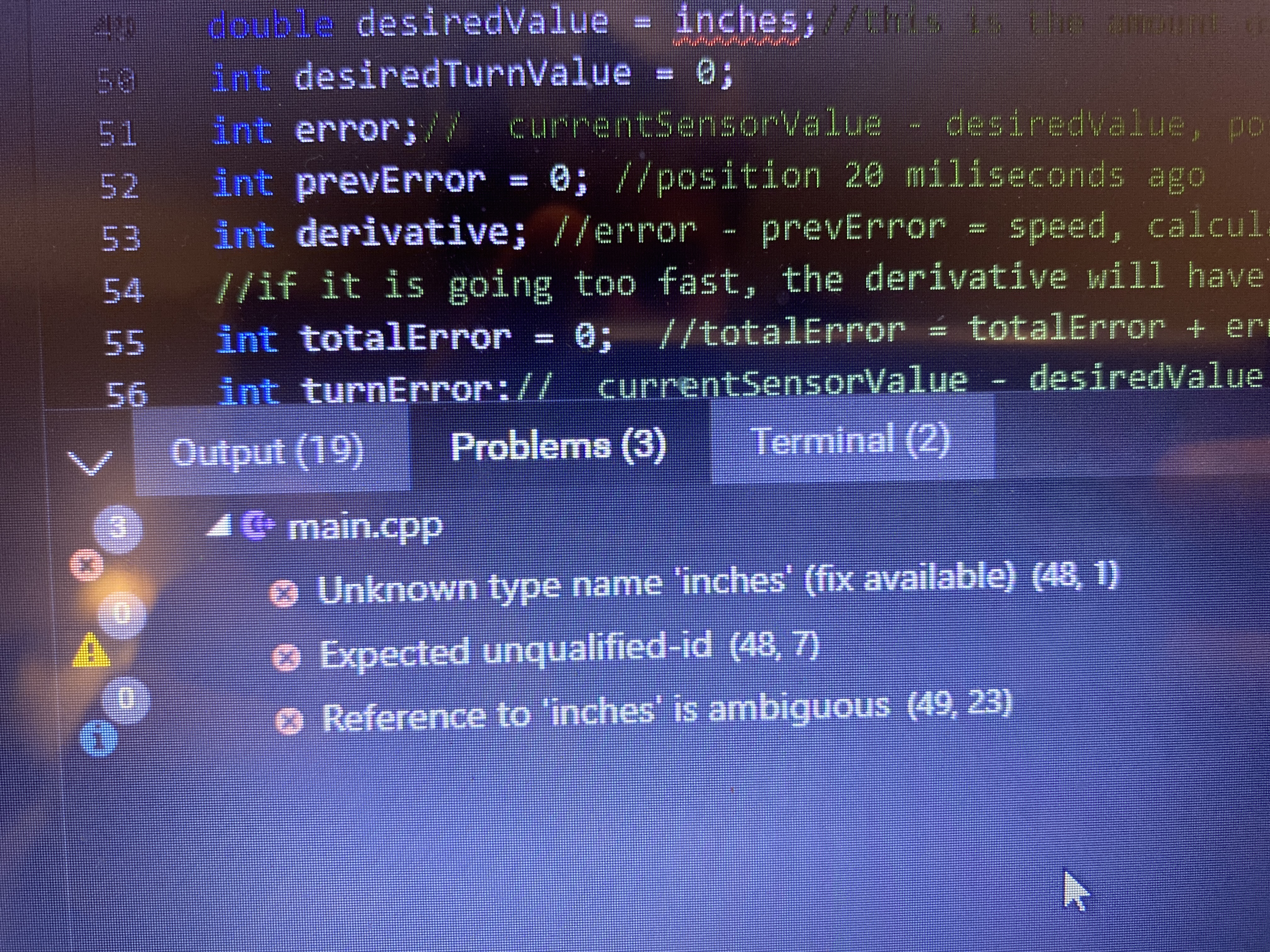
You declare inches as a double with no value, then you say inches / PI other stuff = degrees
It does not know what inches is, you need to give a variable a number before using it in most cases.
Could you explain what you are trying to accomplish with double inches, degrees, and desiredValue?

1 Like

I tried to create a math problem for the computer to solve so that I could input a random amount of inches and that it would input it to the equation and determine how many degrees it needs to spin. The double inches is as a value so that I can input it as any number and it would solve the equation, Degrees is how many degrees the motors needs to spin and desiredValue is the value I want in inches. I didnt assign inches a value because I wanted to input it later in the code so that in my auton I could just change the value to be the amount of inches I want.

Ok just put degrees first then like degrees = stuff ;
Also P is Proportional not Potential

1 Like

Along with coding I would prefer dabbling into Arduino, this will sharpen your engineering skills, coding skills, teach you a bit about electricity(when plugging LED and other components into the board), and prepare you for a more technical approach to robotics and engineering. There are some great starter kits out there for a great price. If you are confident enough that you understand the main concepts you can try to make your own projects.

Some ideas include…
A robotic arm that types on a keyboard
A system that opens and closes your blinds for you
etc…

What I’m trying to get at is… do what pleases you. If you enjoy coding, do it! With time and commitment anything is possible!

2 Likes

Yeah I have been building and coding with arduino for about a year now and it is pretty great! I have made many different projects and I can use it for most any robotics projects!

Sorry for all of the questions I have asked but I am a beginner and want to learn new things. Anyway, I talked to my friend and he said that PID for driving (getting it to drive a certain distance and slow down as it is closer to the target) is hard (and i agree) and said that the “rotateFor” command will get me close enough to what I want. I want to learn PID but then again, I don’t really know how to and if it will be useful with getting a robot to move forward for a somewhat short distance such as when on a field traveling about 12-15 inches? Thanks!

rotateFor isn’t terrible, it’s a whole lot better than time, but the problems arise when your wheels slip and skid, which throws off your values and makes it inconsistent. Making the robot move slower will reduce this slip, but the proper way to deal with it is to use external tracking wheels, and use the values from these wheels to make a control loop, such as pid.

1 Like

Oh ok, so instead of using the internal motor encoders, I could use a motor encoder/tracking wheel to find out the value and use that to determine if it should move faster or slower? But is there a way to use the internal motor encoders instead of an external one?

You don’t necessarily need to use external encoder wheel modules, but most competitors would highly advise that you do.

2 Likes

yes, the spinFor command does this decently well using build in PID. but the issue with the internal encoders is that if the wheel skids on the ground, the encoder no longer has an accurate value, and your movements will be inconsistent.

4 Likes

Hey so I’m trying to use the rotateFor and startRotateFor commands but the startRotateFor command doesn’t seem to work. I don’t know why, it just highlights it in red.

So it looks like you are only providing 2 values to a function with 3 parameters. You can check a list of useful functions here
void startRotateFor( directionType dir, double rotation, rotationUnits units, double velocity, velocityUnits units_v )
You are saying void startRotateFor( fwd, 360, deg ) the computer doesnt know the velocity units, or voltage units that you want.
LMK if this helped

2 Likes

Ok so I did add the velocity units but it still is highlighted red.

LeftMotor.startRotateFor(fwd, 360, deg, 100, velocityUnits::pct);
RightMotor(fwd, 360, deg, 100, velocityUnits::pct);

This is my code but the startRotateFor is still highlighted red.

What is the error? 20 char

The error said “No member named ‘startRotateFor’ in ‘vex::motor_group’ (61,13)

I understand the problem because I was using a motor group in vexcode pro but that command only works for individual motors! Thanks for your help though!! Really appreciate it!

1 Like