About a year ago I wrote some code that would allow blocks of memory to be written as a file in the ROBOTC file system. This would allow, for example, an array or structure containing information that the robot had obtained to be saved in flash and later downloaded to the PC for analysis. I decided not to release the code at that time, as we know there are problems in using flash when the robot is functioning, however, because of the recent interest in “rerun” type programs I’m going to throw it out with the understanding that there will possibly be certain limitations.
The ROBOTC file system uses two areas of flash memory, a table of contents with two long integer entries per file, the address (as an offset from the beginning of the file system) of the file in flash and the size of each file. The files themselves can be stored anywhere, ROBOTC places then after the TOC, I place them in higher memory so that there is always some room for the ROBOTC program to be downloaded into what is called “slot 0”.
Each file has a header followed by the actual file data, the header could change with different versions of ROBOTC but has been stable at 22 bytes for some time (in the 3.6x versions, not checked V4.X yet). The header, as a structure, would be something like this.
typedef struct _flash_file {
    unsigned char name[16];                ///< file name
    unsigned char type;                    ///< file type, wav, exe etc.
    unsigned char time[4];                 ///< file creation time
    unsigned char unknown;                 ///< unknown flags
    } flash_file;
A 16 character (max) file name
A file type, these are defined in the RobotCIntrinsics.h file as follows.
typedef enum short
{
    ftNone              = 0,
    ftExecutable        = 1,

    ftSound             = 2,
    ftWAV               = 3,

    ftText              = 4,
    ftData              = 5,
    ftIcon              = 6,
    ftMIDI              = 7,
    ftLast
} TFileExtensionTypes;
There is a 4 byte time stamp and a final byte that I haven’t bothered to decode yet as it seems unused for data files.
I add some internal variables to the data structure as well but these are not written to flash.
Code that would print all the file names in the file system may look something like this (this is one of the library functions, the user would just call FileReadVTOC() to print the directory in the debug window).
/*-----------------------------------------------------------------------------*/
/** @brief     Read flash file table of contents and print in debug window     */
/*-----------------------------------------------------------------------------*/

void
FileReadVTOC()
{
    long *toc = (long *)(baseaddr + VTOC_OFFSET);
    long  addr;
    long  size;
    short slot;

    flash_file  f;

    // more than kMaxNumbofFlashFiles files we have an error
    for(slot=0;slot<kMaxNumbofFlashFiles;slot++)
        {
        // Read file address
        addr = *toc++;
        // read file size
        size = *toc++;

        // Good file ?
        if( addr == (-1) )
            return;

        f.addr       = baseaddr + addr;
        f.data      = (unsigned short *)(f.addr + FLASH_FILE_HEADER_SIZE);
        f.datalength = size;

        // Read header
        FileReadHeader( &f );
        // Display
        FileDebug( &f );
        }
}
Code to save data to a file like this.
static short tmpData[1024];

#include <FlashLib.h>

task main()
{
    int   i;

    // create some test data
    for(i=0;i<1024;i++)
        tmpData* = i;

    // Write 200 bytes (100 short ints) to a file called test
    FileAddFile( &tmpData[0], 100, "test" );

    // Done
    while(1)
        wait1Msec(500);
}
I’m not following normal file access conventions, there is no fopen, fwrite, fclose etc. All you can do is dump memory to a new file that is added to the file system. When done, you can pull up the “File Management” window like this.
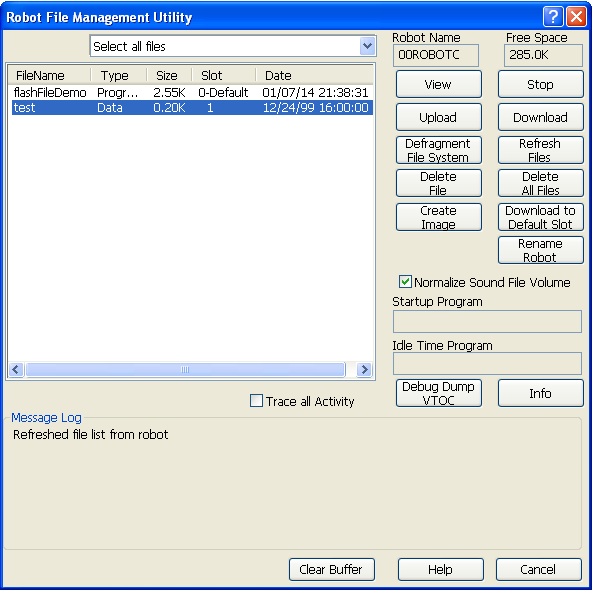
I still want to do a little testing so will probably post the code tomorrow or Thursday.*
 Looks promising.