@rs1 linked a old (but still very relevant) post of mine
I am happy to share some thoughts.
For context, we faced the same engineering problem in the 2018-2019 season Vex Turning Point. We needed to be fast enough to drive around the field, dodge defense, and shoot flags. We needed precision while aiming for flags and the parking platforms.
I will summarize a few simple work arounds that have been mentioned.
- Holding a slow mode button down. The logic is simple, if a button is pressed, then multiply the
max_speedby a factorn. This factor can be a fraction (slowing speed down) or a whole number (increasing speed). Depends on what preference you have. Like you mentioned it is very crude and difficult to customize more than 2 speeds, although we did use it at early comps pretty successfully. Simple and effective wins often. - Use two drivers. Hard and chaotic tbh. Especially from a former driver, programmer, and drive coach 's perspective. Driver should focus on driving and their reaction time is limited by communicating with drive coach / co-driver. From a programming perspective, this is a hard problem. Two inputs controlling one hardware resource. Could be come a recipe for disaster without carefully written code. Could become a huge point of argument during the pressure of a competition. I have only used two drivers where each one controlled different subsystems with no overlap
Now, we can think about a generalized answer to the question you originally posed: Is there a way to have 2 drive sensitivities? What about n drive sensitivities? Note: I am intentionally use the word sensitivity. This is because joystick values are continuous rather than just “two values”. Sure you can have two max speeds, but that is not an elegant solution. Instead, its better to think about it like this. In “slow mode” If I push the joysticks half way, I only move at quarter of the max speed. In “fast mode” if I push the joysticks half way, I move at half speed. Slow mode should give you more “resolution” to hit lower speed values. So how do we get “slow mode” and “fast mode” to move at full speed when the joysticks all the way?
We can use a function! A continuous function like you might see in early algebra classes. Take a look at this post I wrote:
You can see that these functions all start at (0,0) and intersect (1,1).
This means, when you don’t push the joysticks you have 0 speed. When you push the joysticks all the way, you have full speed. The change in slope between 0 to 1 is what matters. When implemented, it really makes a noticeable difference!
You can also read this which gets more into the topic: What do you think is a more efficient way to drive your robot? - #42 by _Colossus. Note: 127 was just the max speed that the motors used in the C++ library we were using. For blocks it might be [0,1] or [0,100], however you can do the substitution easily.
Now, in terms of code in blocks you just have to do some multiplication and division to the joystick value before sending it to the motor block. You can even skip the exponents by using repeated multiplication. Don’t forget that even powered functions cannot be negative. So should probably do all the math inside an abs value and then multiply by the sign of the joystick.
If I were using scratch and wanted to model the quadratic curve, it would look like the following. Note: max_speed must be the max value that the motor takes in. It could be 1, 100, 127 etc depending on which environment you are using.
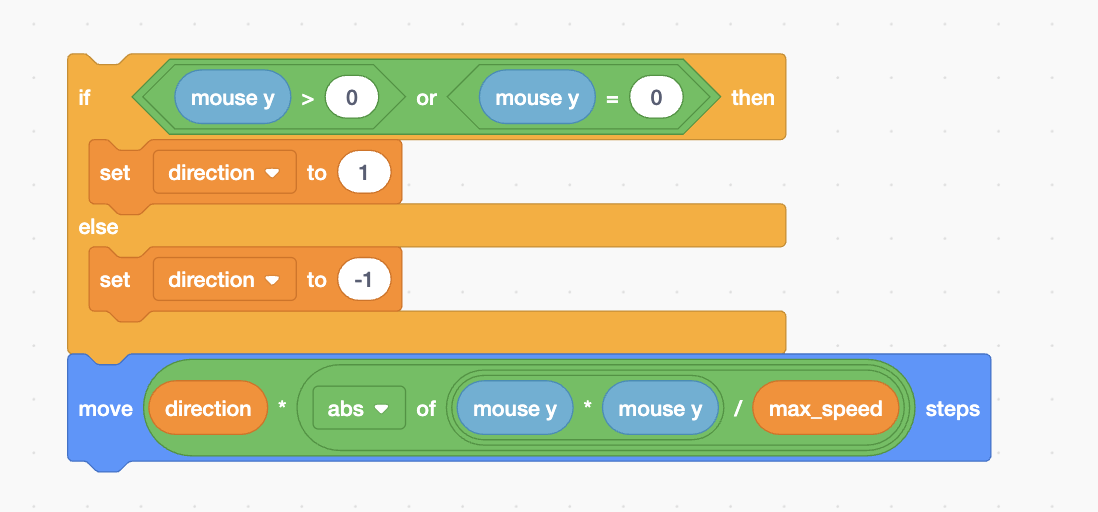
You could even one line it
