Nice, I recently learned a ton more about robotc, I definitely like it for auto.
Hmmm… Thats in the program or the installer?
Generally, when you create a new project in PROS, it’ll direct you to a screen, asking you what type of project it is. You can select Vex Cortex here, and when you do, it’ll be fine.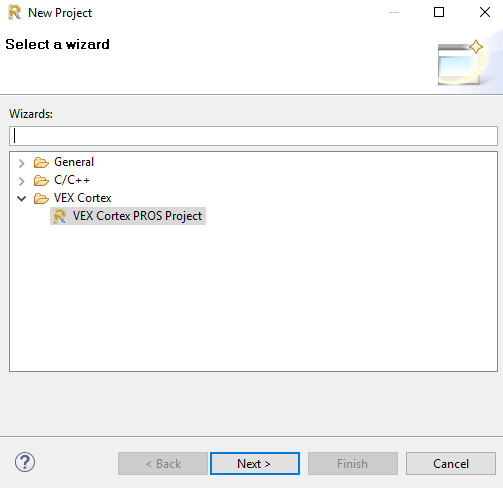
In the program itself. There’s a wizard to create a new project, and you select a template
Strange, I’m not getting that.
- Live compile
- Intelligent auto Fix-It
- Graphical Debugger
- No such thing as saving
- Internal GIT support / Full Version Editor
- Super Fast Compiler
- Assistant Editor (BEST Thing Ever!!!)
- Editable typeface
- Autocomplete
Basically, the best editor ever.
All of those features are available in other editors. Allow me to brag on Atom for a moment:
- PLUGIN SYSTEM! This alleviates any problem I have with Atom, because someone has written a program to solve it
- There’s no Live Compile natively, you don’t need to always compile instantly, especially when compiling takes some time (but I’m sure there’s a package supporting it)
- Native git support, 'cause it’s made by GitHub
- Panes in Atom emulate assistant editor
- Complete and udder stylization and customization. Anything I want to change, I can
Most of the code I write is HTML/CSS/JavaScript or Node.js, which makes Atom perfect for me, but the support for C, the second most used language in my arsenal, is pretty decent. But if you like Xcode, keep on keeping on
OSX. Interestingly enough, the installation fails, but everything works
I compile in RobotC, but I write all of my code in vim.
RobotC takes the cake for me, I love the stuff the guys at Purdue have done, but I honestly don’t think that using PROS, especially at competitions like World Championships, is ideal. You spend more time debugging your code, and making sure it’s flawless, whereas with RobotC, it’s intuitive, and supported by VEX, so you won’t have to worry about any firmware issues. That being said, I’m looking forward to what PROS has in it’s future, and I’ll definitely reconsider it once more progress has been made with it, or if it gains official VEX support, something I know that they’ve wanted for a long time.
PROs has some benefits, but they won’t release their driver source code. So, we have stuck with RobotC since it has real time support and excellent answers with jpearman onboard now.
I’ve programmed VEX in EasyC and RobotC before, but I think RobotC will be a better fit for Starstruck. RobotC provides way more control over the actual program than EasyC, while EasyC is a lot easier to understand and use. However, there are many tutorials in the forms of pdfs and Youtube videos for RobotC, so it shouldn’t be too difficult to learn it, and I think it’s worth it, because a lot of the bugs that come up in EasyC don’t appear when using RobotC.
XCode is actually really goddamn amazing. I hate to sound like an Apple fanboy, but they really did make a nice IDE. Normally IDE’s like Visual Studio are somewhat overkill for beginners, they offer too much organization for tiny projects. Like in Visual Studio, you have to create a “Solution” then add a “Project” to that solution just to begin adding source files. This makes perfect sense if you have a huge project with multiple DLL’s and other completely separate dependant projects, etc. But for Hello World type stuff (or most single file projects in general, IE 99% of what Vex people do), it’s stupidly overkill and the wizards and extra tools and crap get in the way.
XCode does something Apple seems to be doing everywhere. They take something powerful and capable and hide the stuff you don’t need. It’s there, but not in your face.
It’s crazy easy to start an XCode project. Want to use git? Also super easy. Need crazy advanced debugging? It’s gotcha covered. Need super dumb simple breakpoint debugging? No problem. Want to do super specific iOS stuff with emulators and whatever (I’m not an iOS developer so IDK), it has it.
So yeah, if I’m writing C or C++ on my MacBook Pro, I’m reaching for XCode immediately.
Fancy! I can’t stand VIM and really REALLY REALLLLLLLLY don’t understand it’s appeal.
Sigh, been there. Having said that, I’ll support anyone bringing us closer to C++ support (or Java, or Swift, or Python, even JavaScript would be interesting).
Errrrrrrrrr…rrrr…r.r… No.
ROBOTC has a decently simple API into the VEX hardware, but their documentation is lacking and the general support for real C is oddly not there. I honestly don’t get it. I don’t understand why a real linker and proper C compliance is such a struggle for them.
lol
One can dream I suppose.
@Cody I wouldn’t hold your breath on any interpreted language. I’m a bind of a JS fiend, so I, as an experiment, wrote some node.js bindings for PROS. The entire package ended up being tens of megabytes (Thanks Chromium), so I scraped it. As for python, I don’t know, but I would suspect that event the most codegolfed interpreter would be more than the 384KB program space. Any language you are going to use is most likely going to have to be compiled (except for ROBOTC, right?)
You can write Python code for VEX EDR and VEX IQ using Robot Mesh Studio at www.robotmesh.com/python. You can write, save and download code to your robot from the online IDE, and there are PC licenses available if you need to run standalone. The same environment also offers Google’s Blockly interface, which generates Python code automatically. Python code generated in Blockly can be copied into a Python project.
The IDE provides Python, Blockly, Controller Express (a simple point-and-click environment to set up joystick control), and Flowol, a flowchart-based teaching tool. All four of these generate code which can be downloaded to either EDR or IQ robots.
Give it a try – it’s free.
Swift. Yes.
Compiler dev work towards switft 3.0 is ARMv7 core so not on existing EDR hardware.
I tagged you as an answer on accident, haha 
I haven’t seen anyone use that, it looks pretty cool.