Slightly off topic but related.
VEXcode for V5 has a “console” class we don’t talk about much, this allows you to use the screen as output for printf or std::cout. You need to include another header and create one instance of the console class. For example,
#include "vex.h"
#include "vex_console.h"
#include <iostream>

using namespace vex;

// define console on V5 screen
vex::console     Console;

int main() {
    int count = 0;

    Console.init();

    while(1) {
        std::cout << "Hello " << count++ << std::endl;
        // Allow other tasks to run
        this_thread::sleep_for(500);
    }
}
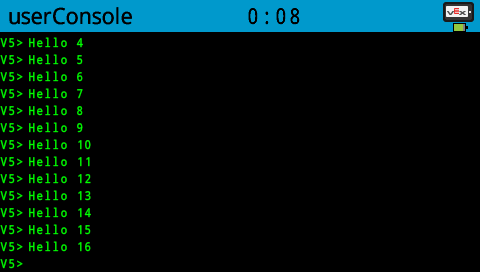
Output on the V5 screen for the above code would be as shown in the image below.
CR/LF cause a new line and scrolling, no other control characters (no VT100 or anything) are supported. But it’s useful for debug.
If you use it in another thread, call Console.init(); at the beginning to set correct text size.