Our bot is running into an issue where the autonomous code isn’t working. Weird thing about it? Its not the autonomous code that’s failing. I don’t know exactly how it works, but the area where I set our buttons interferes with the auton code. Example: The code that maps what button spins intake gets deleted, the autonomous code for spinning the intake works. But you add the button mapping for intake back, the intake stops working during auton. Another thing, all the code works just fine outside of autonomous period.
I am suspecting that your intake control code’s “stop” command is overriding the command in your auton. Can you send your code?
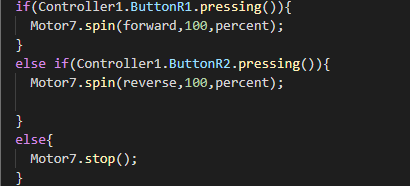
Can you show me how/where you are calling this function? The control code itself is near identical to how we do it so that itself isn’t the issue.
I’m sorry, what do you mean where I’m calling it? its being configured in the robot-config.cpp area within the if(RemoteControlCodeEnabled) loop. could that be the issue?
I’m not a pro. What do you mean by “deleted” , like it doesn’t work? but I would say use this:Events | VEX V5 - Python API — VEXcode Documentation
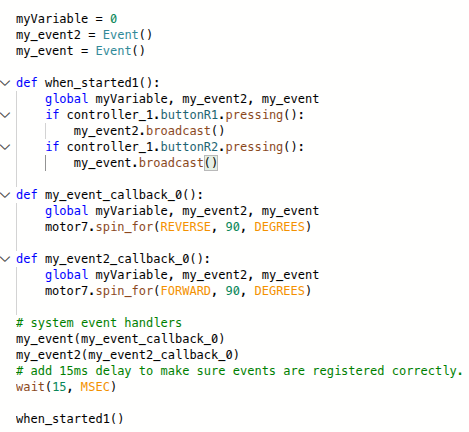
This is a alternative, you set “If r1 pressing then broadcast (the event name)” and “If r2 pressing then broadcast (the event name)” and set when you receive the r1 pressing then move motor7 and when r2 is pressing then receive .I made an example in the image
Are you able to zip up your code and upload it here? It’d make it easier for me to debug with being able to see the entire code.
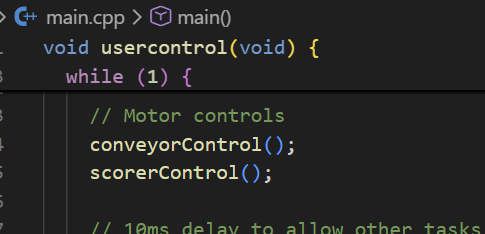
By “calling” I mean where is the function itself being told to run. For example, here are my motor controls in my robot-config.cpp file:
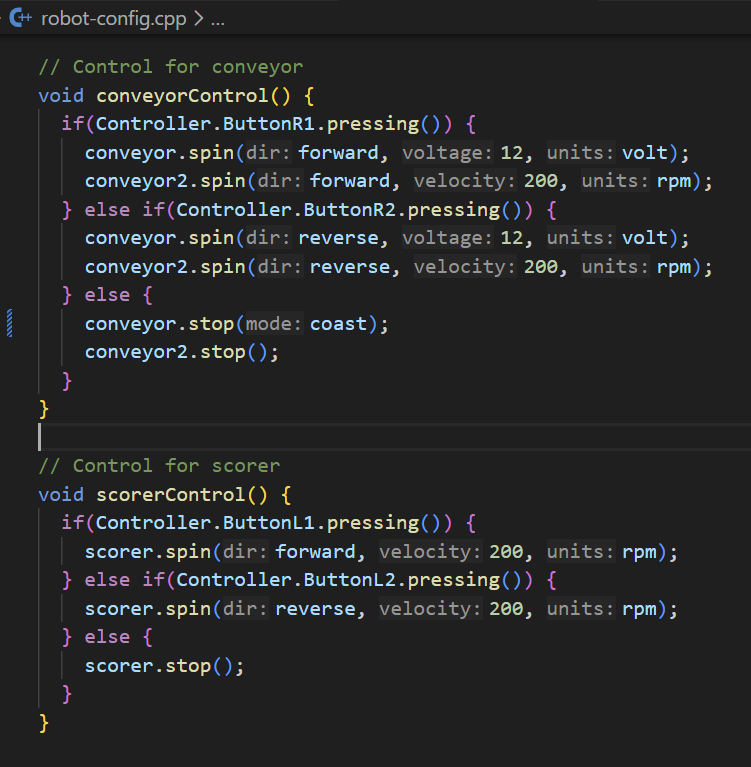
and then I tell them to run inside of the while loop inside of user control in main.cpp:
I tried sending it, but it said something like “New users can not upload files” or something
This is interesting, but I dont use python for vex. I might have to try it out next year