Vex v5 Brain does not connect to my computer via usb. I have tried different USB cables and different PCs, I even tried different Macs with macOS from high Sierra to sonoma
Try the wires with a different brain this could be a faulty brain port.
The USB cables are Ok, I guess it’s the USB port on the brain. Any way to fix that?
If you can borrow someone else’s brain, attempt to connect to that one so that you know for sure it’s your brain that’s broken.
If that’s the only brain you have your best bet is to just upload from the remote, and hopefully that works.
Good luck!
I borrowed my friends brain and it works. I was able to update his v5 brains firmware for him. I was also able to download some programs unto his v5 brain. I tried remote connection to my brain but the firmware needs to be updated before it works. The USB connection needed for the firmware update. Any way to update the firmware? Because I am not able to connect to my v5 brain using USB
The only way is using the VSCode vex extension and a tethered V5 controller.
Thank you very much. I will try that as soon as I am able to charge my v5
IPlease how do I do the remote update on vscode
?
To update a brain through a controller you will need to:
-
Connect Controller to Brain using smart Port Cable
-
Connect V5 Controller to PC using microusb.
-
Power on brain and controller.
-
Open VSCode with VEX Extension Installed.
-
Verify Controller is detected by either:
- Checking status bar:

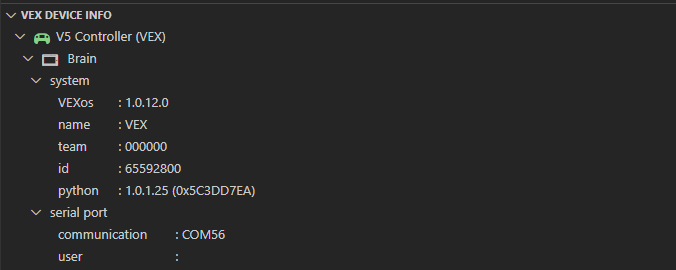
- Checking system info appears:
- Checking status bar:
-
Open VSCode command pallet by pressing:
- Windows:
CTRL + SHIFT + P - Mac:
CMD + SHIFT + P
- Windows:
-
Run the following command below:

-
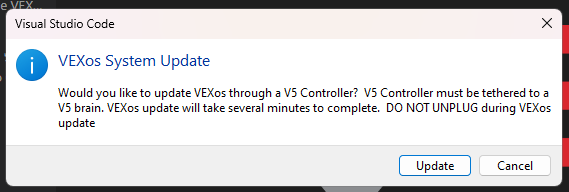
You should see the following modal appear:
-
Press update button on modal to begin vexos update process through a controller. DO NOT UNPLUG during vexos update.
Thank you. You’re a life saver.
(edit: personal contact details removed by moderators)
I’m confused. It does not work straight away
[12/02/2024 19:56:46:620] [Project Manager] [warning] No VEX Projects found in workspace
[12/02/2024 19:57:32:660] [Command] [error] [Vexos Update][Result]:(1)
What are you trying to ask ?
Hi, I updated the brain through the controller, but still, the USB connector is not working; I mean,n my laptop does not recognise the port. I tested it with another V5 brain, and it works. It means is not the cable or the computer. What could I do?
Not much, you seem to have diagnosed correctly that the USB port on the brain is broken. VEX does offer a repair service, you can find info on that on the vex support page on the website.
I know that this was a service which was offered in the past (2114 made use of it several times), but the webpage which talked about the repair program seems to be missing now, at least I can’t seem to find it. I also found this Q&A that references the repair program being discontinued.
Do you know if the program is actually still a thing/do you have a link to the page on the vex site for it?
Well, I didn’t know about that, guess we stopped doing it, I can’t find the information that used to be there.
That you! Thank you! Thank you!
You can connect your computer to your controller, then as long as the controller is connected to the brain via radio or V5 smart cable, you can download just like normal