We are running into issues with our codes for the Level up where they run fine once, then don’t run the next time around. I wonder if the code is too long? Is there a way we can compress the code? There is a long pause prior to the code running (including the calibration). Ideas???
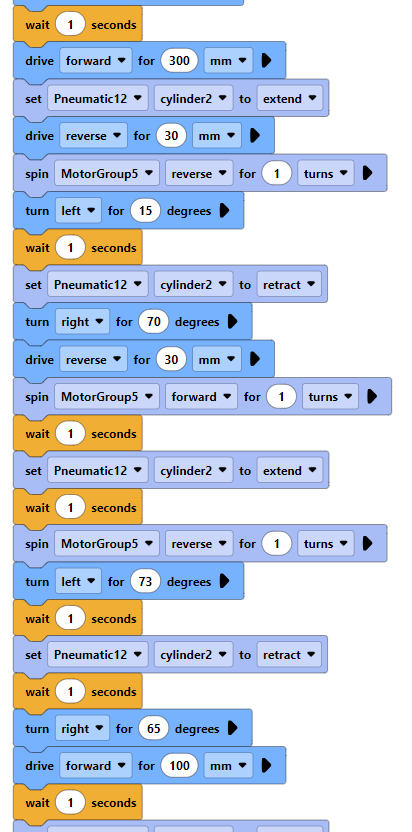
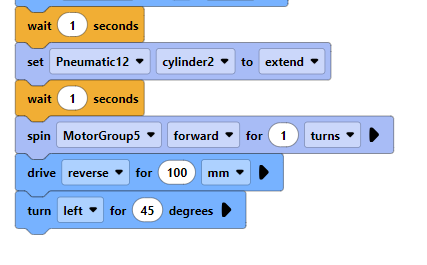
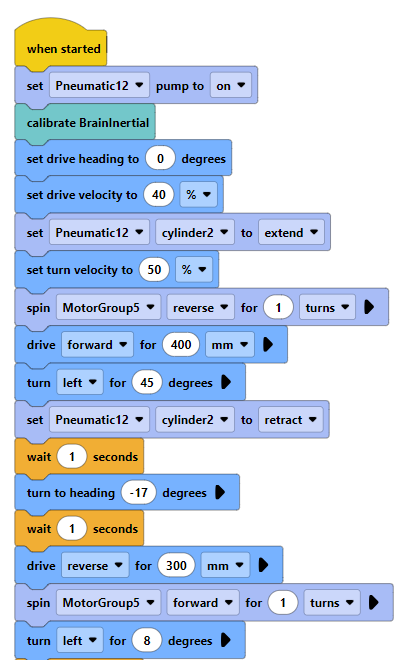
Here is the code. I use blocks as I have junior students. It is all together as one but I had to snip it as I could fit it together in one snap without making it tiny. Any feedback would be appriciated the kids have worked so hard on this.
I think perhaps the beginning of the program was lost when adding the images
Obviously we don’t know what the configuration on the robot is.
Does your statement mean if the program is stopped and then just restarted or does the issue also show if the brain is turned off and on again ?
Does the robot have any type of arm mechanism ?
One common case that causes code to get “stuck” is commanding a motor or motor group to turn a specific number and the motors not being able to achieve that because of something like a mechanical limit or the motors becoming hot and limiting current. For example, an arm lifting as high as it can but not as high as the code want’s it to. Usually this can be helped by setting a timeout on the motor of say 3 or 4 seconds, if the motor does not achieve what was asked, the code moves on.
Robot is configured with a couple of beams raising a pneumatic claw. 2 Motor drive train. Motor group for the beam lift and pneumatic port. We figured out that if there is a code that cannot run-motor group set up in the wrong way, pneumatic claw already extended etc it will just not run. But we are finding even with all of those considerations taken care of it is very hit and miss, after the brain inertial calibrates it just doesn’t do anything sometime, waits for 20+ seconds, then goes, other times not at all. Attached is the start of the code.
I would suggest having the pneumatic pump OFF prior to calibrating brain inertial. The vibrations from the pump can interfere with calibration. If the brain doesn’t calibrate your code does not move to the next block. This might explain the variable time your teams notes for the code to progress. Although default for the pump is supposedly “off” when a program starts, my son’s always seems to default to ON. Their first line of code is always “set pump off” then brain calibrate, then “tada” sound when calibration done (tells them it was able to calibrate), then all other motor, pneumatic (turn pump on, extend cylinders), booleans statuses, etc, then LED light green for “go” - tells the team it the bot is done with startup. Then a “broadcast” block. Wait 1 second, then set light to whatever color they want to indicate broadcast has been received. All the auton “driving” blocks are under a receive broadcast block.
The “startup routine” is something they thought of last season along with broadcast to turn on other parts of code after startup is done. They use sounds and LED colors as status indicators to signal what part of their code has completed, which is currently going, etc.