I was trying to find a version of Vex Coding Studio so I can convert some code but I cannot download it from vex since it is discontinued. Does anyone have or know where I can get a copy of it?
from my understanding VCS is not needed to convert VCS projects into VEXCode projects, rather VEXCode will handle the conversion itself.
How would that work? I have tried to copy and paste older code but I just get a bunch of errors.
This help article should help:
Use the import option in VexCode. In the top right when you go to make a new file on the bottom of the drop down menu is an import feature.
The only issue there is is that I only have a single C++ code file.
What I would recommend is take the single file and rewrite it into a new program.
Can you do me a favor and add all of the sensors to the vexcode setup, and copy and paste your VCS code into the main.cpp file?
Compile and share a screenshot of the errors and terminal output
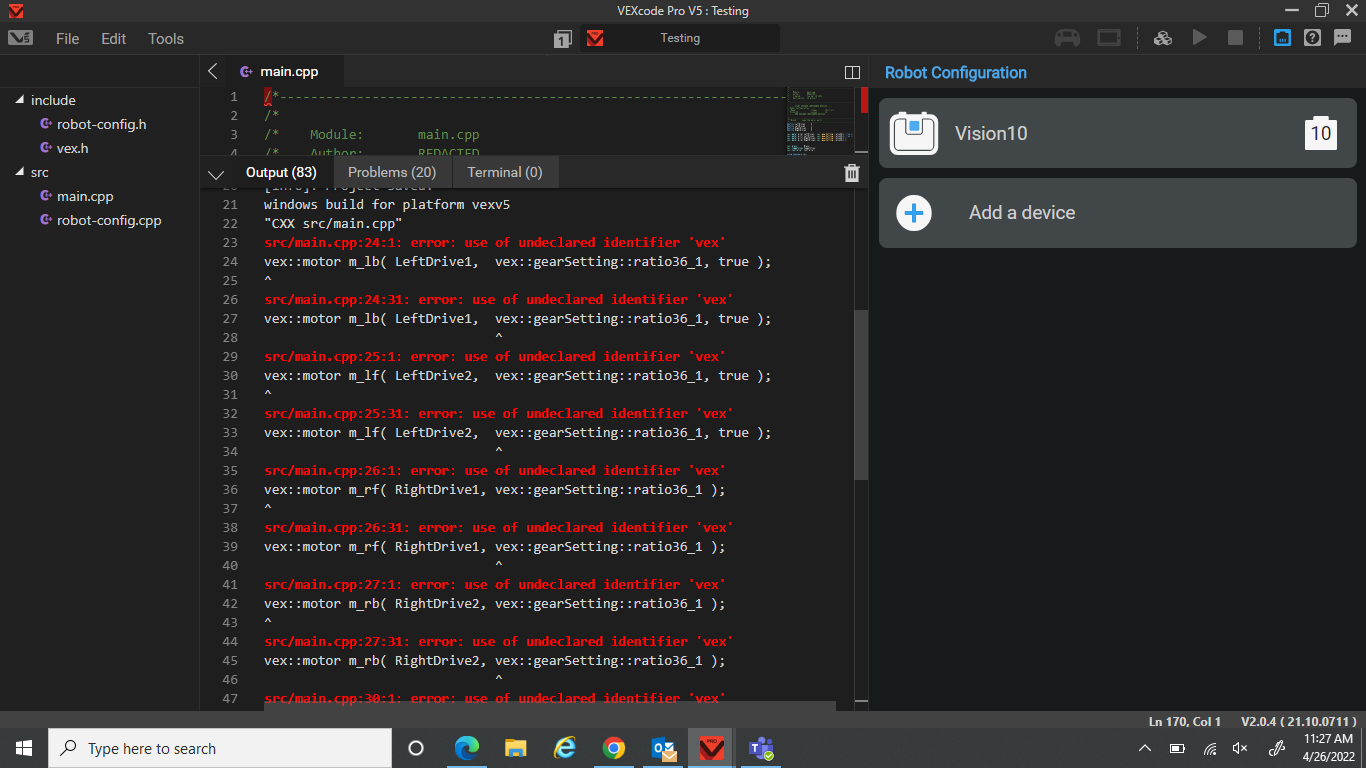
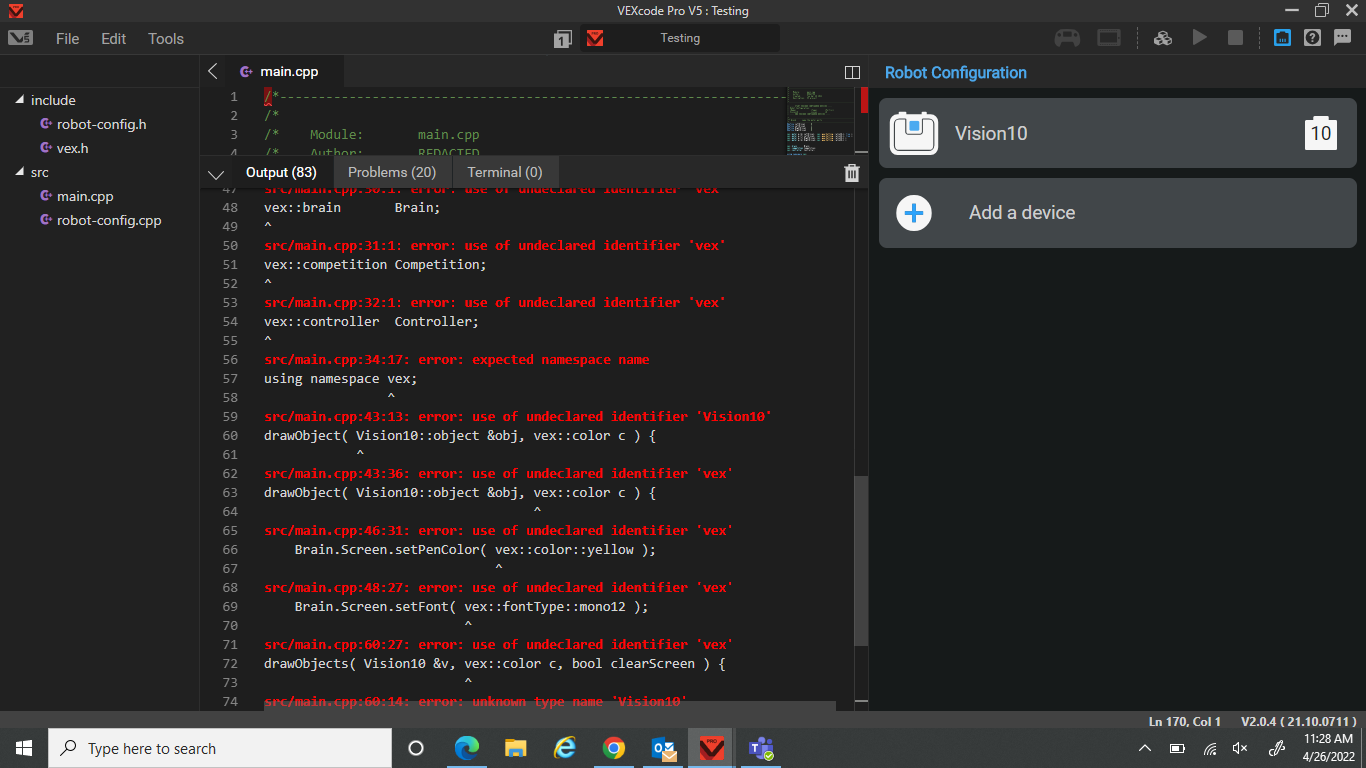
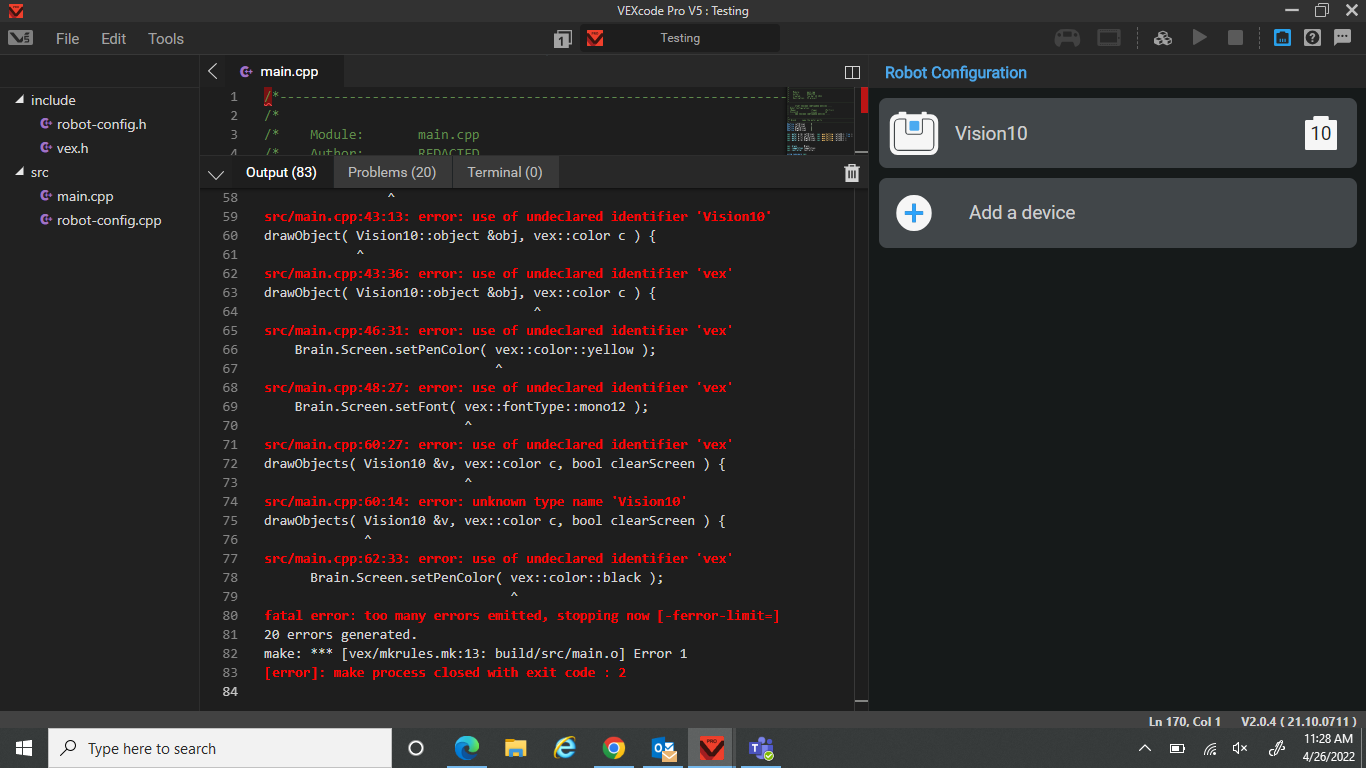
Oh dang, that seems strange. Can you also post your code possibly and surround the code with [code] and [/code] to format it as code in the forum?
/*----------------------------------------------------------------------------*/
/*                                                                            */
/*    Module:       main.cpp                                                  */
/*    Author:       REDACTED                                                  */
/*    Created:      Tue Apr 26 2022                                           */
/*    Description:  V5 project                                                */
/*                                                                            */
/*----------------------------------------------------------------------------*/

// ---- START VEXCODE CONFIGURED DEVICES ----
// Robot Configuration:
// [Name]               [Type]        [Port(s)]
// Vision10             vision        10
// ---- END VEXCODE CONFIGURED DEVICES ----

/*-----------------------------------------------------------------------------*/
/** @cond      name the motor ports                                            */
/*-----------------------------------------------------------------------------*/
#define LeftDrive1      0
#define LeftDrive2      1
#define RightDrive1     8
#define RightDrive2     9

vex::motor m_lb( LeftDrive1,  vex::gearSetting::ratio36_1, true );
vex::motor m_lf( LeftDrive2,  vex::gearSetting::ratio36_1, true );
vex::motor m_rf( RightDrive1, vex::gearSetting::ratio36_1 );
vex::motor m_rb( RightDrive2, vex::gearSetting::ratio36_1 );


vex::brain       Brain;
vex::competition Competition;
vex::controller  Controller;

using namespace vex;

int   screen_origin_x = 150;
int   screen_origin_y = 20;
int   screen_width    = 316;
int   screen_height   = 212;

// function to draw a single object
void
drawObject( Vision10::object &obj, vex::color c ) {
    int labelOffset = 0;

    Brain.Screen.setPenColor( vex::color::yellow );
    Brain.Screen.drawRectangle( screen_origin_x + obj.originX, screen_origin_y + obj.originY, obj.width, obj.height, c );
    Brain.Screen.setFont( vex::fontType::mono12 );

    if( obj.originX > 280 )
      labelOffset = -40;
    if( obj.originY > 10 )
      Brain.LCD.printAt( screen_origin_x + obj.originX + labelOffset, screen_origin_y + obj.originY-3, "Sig %o", obj.id );
    else
      Brain.LCD.printAt( screen_origin_x + obj.originX + labelOffset, screen_origin_y + obj.originY+10, "Sig %o", obj.id );
}

// function to draw all objects found
void
drawObjects( Vision10 &v, vex::color c, bool clearScreen ) {
    if( clearScreen ) {
      Brain.Screen.setPenColor( vex::color::black );
      Brain.Screen.drawRectangle( screen_origin_x, screen_origin_y, screen_width, screen_height, vex::color::black );
    }

    for(int i=0;i<v.objectCount;i++)
      drawObject( v.objects[i], c );
}

bool turning = false;

void
driveTurn( int speed ) {
      int   drive_l_front = speed;
      int   drive_l_back  = speed;
      int   drive_r_front = -speed;
      int   drive_r_back  = -speed;

      if( speed != 0 )
        turning = true;
      else
        turning = false;
      m_lf.spin( vex::directionType::fwd, drive_l_front, vex::velocityUnits::rpm );
      m_lb.spin( vex::directionType::fwd, drive_l_back , vex::velocityUnits::rpm );
      m_rf.spin( vex::directionType::fwd, drive_r_front, vex::velocityUnits::rpm );
      m_rb.spin( vex::directionType::fwd, drive_r_back , vex::velocityUnits::rpm );
}

void
eventButtonA() {
  driveTurn( 50 );
}
void
eventButtonB() {
  driveTurn( -50 );
}
void
eventButtonX() {
  driveTurn( 0 );
}

#define TARGET  150

void
eventButtonY() {
  while(1) {
    // get latest objects
    int numberObjects = Vision1.takeSnapshot( SIG_1 );

    if( numberObjects > 0 ) {
      // make a copy
      vex::vision::object obj = Vision1.objects[0];

      if( obj.centerY != 0 && obj.width > 20 && obj.height > 20 ) {
        int error = obj.centerY - TARGET;

        // simple P control
        int drive = error;
        if( drive > 50 ) drive = 50;
        if( drive < -50 ) drive = -50;

        // object is found and centered
        if( obj.centerY > (TARGET-15) && obj.centerY < (TARGET+15) ) {
          driveTurn(0);
        }
        else {
          driveTurn( drive );
        }
      }
    }
    else {
      // look for object
      driveTurn( 50 );
    }

    // pressing X stops loop
    if( Controller.ButtonX.pressing() ) {
      driveTurn(0);
      return;
    }

    vex::this_thread::sleep_for(50);
  }
}

int main() {
    // Draw an area representing the vision sensor field of view
    Brain.Screen.clearScreen( vex::color::black );
    Brain.Screen.setPenColor( vex::color::green );
    Brain.Screen.drawRectangle( screen_origin_x-1, screen_origin_y-1, screen_width+2, screen_height+2 );

    Controller.ButtonA.pressed( eventButtonA );
    Controller.ButtonB.pressed( eventButtonB );
    Controller.ButtonX.pressed( eventButtonX );
    Controller.ButtonY.pressed( eventButtonY );

    while(1) {
      // request any objects with signature 1
      int numberObjects = Vision1.takeSnapshot( SIG_1 );

      Brain.Screen.setPenColor( vex::color::white );
      Brain.Screen.setFont( mono20 );
      Brain.Screen.setCursor( 2, 2 );
      Brain.Screen.print( "Sig 1 %2d", (int)numberObjects );
      Brain.Screen.setCursor( 3, 2 );
      Brain.Screen.print( "C %4d", Vision1.objects[0].centerY  );

      // draw any objects found
      drawObjects( Vision1, vex::color::blue, true );

      // run 10 times/second
      this_thread::sleep_for(100);
    }
}Use #include <vex.h>
That is the vast majority of errors (I think VCS auto includes vex header file by default, I may be wrong)
This made some errors go away but then there were new ones.
Can you post them? <20char>
Also, have you configured the motors? The comments indicate that you haven’t
src/main.cpp:45:13: error: 'Vision10' is not a class, namespace, or enumeration
drawObject( Vision10::object &obj, vex::color c ) {
            ^
include/robot-config.h:15:15: note: 'Vision10' declared here
extern vision Vision10;
              ^
src/main.cpp:55:13: error: no member named 'LCD' in 'vex::brain'
      Brain.LCD.printAt( screen_origin_x + obj.originX + labelOffset, screen_origin_y + obj.originY-3, "Sig %o", obj.id );
      ~~~~~ ^
src/main.cpp:57:13: error: no member named 'LCD' in 'vex::brain'
      Brain.LCD.printAt( screen_origin_x + obj.originX + labelOffset, screen_origin_y + obj.originY+10, "Sig %o", obj.id );
      ~~~~~ ^
src/main.cpp:62:1: error: variable has incomplete type 'void'
drawObjects( Vision10 &v, vex::color c, bool clearScreen ) {
^
src/main.cpp:62:38: error: expected '(' for function-style cast or type construction
drawObjects( Vision10 &v, vex::color c, bool clearScreen ) {
                          ~~~~~~~~~~ ^
src/main.cpp:62:46: error: expected '(' for function-style cast or type construction
drawObjects( Vision10 &v, vex::color c, bool clearScreen ) {
                                        ~~~~ ^
src/main.cpp:62:24: error: use of undeclared identifier 'v'
drawObjects( Vision10 &v, vex::color c, bool clearScreen ) {
                       ^
src/main.cpp:62:59: error: expected ';' after top level declarator
drawObjects( Vision10 &v, vex::color c, bool clearScreen ) {
                                                          ^
                                                          ;
src/main.cpp:82:9: error: use of undeclared identifier 'turning'
        turning = true;
        ^
src/main.cpp:84:9: error: use of undeclared identifier 'turning'
        turning = false;
        ^
src/main.cpp:110:25: error: use of undeclared identifier 'Vision1'
    int numberObjects = Vision1.takeSnapshot( SIG_1 );
                        ^
src/main.cpp:110:47: error: use of undeclared identifier 'SIG_1'
    int numberObjects = Vision1.takeSnapshot( SIG_1 );
                                              ^
src/main.cpp:114:33: error: use of undeclared identifier 'Vision1'; did you mean 'Vision10'?
      vex::vision::object obj = Vision1.objects[0];
                                ^~~~~~~
                                Vision10
include/robot-config.h:15:15: note: 'Vision10' declared here
extern vision Vision10;
              ^
src/main.cpp:161:27: error: use of undeclared identifier 'Vision1'
      int numberObjects = Vision1.takeSnapshot( SIG_1 );
                          ^
src/main.cpp:161:49: error: use of undeclared identifier 'SIG_1'
      int numberObjects = Vision1.takeSnapshot( SIG_1 );
                                                ^
src/main.cpp:168:36: error: use of undeclared identifier 'Vision1'; did you mean 'Vision10'?
      Brain.Screen.print( "C %4d", Vision1.objects[0].centerY  );
                                   ^~~~~~~
                                   Vision10
include/robot-config.h:15:15: note: 'Vision10' declared here
extern vision Vision10;
              ^
src/main.cpp:171:20: error: use of undeclared identifier 'Vision1'; did you mean 'Vision10'?
      drawObjects( Vision1, vex::color::blue, true );
                   ^~~~~~~
                   Vision10
include/robot-config.h:15:15: note: 'Vision10' declared here
extern vision Vision10;
              ^
17 errors generated.
make: *** [vex/mkrules.mk:13: build/src/main.o] Error 1
[error]: make process closed with exit code : 2
Just did, not much changed.
2 things. It is no longer Brain.LCD It is now Brain.Screen .
Secondly, review the new syntax for vision sensors. The commands have changed a lot. It is no longer just SIG_1 but actually something like VISION_SIG_1 (look at robot-config.h)
Note: I have another example program with only one error but I don’t really know how it works yet.
Thank you for pointing that out