Laziness is my guess, the time consuming, grueling, and terrible process of attaching code, it’s so painfully long, its like a full minute of my time, despite it causing several minutes of waste and them either not getting the problem solved or they end up posting the code and wasting the first post.
*if you guys couldn’t tell I’m using sarcasm, please always upload code, its not that hard and makes our job a lot easier

void pre_auton(void) {
  // Initializing Robot Configuration. DO NOT REMOVE!
#include "vex.h"

using namespace vex;

void drawLogo() {
    static const char* imageColors[] = {
        "#000000", "#f6c445", "#f9d94b", "#fdf050", "#fdf251", "#f9d84b", "#f8c545", "#fac746", "#f3c244", "#deb13e", "#d7ab3c", "#b69133", "#2c2410", "#080602", "#0e0c05", "#211c0f", "#eebe42", "#cda339", "#362e15", "#463a14", "#a9862f", "#95772a", "#171308", "#e9ba41", "#c19a36", "#e4b53f", "#604f1c", "#584719", "#846d26", "#f3e84f", "#fef462", "#fff652", "#a69f3b", "#fef790", "#fffccb", "#fffde2", "#fef9ae", "#c0b83f", "#ded449", "#ffffff", "#fdf24e", "#d3ca4c", "#fdf576", "#fffef3", "#8e7328", "#6d571e", "#785f21", "#918b32", "#f1f1f1", "#e9df4b", "#b5ad3a", "#3e3e3d", "#e5e5e4", "#818180", "#646020", "#d5d5d0", "#595958", "#7e6624", "#919190", "#fcc946", "#c8bf40", "#b8b8b8", "#6e6e6e", "#a9a9a8",
    };

    static const int imageIndices[] = {
        0, 1, 2, 3, 4, 3, 5, 1, 6, 7, 8, 9, 10, 9, 11, 12, 13, 14, 15, 11, 10, 9, 8, 7, 6, 1, 2, 3, 4, 3, 5, 1, 16, 10, 17, 10, 11, 18, 15, 12, 15, 13, 0, 15, 12, 15, 19, 20, 10, 17, 10, 16, 1, 2, 3, 4, 3, 5, 1, 6, 7, 17, 19, 12, 13, 0, 15, 12, 18, 17, 1, 2, 3, 4, 3, 5, 1, 7, 16, 17, 21, 22, 0, 13, 0, 14, 21, 23, 7, 6, 1, 2, 3, 4, 3, 5, 1, 6, 16, 17, 20, 19, 12, 13, 0, 13, 12, 13, 0, 18, 20, 17, 23, 6, 1, 2, 3, 4, 3, 5, 1, 8, 11, 19, 15, 13, 0, 22, 20, 24, 11, 18, 13, 0, 15, 18, 19, 24, 7, 1, 2, 3, 4, 3, 5, 1, 16, 9, 11, 12, 0, 13, 22, 15, 18, 25, 7, 1, 24, 18, 15, 22, 13, 0, 22, 21, 9, 16, 1, 2, 3, 4, 3, 5, 1, 6, 8, 11, 12, 22, 0, 18, 20, 10, 8, 1, 10, 11, 19, 14, 0, 13, 22, 12, 11, 1, 2, 3, 4, 3, 5, 1, 6, 8, 25, 20, 12, 0, 14, 18, 11, 8, 7, 6, 1, 6, 8,
numbers ect.
46, 13, 0, 12, 24, 7, 6, 23, 18, 0, 22, 20, 7, 1, 2, 3, 4, 3, 5, 1, 6, 24, 14, 0, 19, 10, 1, 8, 10, 22, 0, 12, 24, 6, 8, 25, 18, 0, 13, 26, 17, 6, 1, 2, 3, 4, 3, 5, 1, 6, 24, 14, 0, 15, 26, 46, 26, 13, 0, 22, 27, 46, 45, 22, 0, 22, 20, 7, 1, 2, 3, 4, 3, 5, 1, 6, 24, 14, 0, 22, 20, 6, 1, 2, 3, 4, 3, 5, 1, 6, 24, 14, 0, 22, 20, 6, 1, 2, 3, 4, 3, 5, 1, 6, 24, 14, 0, 14, 26, 17, 6, 1, 2, 3, 4, 3, 5, 1, 6, 10, 46, 57, 17, 8, 1, 0,
    };

    static const int imageCounts[] = {
        960, 144, 1, 1, 224, 1, 1, 62, 2, 2, 1, 1, 1, 1, 1, 1, 1, 9, 1, 1, 2, 1, 1, 3, 1, 160, 1, 1, 224, 1, 1, 62, 1, 1, 1, 1, 1, 1, 1, 1, 1, 1, 11, 1, 1, 1, 1, 1, 1, 1, 1, 1, 160, 1, 1, 224, 1, 1, 60, 1, 1, 1, 1, 3, 1, 19, 1, 2, 1, 1, 160, 1, 1, 224, 1, 1, 59, 1, 1, 1, 1, 1, 24, 1, 1, 1, 1, 1, 2, 1, 156, 1, 1, 224, 1, 1, 57, 1, 1, 1, 1, 1, 1, 1, 8, 1, 8, 1, 9, 1, 1, 2, 1, 1, 155, 1, 1, 224, 1, 1, 57, 1, 1, 1, 1, 1, 10, 1, 1, 6, 1, 1, 1, 9, 1, 1, 1, 1, 1, 155, 1, 1, 224, 1, 1, 55, 1, 1, 1, 1, 9, 1, 1, 2, 1, 1, 6, 1, 1, 1, 2, 1, 1, 7, 1, 1, 1, 1, 154, 1, 1, 224, 1, 1, 53, 1, 1, 1, 1, 1, 10, 1, 1, 3, 1, 8,
numbers ect
1, 1, 1, 2, 1, 1, 1, 1, 14, 1, 1, 3, 1, 1, 1, 16, 1, 1, 1, 3, 1, 1, 1, 148, 1, 1, 224, 1, 1, 48, 1, 1, 1, 2, 1, 1, 1, 15, 1, 1, 1, 2, 1, 1, 1, 17, 1, 1, 3, 1, 1, 1, 148, 1, 1, 224, 1, 1, 48, 1, 1, 1, 2, 1, 1, 1, 16, 1, 1, 2, 1, 1, 1, 17, 1, 1, 2, 1, 1, 1, 1, 148, 1, 1, 224, 1, 1, 48, 1, 1, 1, 2, 1, 1, 17, 1, 1, 2, 1, 1, 18, 1, 1, 2, 1, 1, 1, 149, 1, 1, 224, 1, 1, 48, 1, 1, 1, 49, 1, 1, 1, 149, 1, 1, 224, 1, 1, 48, 1, 1, 1, 49, 1, 1, 1, 149, 1, 1, 224, 1, 1, 48, 1, 1, 1, 48, 1, 1, 1, 1, 149, 1, 1, 224, 1, 1, 48, 1, 1, 49, 1, 1, 1, 6, 960,
    };
    int x = 0, y = 0;
    for(int i = 0; i < sizeof(imageIndices) / sizeof(imageIndices[0]); ++i) {
        int index = imageIndices[i];
        int count = imageCounts[i];
        if(index >= 0) {
            const char* color = imageColors[index];
            Brain.Screen.setPenColor(color);
            for(int j = 0; j < count; ++j) {
                Brain.Screen.drawPixel(x++, y);
                if(x >= 480) { x = 0; y++; }
            }
        } else {
            x += count;
            while(x >= 480) { x -= 480; y++; }
        }
    }
}


  // All activities that occur before the competition starts
  // Example: clearing encoders, setting servo positions, ...
}
you seem to have the drawLogo() function inside the pre_auton function, can’t do that, move it outside.
Where would that go.
You need to move the function drawLogo() to be in front/before the pre_auton function. You can’t nest the functions the way you are doing.
Did moving the code work?
It crashes my Chromebook everytime any fix
Hi. Did you read the posts in this thread?
PLEASE POST YOUR CODE.
Its the website when I upload the image
So when i do all of the steps in C++ they don’t work, It give me an error or just prints hello v5 on the brain, anyway i could fix this?
I tried to import this to my c++ code, I pasted this above my void initalize, but there are errors #include “vex” and when I remove it, the brain. starts to error out
then it randomly started not erroring out, then when I built it,the enitre thing became weird


Any chance there is an ability to do a slideshow/revovling images as I would love to have memes rotating on our brain during a match!
What do you mean about the missing variables? I am using a AI sensor and I thought it automaticly put them in.
Also how do you get that to display live on a chromebook without the brain?
You can do that but you would have to use a high power device or a sd card and just time it in intervoles.
What does that mean/how do I do it?
Just want to post a warning for anyone using this technique.
This can create executable files larger than the V5 can handle if you are using lots of images, for example, to create a UI. The V5 has a hard limit of 3MB for files in the file system, VEXcode will use compression to get the executable size down, but sometimes this doesn’t work and the program will not download correctly. We were checking feedback on a VSCode download issue this morning, the program used over 3MB for just the several images embedded into the code causing download to fail.
You would be far better off using png images converted into a C structure and using the existing “draw image from buffer” API. Images in the feedback project were using ~420K of memory each, the same image as an 8bit png file is around 20k, approx 20x smaller.
To convert images there are a number of online converters, one such is here (which I found at random but seems to work, not endorsing it in any way)
an example of how to setup after you choose the image (ignore that this image is too large for the V5 screen, images should generally be 480x240 or smaller)
The image should be a png image, you may wish to process in Photoshop etc. to reduce the size by converting to 8 bit indexed format first.
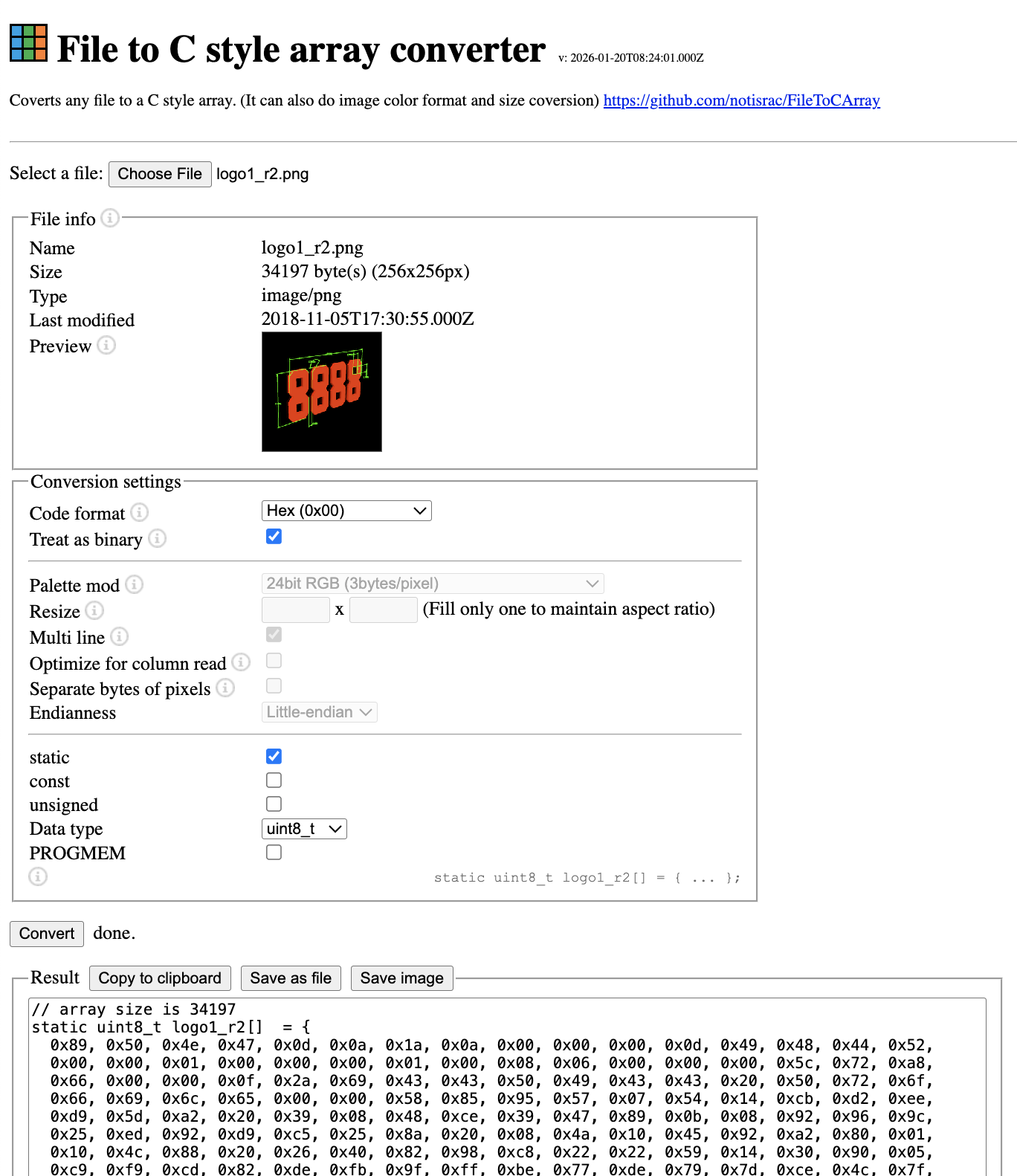
you then copy the array to your code, it might look something like this at the beginning of your program, however, usually I put this type of data in a separate file and include it where needed.
using namespace vex;

// A global instance of vex::brain used for printing to the V5 brain screen
vex::brain       Brain;

// define your global instances of motors and other devices here

// array size is 34197
static uint8_t logo1_r2[]  = {
  0x89, 0x50, 0x4e, 0x47, 0x0d, 0x0a, 0x1a, 0x0a, 0x00, 0x00, 0x00, 0x0d, 0x49, 0x48, 0x44, 0x52,
  0x00, 0x00, 0x01, 0x00, 0x00, 0x00, 0x01, 0x00, 0x08, 0x06, 0x00, 0x00, 0x00, 0x5c, 0x72, 0xa8,
  0x66, 0x00, 0x00, 0x0f, 0x2a, 0x69, 0x43, 0x43, 0x50, 0x49, 0x43, 0x43, 0x20, 0x50, 0x72, 0x6f,
  0x66, 0x69, 0x6c, 0x65, 0x00, 0x00, 0x58, 0x85, 0x95, 0x57, 0x07, 0x54, 0x14, 0xcb, 0xd2, 0xee,
  0xd9, 0x5d, 0xa2, 0x20, 0x39, 0x08, 0x48, 0xce, 0x39, 0x47, 0x89, 0x0b, 0x08, 0x92, 0x96, 0x9c,

  etc.
Then use as follows
Brain.Screen.drawImageFromBuffer( logo1_r2, 0, 0, sizeof(logo1_r2) );