Live PROS Robot Viewer

MotionView + MVLib: Open-source telemetry & replay logging for PROS V5

Hi everyone,

I’ve been developing an open-source telemetry and logging toolchain for PROS V5 teams called MotionView, with a companion library MVLib, and wanted to share it here for feedback and wider use.

The goal is to make autonomous debugging visual, replayable, and data-driven without teams needing to build custom logging formats or visualization tools.


What MotionView does

MotionView is a desktop app that reads robot logs and visualizes:

  • Robot paths on a full field
  • Pose data (x, y, heading) over time
  • A watch list (battery, motor temps, RPM, current, auton state, etc.)
  • Hover-to-inspect values at any point in a run
  • Playback controls for reviewing autonomous

MotionView also lets you change:

  • Units (inches / tiles / etc.)
  • Field origin offsets (x, y, heading)
  • Playback speed and scrubbing

Screenshots

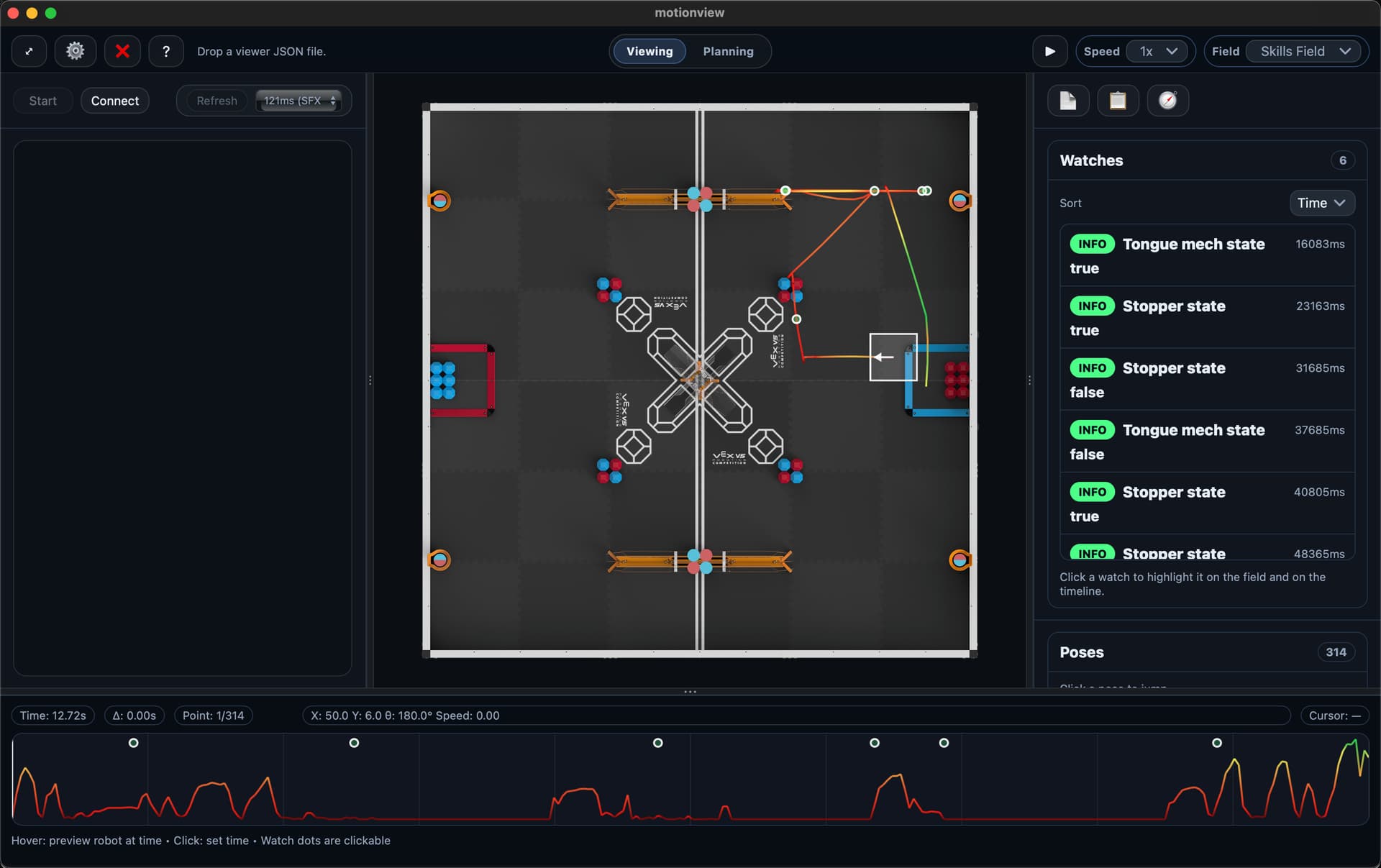
Viewing Mode (Run Playback)

Click here to view the image.

Shows a recorded autonomous run with:

  • The robot path drawn on the field
  • Pose readouts
  • Active watches listed on the side
  • Hovering on the path to inspect values at that moment

This run is a real recorded run from my robot in the VEX Pushback competition.

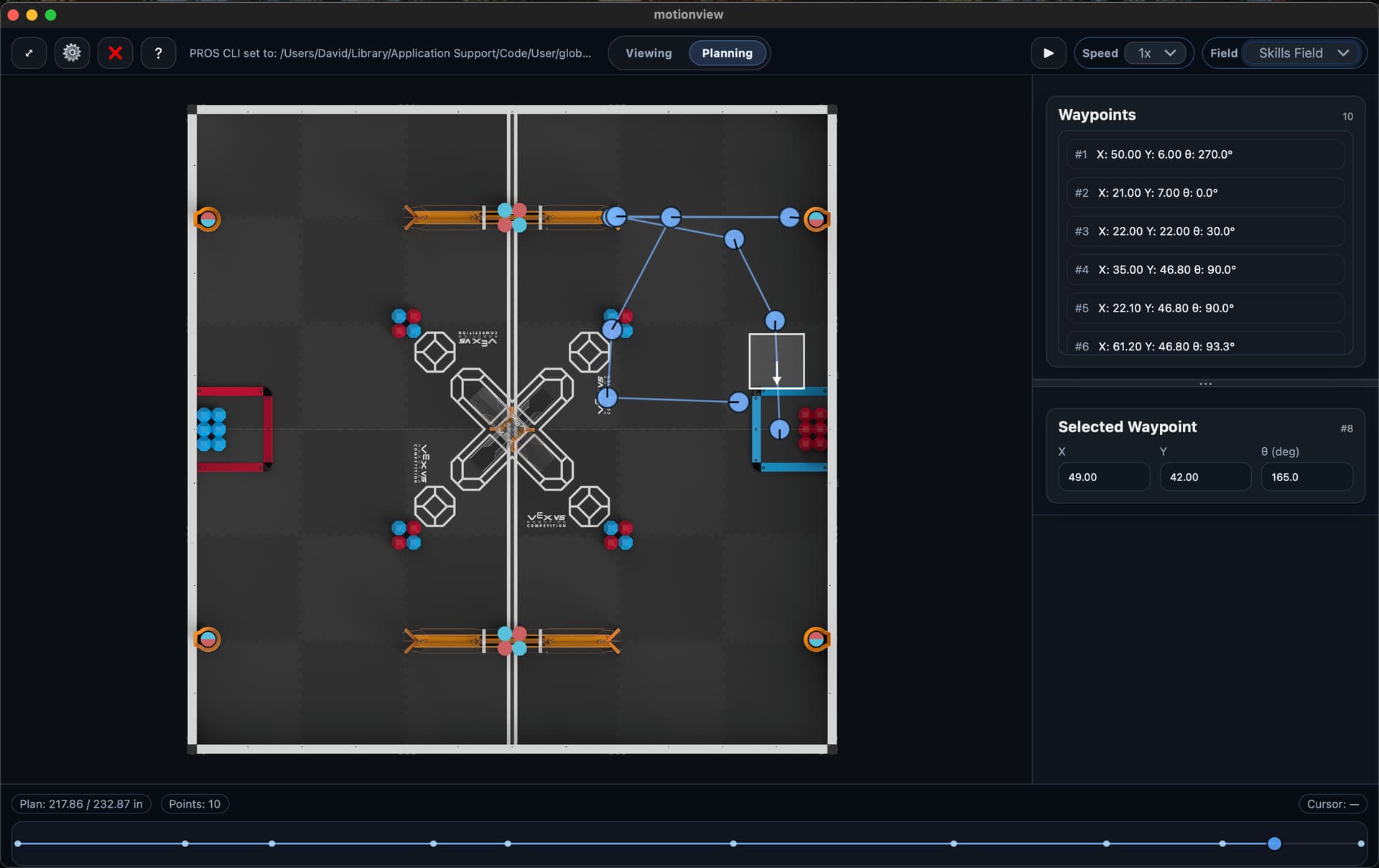
Screenshot 2 — Planning Mode

Click here to view the image.

Shows MotionView’s planning mode, where:

  • Paths can be laid out visually
  • Geometry and heading changes are previewed
  • Planned paths are separate from recorded runs

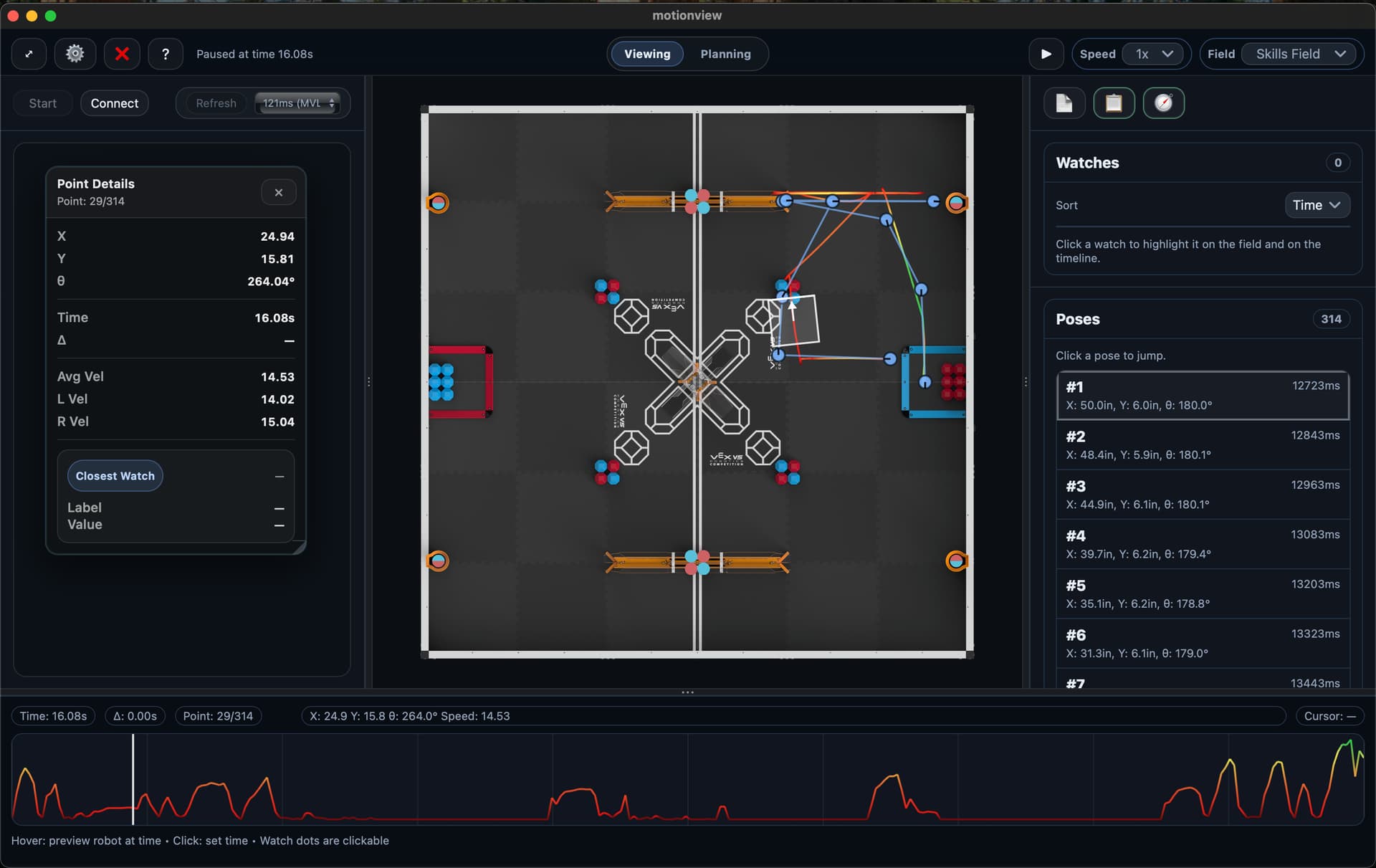
Screenshot 3 — Overlay Mode (Planning + Real Run)

Click here to view the image.

Shows a planned path overlaid on a real autonomous run, making it easy to:

  • See drift or error
  • Compare intended vs actual motion
  • Tune odometry and control

What is MVLib?

MVLib is a lightweight C++ logging and telemetry library for PROS that outputs data in a format MotionView understands.

It provides:

  • Structured logs (instead of scattered printfs)
  • Pose streaming for path visualization
  • “Watches” that track values over time
  • Automatic integration with MotionView

MVLib is optional — MotionView can read any logs in the right format — but MVLib simplifies setup and ensures consistency.


Supported odometry libraries

MVLib currently supports:

  • EZ-Template
  • LemLib
  • OkapiLib
  • Custom odometry via a user-supplied pose getter

Adapters are header-only and enforced at compile time so only one odometry source is active.


Example use cases

Teams are using this to:

  • Debug why an auton failed (not just that it failed)
  • Track brownouts, overheating, or jams
  • Compare runs between code changes
  • Tune odometry and autonomous routines visually

Project status

  • Open-source
  • Actively developed
  • Used on real robots
  • Still evolving — feedback welcome

I’m especially interested in:

  • Feature requests
  • UI feedback
  • Edge cases with different odometry setups

Links

Downloads

Official download links for MacOS and Windows:

Thanks for reading — feel free to reply or DM me if you want to try it or have questions.


Here are the 3 screenshots attached

I tried installing this using the installer and it crashed immediately upon opening. I installed it on Windows, I’ve tried reinstalling it several times.

Thank you for bringing this to my attention.
The crash is because the app could not find the backend script (motionview-py) that manages livestreaming. I belive I fixed this with release v0.1.1. Please re-download, and uninstall before re-installing.

If you want to see the back end logs of the app, they are in: /Users/<yourUser>/AppData/Roaming/com.motionview.motionview

So this connects to any PROS program you have? Even EZ Template?

Yes.
I made an EZ-Template adapter for MVLib, which is the library that works best with MotionView. I have not really been able to test it with EZ-Template or OkApi, specifically with the older PROS version. I have only ever actually tested it with LemLib, so EZ-Template and OkApi might have version mismatches or other issues.

Thanks for the info, may be a while till I try to use this, my kids are still learning the basics of EZ Template and Telemetry is a little more advanced for Middle School still.

Thanks again for building this, this is awesome.

I just compilled MVLib with EZ-Template and it does work. The only issue is you have to create a pros::MotorGoup in addition to the ez::Drive chassis with your motor ports. I wasn’t able to actually see if it works though, as I dont have a robot.
This is the code that I made that compilled successfully:

#include "main.h"
#include "mvlib/core.hpp"
#include "mvlib/Optional/mvlib_optional_ez-template.hpp" // EZ-Template adapter

ez::Drive chassis(
    {1, 2, 3},   
    {-4, -5, -6},  
    7,
    4.125,
    343);  

pros::MotorGroup left_mg({1, 2, 3},
                pros::MotorGearset::blue,
                pros::v5::MotorUnits::degrees); // Creates a motor group with forwards ports 1 & 3 and reversed port 2

pros::MotorGroup right_mg({-4, -5, -6},
                pros::MotorGearset::blue, 
                pros::v5::MotorUnits::degrees); // Creates a motor group with forwards port 5 and reversed ports 4 & 6

void initialize() {
  // Print our branding over your terminal :D
  ez::ez_template_print();

  pros::delay(500);  // Stop the user from doing anything while legacy ports configure

  chassis.opcontrol_curve_buttons_toggle(true);   // Enables modifying the controller curve with buttons on the joysticks
  chassis.opcontrol_drive_activebrake_set(0.0);   // Sets the active brake kP. We recommend ~2.  0 will disable.
  chassis.opcontrol_curve_default_set(0.0, 0.0);  // Defaults for curve. If using tank, only the first parameter is used. (Comment this line out if you have an SD card!)

  // Set the drive to your own constants from autons.cpp!
  default_constants();

  ez::as::auton_selector.autons_add({  /* your autons ... */ });

  // Initialize chassis and auton selector
  chassis.initialize();
  ez::as::initialize();
  master.rumble(chassis.drive_imu_calibrated() ? "." : "---");

  // Init MVLib
  mvlib::Logger& logger = mvlib::Logger::getInstance(); // Get the logger object

  mvlib::setOdom(logger, &chassis);

  // Attach our left and right drivetrain MotorGroups to it
  logger.setRobot({
	.LeftDrivetrain = mvlib::shared(left_mg),
	.RightDrivetrain = mvlib::shared(right_mg)
  });
}

Can you record and play it back on the bot?

MotionView displays pose and speed on a map (among other things), but does not directly support exporting a path. However, using it as a reference while making a route by looking at the poses (or using Planning Mode) may be useful. MotionView is an analyzer and planner and doesn’t directly export paths
You might looking for something like path.jerryio.com to make routes for the robot.

Thank you so much for developing this tool. I was actually working on a much simplified, but not as cool, version of an odometry analyzer that just printed out sensor data to a large (300KB) .txt file on the brain’s SD card.
I probably won’t get playing with the library until after the worlds competition. I can’t wait to try out the library! It looks really cool!

I have changed the name of MVLib, so the links that are here are not going to work. Use this link for MVLib instead. I have also switched to GitHub releases, so this is the new download link.

This is free to use and legal for coding? Sounds nice if it is.

This is completely free, no paywalls or subscriptions at all. I believe that it’s similar to a tool like path.jerryio in VEX legality.

The download link has changed again for v1.0.0. Use this link to download.
I also just made a post on VexForum announcing MotionView v1.0.0. It may still be pending when this post comes out.