Oh, I see. I’ll try that, thank you.
Yep, apparently that’s what’s not working.
I’ll switch that and see if it works, but my current code is the same one as listed in this post, which multiple people say works. I’ll still give it a shot, though. Thank you!
How do the wheels look like? Do they form “X” from the top or “O”?
technik3k discuss this in quite a detail of the theory.
They form an x shape. That thread looks interesting I’ll definitely check it out. Thanks.
Hi, for some reason this code makes it so that axis 3 makes the robot spin and axis 4 to go forwards. Axis 1 also makes the robot go forwards. I have no clue why.
here’s the exact code with your additions:
#include "vex.h"

using namespace vex;

#include "robot-config.h"

competition Competition;

int threshold = 10;
int p = 0;

int liftSpeed = 50;


void precision() {
  if (p == 0) {
    p = 1;
  } else {
    p = 0;
  }
}

void userControl() {

  while (1) {
    // Controller1.ButtonA.pressed(precision);

    if(Controller1.ButtonUp.pressing() and Controller1.ButtonR1.pressing()){
      ForkF.spin(forward, liftSpeed, pct);
      waitUntil(!Controller1.ButtonR1.pressing());
      ForkF.setVelocity(0, percent);
      ForkF.setStopping(brake);
  }
    if(Controller1.ButtonUp.pressing() and Controller1.ButtonR2.pressing()){
      ForkF.spin(reverse, liftSpeed, pct);
      waitUntil(!Controller1.ButtonR2.pressing());
      ForkF.setVelocity(0, percent);
      ForkF.setStopping(brake);
  }
    if(Controller1.ButtonDown.pressing() and Controller1.ButtonR1.pressing()){
     if(Controller1.ButtonDown.pressing()){
     ForkB.spin(forward, liftSpeed, pct);
     }
     waitUntil(!Controller1.ButtonR1.pressing());
     ForkB.setVelocity(0, percent);
     ForkB.setStopping(brake);
   }
   if(Controller1.ButtonDown.pressing() and Controller1.ButtonR2.pressing()){
     ForkB.spin(reverse, liftSpeed, pct);
     waitUntil(!Controller1.ButtonR2.pressing());
     ForkB.setVelocity(0, percent);
     ForkB.setStopping(brake);
   }
   if(Controller1.ButtonLeft.pressing() and Controller1.ButtonR1.pressing()){
      ForkL.spin(forward, liftSpeed, pct);
      waitUntil(!Controller1.ButtonR1.pressing());
      ForkL.setVelocity(0, percent);
      ForkL.setStopping(brake);
    }
    if(Controller1.ButtonLeft.pressing() and Controller1.ButtonR2.pressing()){
      ForkL.spin(reverse, liftSpeed, pct);
      waitUntil(!Controller1.ButtonR2.pressing());
      ForkL.setVelocity(0, percent);
      ForkL.setStopping(brake);
    }
    if(Controller1.ButtonRight.pressing() and Controller1.ButtonR1.pressing()){
      ForkR.spin(forward, liftSpeed, pct);
      waitUntil(!Controller1.ButtonR1.pressing());
      ForkR.setVelocity(0, percent);
      ForkR.setStopping(brake);
    }
    if(Controller1.ButtonRight.pressing() and Controller1.ButtonR2.pressing()){
      ForkR.spin(reverse, liftSpeed, pct);
      waitUntil(!Controller1.ButtonR2.pressing());
      ForkR.setVelocity(0, percent);
      ForkR.setStopping(brake);
    }

    int front = Controller1.Axis3.position(vex::percent);
    int side = Controller1.Axis4.position(vex::percent);
    int turn = Controller1.Axis1.position(vex::percent);
    FR.spin(vex::forward, front - side - turn, vex::percent);
    FL.spin(vex::forward, front + side + turn, vex::percent);
    BR.spin(vex::forward, front + side - turn, vex::percent);
    BL.spin(vex::forward, front - side + turn, vex::percent);
  }
}

int main() {

  Competition.drivercontrol(userControl);


  while (true) {
    wait(100, msec);
  }
}With all due respect, you don’t “own your code”. What that means is that you are trying to copy / paste existing code and you don’t know how it applies to your robot.
I think you need to analyze the problem so that you understand what you need the wheels to do. Grab your notebook and make a grid of the wheel layout similar to the image that @Codec provided in the original thread.
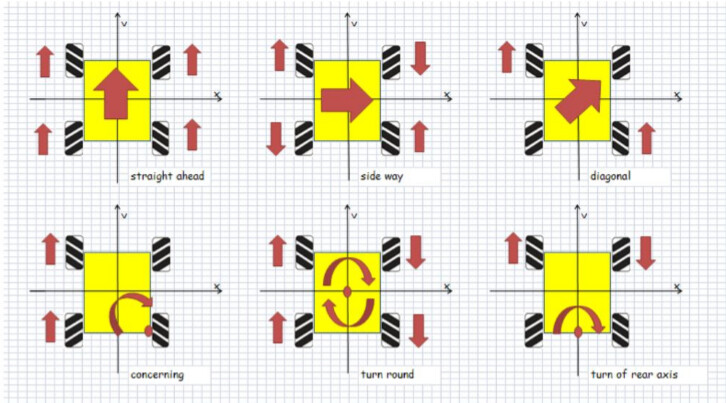
For the robot to roll forward I need LF, LR, RF, RR to rotate positive.
For the robot to roll backward I need LF, LR, RF, RR to rotate negative.
For the robot to strafe left …
For the robot to strafe right…
For the robot to turn left …
For the robot to turn right…
Once you know which values should be positive and which should be negative, combine that with the values of your controller stick. Down and Left on the sticks are negative values and Up and Right are positive. The stick value is 0 when it is dead center (-100 to 0 to +100) which means the value of a center stick will not affect the other values
When you understand what you need the motors to do you can then map that to the stick values. Use the existing code as a reference. Note that the wheels in the photo follow an X pattern and I believe that your wheels were in an O pattern.
You may need to manually roll / slide your robot and watch how the wheels want to move to determine if they should turn forward or backward.
Send picture of wheels from top and bottom view. Also check your motors polarity. Push axis 3 up, all the wheels should move forward.
Thanks everyone. I didn’t figure out the issue, but for some reason after making the front int negative on BR, the robot works. I have no clue what caused this, but if you have a similar issue I guess try that. Thanks again.