I’m assuming you’re using ez-template, in which case you would want to pass the ports both through the ez::Drive and into a pros::MotorGroup to feed to MVLib.
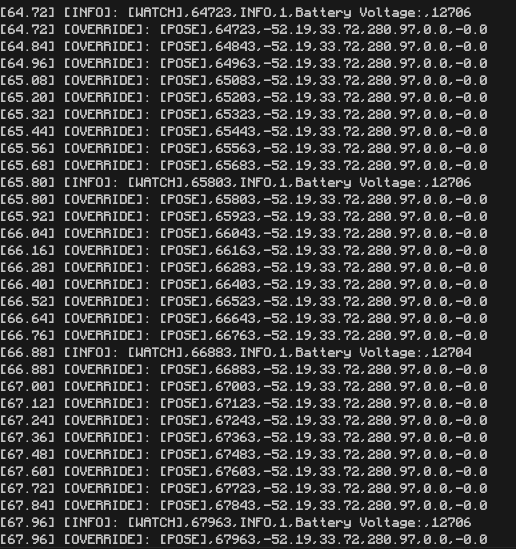
I have never used ez template on an actual robot, but a testing run I did looked like this:
Also, if there is an incompatibility or you can’t get the ports set up right, you can always leave the robot unset and MVLib will still work the same (you just won’t be able to use the default watches).
I hope this helped you!
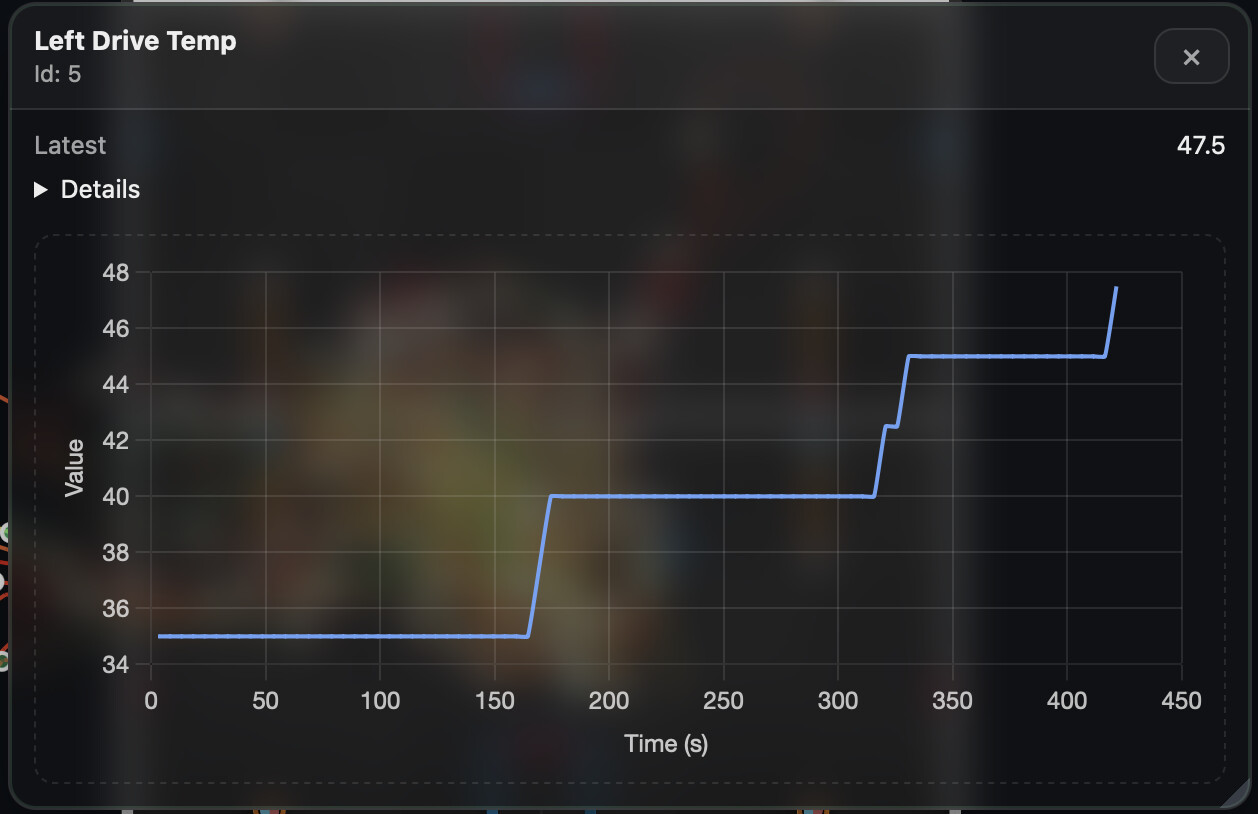
Here, you can see a temperature graph from my left drivetrain as I drive, heating it. Any numeric data type can be graphed.
You can also now pin watches to see their value and level easily. When pinned, a watch spawns a small, movable window that shows the watch’s current value and log level, eliminating the need to scroll through the watch panel.
Fixed buggy top bar when the window is too small (Thanks to @Seth_G for noticing the bug!)
Fixed the issue where rotating the field would mess up the coordinate plane
Fixed version not rendering in the help menu
Fixed MVLib’s massive thread safety and heap issues
Fixed MVLib not respecting LogLevel::OFF or LogLevel::NONE for watches
Fixed MVLib watches not allowing LogLevel::FATAL
Breaking Changes
MotionView versions higher than v1.0.1 use the new v2 schema version. Any currently saved routes you have may import missing details or fail to import at all.
MotionView expects a new [WATCH] format. Older versions of MVLib are not compatible with MotionView v1.1.0.
API Change: The config.hpp file was removed from MVLib. Instead, use the provided runtime setters to change timings.
A dropdown menu to choose would be nice. It would be cool if you could overlay graphs so you could see could see how everything in a run is lining up. And yes I do think this would be a useful feature.
Yes! That’s exactly why graphing, logs, and waypoints were all added! The thing is, you’re the target users. If there is something YOU want, I won’t know until you tell me!
Is there a proper channel for issues & suggestions besides the forums?
I’m on a school issued MacBook and so it lacks most administrator privileges, the motion view app is being ran through the documents folder.
I’m having issues getting output onto the app on MacOS, my settings are set to the same pros project and the pros cli is the same as when I run the command “which pros”. Bridges are green and the pros terminal does output the logger output (pose & battery voltage every second) but the motion view app stays the same.
You can use Discord or stay on VexForum, but there is no special platform or channel (that has been made yet) for issues/suggestions.
Sorry about these issues, and you seem to be having several distinct ones:
The app isn’t in the applications folder?
There is something wrong with the bridge / pros project dir?
The app is running, and the terminal is coming through, but nothing is changing in the UI?
If the app is running and the terminal is updating, then you have correctly set the pros dir and pros exe, and have also gotten MVLib set up.
It would help a lot for troubleshooting if you could send screenshots or a video through Google Drive or by copying and pasting. You can easily take a screenshot (MacOS) by pressing Ctrl + Cmd + Shift + 4, which allows you to take a screenshot directly into your clipboard.
If your symptoms are live, working terminal, but nothing is updating in the UI, then try setting the refresh interval on the livestreaming panel:
Where would this discord be?
The application is in the documents folder, this is because putting something in the applications folder makes it global across all profiles, including the admin one, hence I would need admin support. The bridge and project dir seem to be fine, shown in second screenshot, terminal has the pose being printed as shown in first screenshot.
Set print watches and log to terminal are also both set to true in the initialize before logger.start() is called.
Finally, refresh interval was set to 500ms, and i did click both connect and start
Great, thank you! I’m happy to see that you got MVLib and the livestreaming settings set up correctly.
Just to clarify – the terminal screenshot is from VSCode and not from MotionView, right? Is the terminal output coming through MotionView after you click Connect then Start? This is the final thing I can think of.
The terminal screenshot did come through VScode, on the app i do get connecting, connected, streaming started. Unlike your screenshot however i do not get “No v5 devices were found.” I’ve attached a screenshot with debugging enabled aswell. I’ll get a video of it sometime this week.
This all looks good. Were you connected to your robot, and nothing was coming through? I will look into this because there should always be output text, no matter if there is a device connected:
(MotionView found the controller and connected successfully to it)
The green/red line next to a message indicates whether or not MotionView successfully parsed the line.
After letting the connection stay Connected and Started for a minute, did anything at all come through? If not, then it’s likely an issue with the app or with the pros exe variable. MotionView only checks whether the path exists, not whether it is actually the pros terminal. Try opening a new terminal by doing these steps:
Open VSCode
Open Command Palette: Cmd + Shift + P
Search PROS: Integrated Terminal and select it
In the newly opened terminal, type which pros and paste that result into MotionView’s PROS Exe settings.
Thank you! That seemed to be the issue, I’d recommend that go in the basic troubleshooting on the Github page so someone doesn’t have to dig out this forum.
Another issue has seemed to arise but I don’t think this is an application fault. The stream I guess is failing to connect and shoots out a bunch of errors, ending with PermissionError(keep in mind that this is a school mac). Motion view output attached below.
Great! It looks like the pros exe was the problem.
And yes, that error you got is straight from the pros terminal. It is likely caused by MotionView not having access to the necessary folders, which leads to the pros terminal not having the necessary permissions. Try this fix:
Open the Apple Menu () and go to System Settings.
Scroll down and click on Privacy & Security.
Click on Files and Folders.
Look for MotionView in the list. If it is there, click the arrow next to it and toggle the switch ON for Documents Folder (or Desktop/Downloads, depending on where your code is).
Restart MotionView and try again.
The Other Option:
If MotionView hasn’t requested access, it might not show up in the “Files and Folders” list at all. In that case:
Go back to Privacy & Security → Full Disk Access.
Click the + button at the bottom of the list (you will need to enter your Mac password).
Find MotionView in your Applications folder and add it.
I was unable to give it access through the settings, but I was able to get it fully working by putting the pros project in a non TCC protected folder (the home directory weirdly enough) . Thank you for your help!
I’m excited to say that the next versions of MotionView are adding something that you’ll probably find really nice:
Binary data logging (and graph comparing)
This will allow you to blast out whatever you want at super-fast speeds. You get triple the bandwidth with zero downsides.
Graph 10+ variables at the same time with sub 50-millisecond latency
Get even more Pose updates, and get them faster
It increases resource efficiency, taking up fewer of your CPU cycles
Better waypoint handling
More precise values
To accommodate these massive amounts of data, I made MotionView much more performant. It should now run much better on all hardware, even with 8,000 poses being rendered.
While this version is close, it’s not quite ready yet. You can expect it in the coming days.



 Bug Fixes
 Breaking Changes