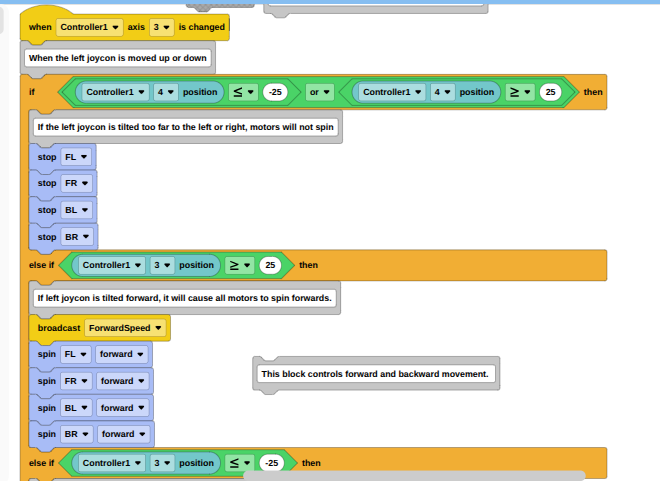
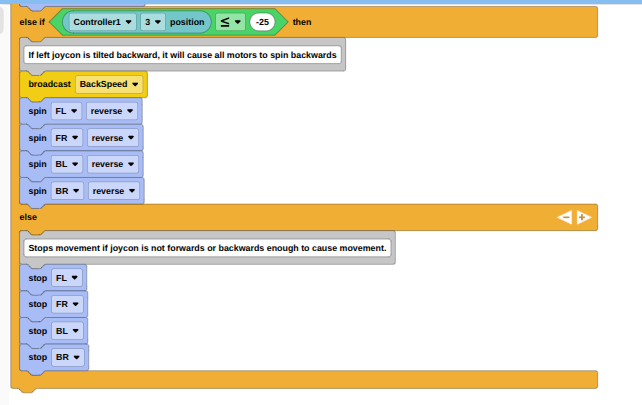
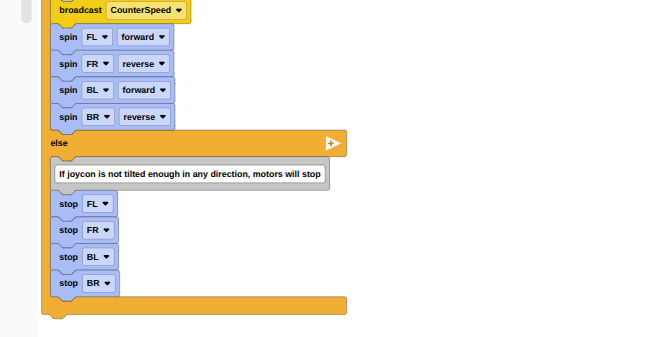
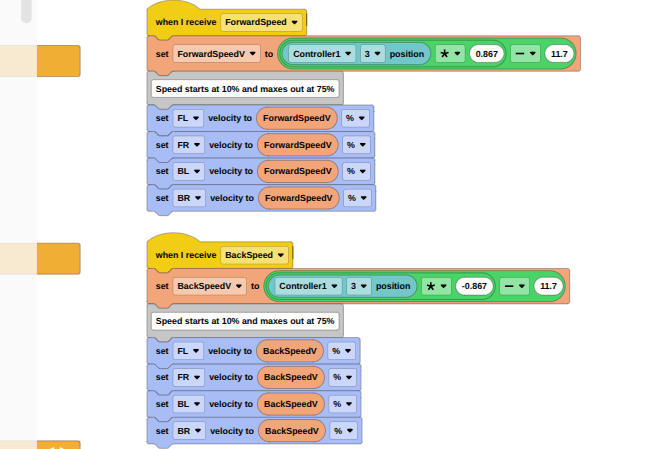
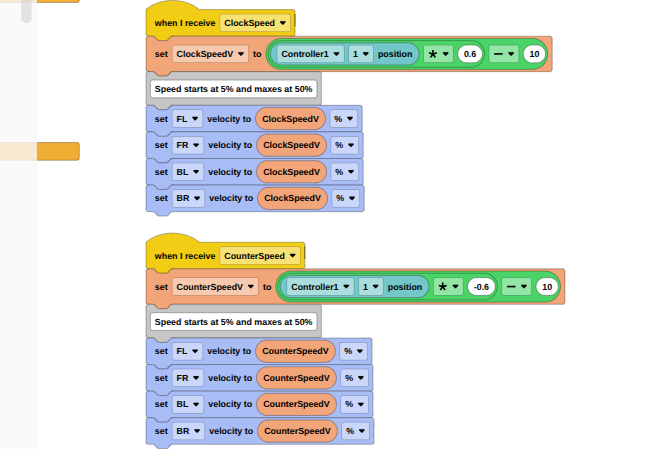
I wrote this code so that the more I move my joystick on a controller forwards or backwards, the faster my vehicle will go. Same concept with turning, just with slower motions. For whatever reason, whenever I attempt to use the program, every input leads to the robot only moving forwards. Any thoughts? Images attached.

This is overcomplicated, why you can’t use the regular drivetrain setup?
They are using six motors which is not regularly supported when setting up the drivetrain even though you can set up a six motor drivetrain if you use VS Code. Though I don’t know why OP could not just use a drivetrain.
Once I get all the basic movement charted out and coded, I am going to add omnidirection to the code via mecanum wheels. The basic drive trains do not support omnidirection, nor do they have the precision I need for my project.
How does this block allow turning? Wouldn’t the left side need to spin backwards while the right spins forward, and vice versa? I am relatively new to VEX, so sorry if I am missing something.
As you can see it depends on which position the controller is at because it uses position 2 and how much strength is given to it to turn left and the same for right but for position 3.
Ohhhh, so it uses one joycon for one side, and the other for the other side? Sounds a bit harder to get more precise motions, unless you’re skilled, then ig it could be more precise.
Yes, that is basically one of the drivetrain configurations. But this one uses one joystick.
You can still do mecanum wheels with a simpler program. You can apply the same concept that @457A used but add in another joystick for side to side.
This is wayyyy overcomplicated. Assuming you’re using split arcade (objectively the best method of control), you can just use this.
(It’s from my python code but the logic still applies) (just put all in a loop)
left_side_speed = controller.axis3.position() + (controller.axis1.position() * .5)
right_side_speed = controller.axis3.position() - (controller.axis1.position() * .5)
left_motors.spin(FORWARD, left_side_speed, PERCENT)
right_motors.spin(FORWARD, right_side_speed, PERCENT)
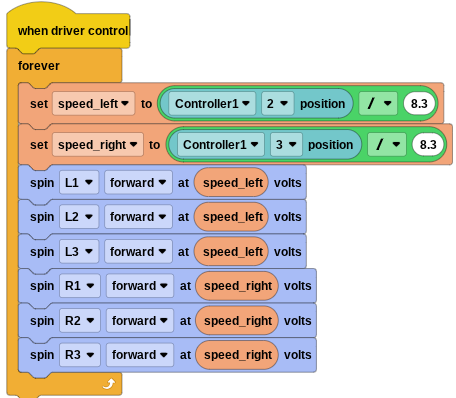
Thank you everyone who responded to the thread! Looking through some of the code y’all sent really helped me understand how I could improve my code. While it might still be overcomplicated, my new program works perfectly and feels smooth and responsive, so I am very satisfied.
One more thank you!!!
(New program)

It sure is, but I guess if you are happy.
for others looking at this, I would not recommend using the “when controller axis is changed” events in this way.
What’s wrong with that? Would it be better if I did when started and put my block in a forever loop?
going into all the details would a long post, time I don’t have right now.
but a couple of the big points.
It’s inconsistent to have an event handler, especially one that want’s to fire very frequently as the “changed” event will, that then blocks for any length of time in a loop.
Both event handler can fire and be running at the same time, this will cause both to be sending values to the motors, in general, you only want one place in code like this that can update motor values.
Ohhhh yeah that tracks, whenever I move both joysticks at the same time my robot does not seem happy about it. That doesn’t bother me though, I’m the pilot, I know not to move both sticks at the same time.