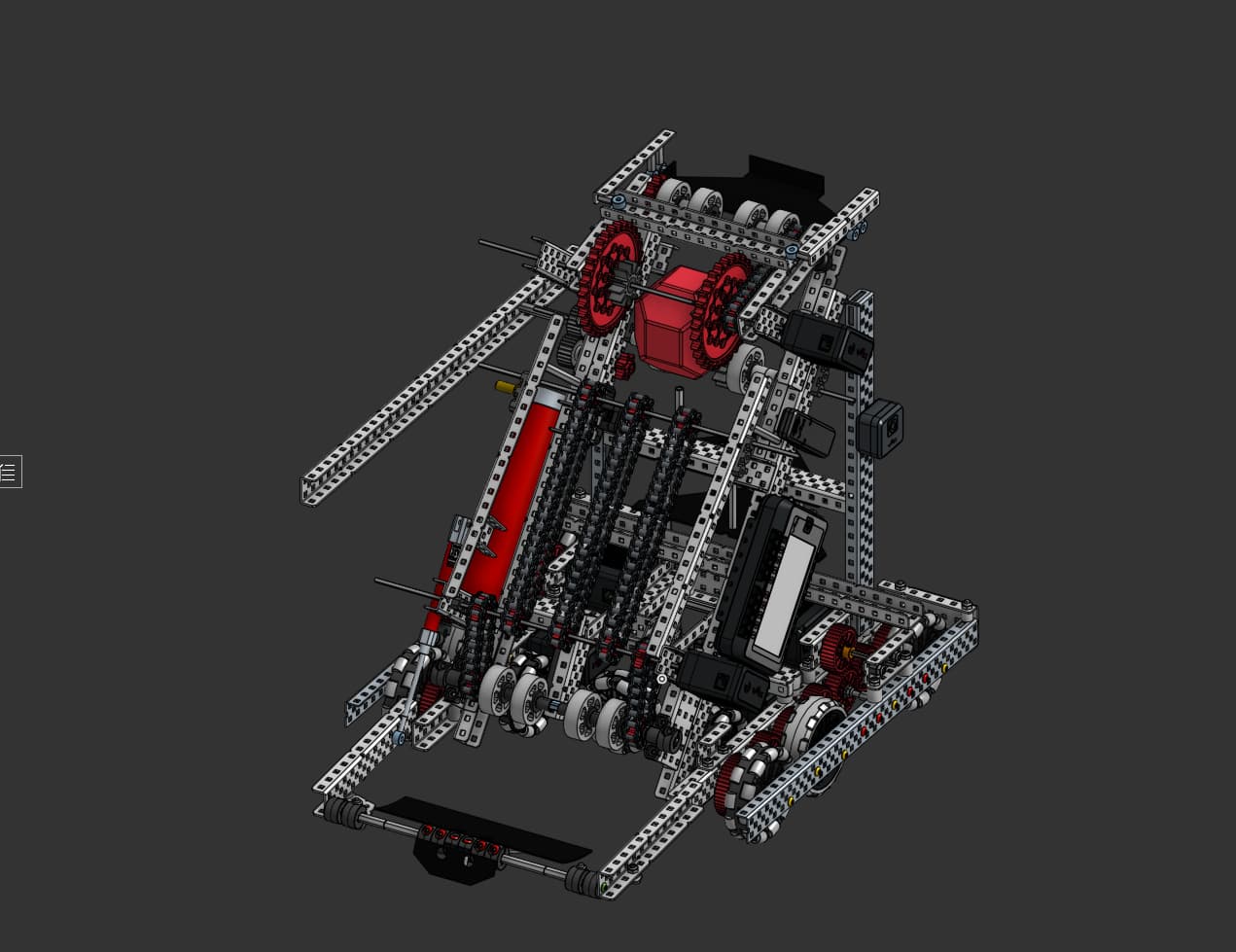
This robot wouldn’t happen to be inspired by some team specifically at mall of america righttt? Surely not… Anyways nice cad, would recommend another crossbrace tho
lol you are right, it’s a good base to start off with, and because it’s my first year ever with cad. Also, the robot isn’t fully done yet, so there is more stuff to add. Thank you for the suggestion!
We are new Middle School team and struggling to get on CAD, is it possible that you could share that file with us? We would only use for CAD reference, no hole counting or anything like that
Nice job! I would recommend looking into adding wings near the top of your bot though. I would also recommend changing your brain placement as well as maybe adding plastic near your hood to act as a funnel or else blocks can potentially jam into the sides. (Speaking from experience). Finally I would also recommend adding plastic near the front of the bot to act as a funnel into your intake or the blocks will just be the edges of your drivebase.
Honestly, I have tried to reference other stuff when learning to CAD, and the best way for me has been to watch video on YouTube and just mess around with the tools to create random stuff. There is also a VEX CAD discord server that might be helpful to you too.
Thank You! Also this was just a design that I made to base off for our robot so we could build quickly, we are in the process of putting on both the winds and something to funnel the blocks for the intake, we did add mid stage funnel too right after I posted this.
Hello, thanks for reaching out! Unfortunately I dont think I will be sharing the actual file for our robot, however I can tell you what we used. In order to even start caddng, we used a website called “Onshape”, which is a product development program simalar to Autodesk Fusion and Solidworks. Why we use Onshape is because it is extremely easy to use and have access because its a website. However just like the previous comments, try to find videos on youtube, thats how I learned!