I coach a V5 team. We use Block coding with 6 motor drivetrains. We have not had any luck trying to code the Inertial sensor to make 90 degree turns, either left or right. Does anybody have any suggestions?
This is quite tedious in block code to repeat these lines every time you want to do a turn, but here is the code for it:
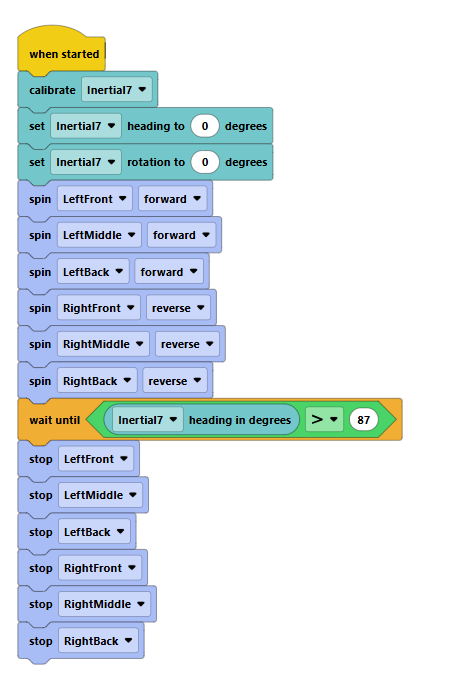
The general idea is just to start spinning motors in the direction you need to turn (to turn right, you spin left motors forward, right motors backward, opposite for left turn), the waiting until the inertial sensor’s value is JUST above or below your target angle. For example, if you were turning 90 degrees, you would do:
- Start spinning right motors backward and left motors forward
- Wait until the inertial’s heading is above 87 or 88 degrees so that when it stops it’s roughly at 90
- Stop the motors
As you can see, it is VERY annoying to do this every time you want to turn. So, I recommend making a custom block like the one shown below so you only have to use this one block every time you have to turn.
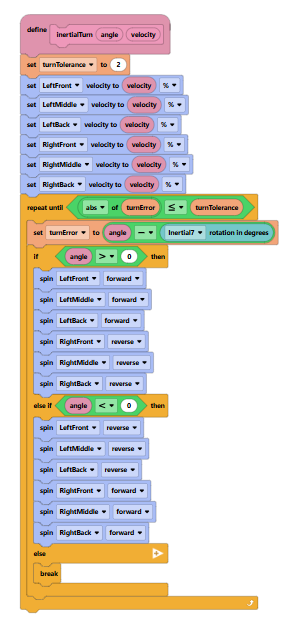
Note: there might be some errors in this code, I don’t code in blocks that often so I might have messed up.
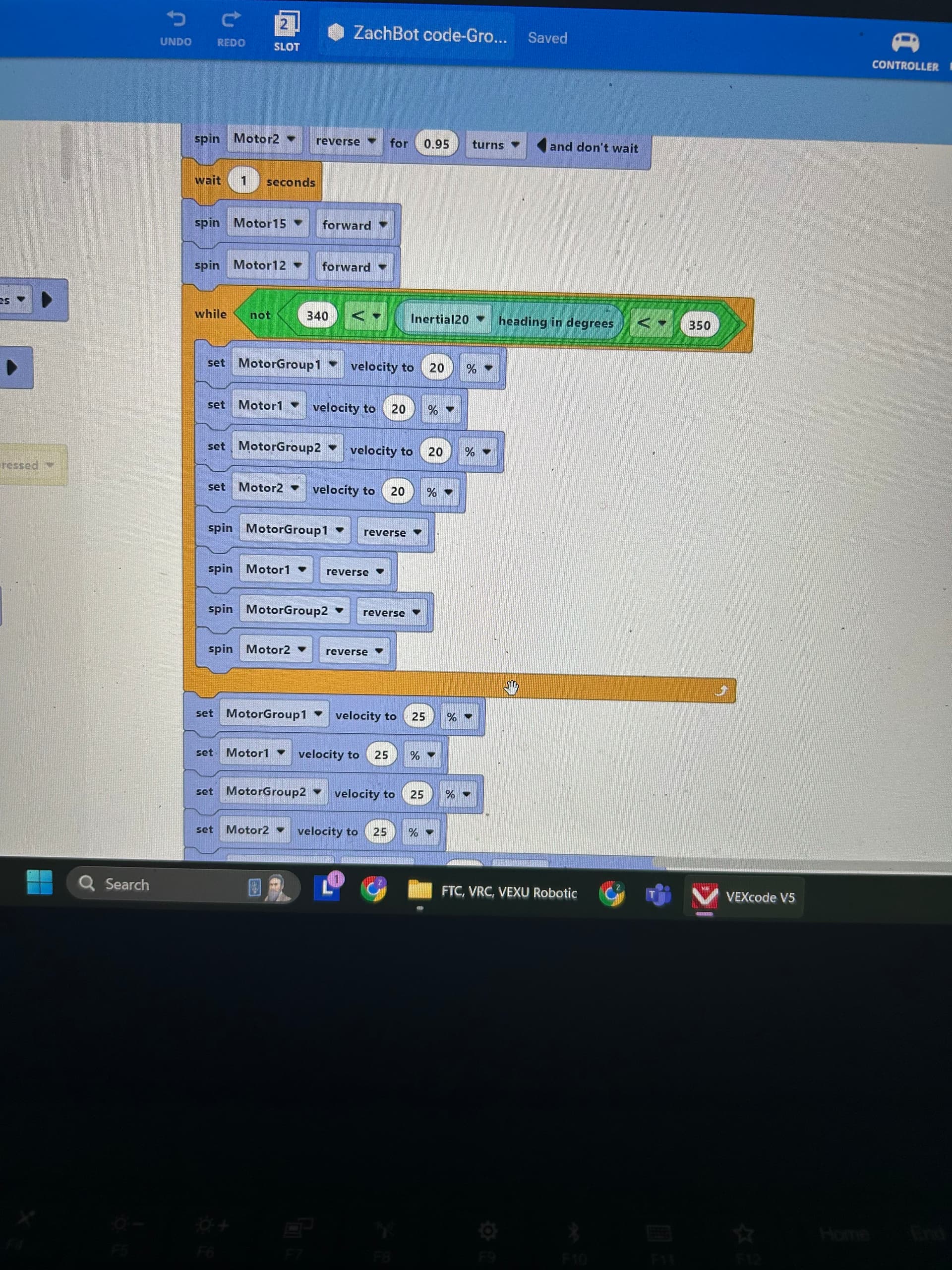
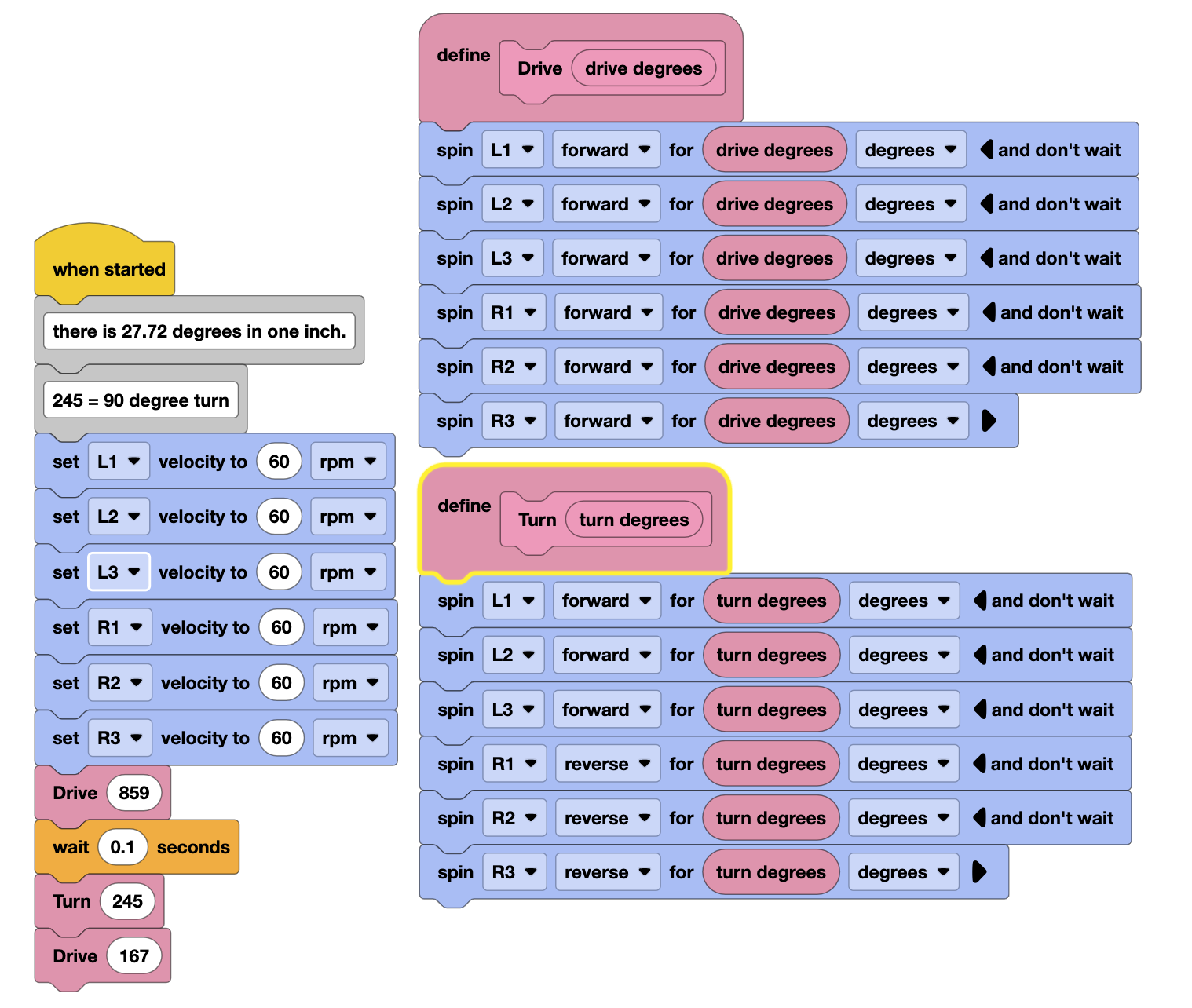
Thanks very much for your reply! We have tried to get this (or something like it) to work…but no luck so far. I’m going to include a picture of our 15 second Auton that shows our 6 motor setup. Can you look at is and see have we could modify what you have sent previously to get this to work for our robot? Thanks in advance!
A couple of questions.
- What happens currently ? How does the robot move ?
You have the code under a “when started” hat so it should run when the program is started, if you want that to run during the autonomous period then place it under a “when autonomous” hat.
- You originally mentioned the inertial sensor, the code above does not use that at all, you are just using the internal motor encoders to spin them a given amount, was this what you had intended ?
By the way, that code I sent is our current code without the Inertial sensor. It picks up two cubes and scores them in the lower tube in the center of the field
ok, I should have read your post more closely.
So what have the student tried ?
It would be better if they made an attempt at coding and then asked for help if it doesn’t work.
The general idea will be to start the motors spinning, monitor the inertial sensor heading and then stop motors when a target heading is reached. A next improvement will be to change the motor velocity based on how far the robot still has to turn, that’s called a proportional controller.
We have that code under “when started” so we can test it out. We change that before we go to a tournament.
Yes…that code does not use the Inertial sensor at all. I just wanted people to see how we have our motors set up in case that was important in coding with the Inertial sensor.
So due to game rules this year I’m not going to give any working/tested code, however, I would suggest the students create some helper user blocks to simplify things, it’s just tedious to keep having to control six motors every time you want to change motor velocity.
so perhaps create a couple to control the three left and right motors.

and then perhaps another to turn the robot at a given velocity

Then the loop to do a controlled turn with the IMU might start to look like this.
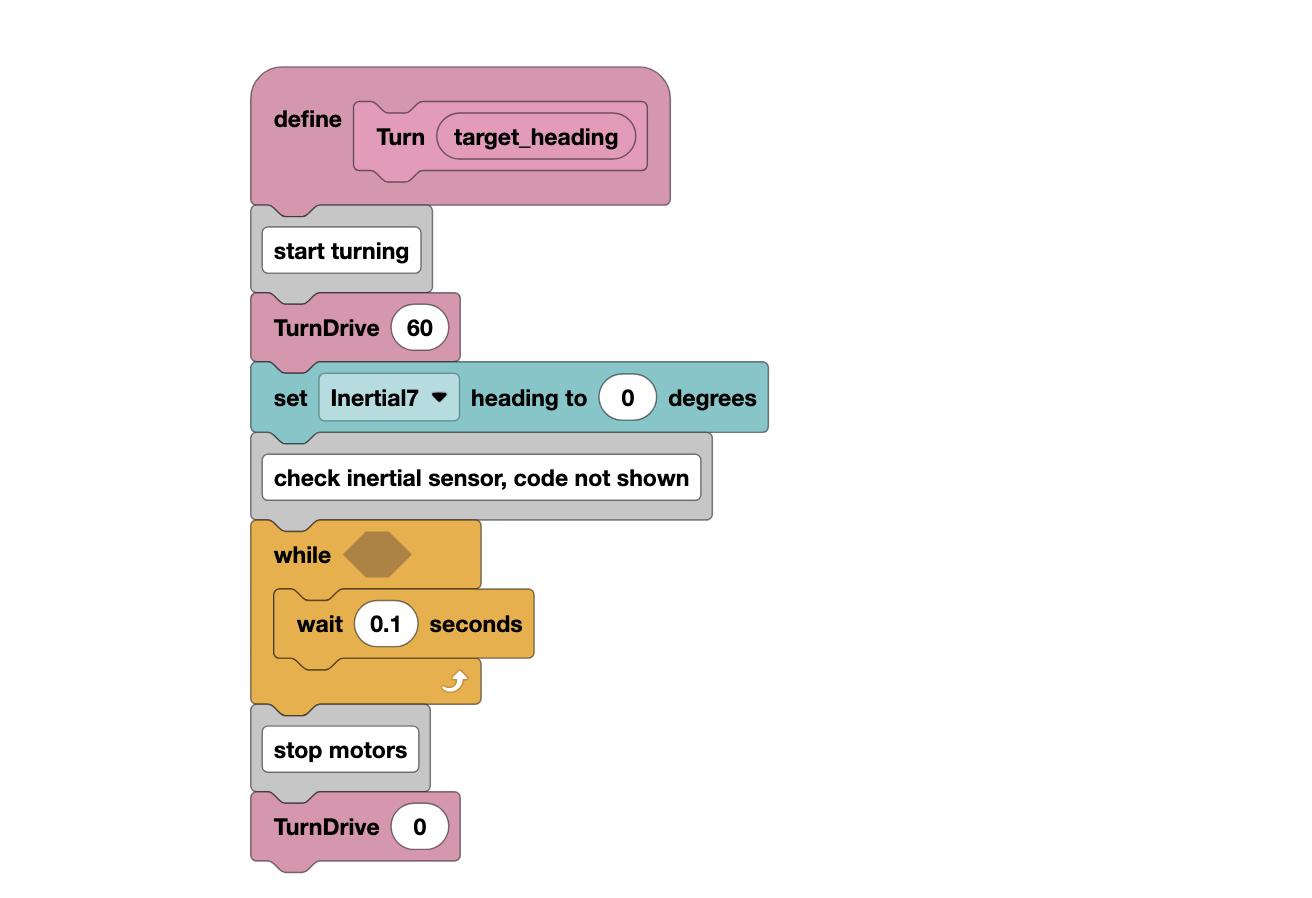
Thanks much for your suggestions! I will pass this along to the students tomorrow and will post the code that they try
Following.
One of my teams tried using the inertial sensor to do proportional turns but didn’t get it working in time for the Australian national championships over the last 2 days here so reverted to their previous code. (Their robot kept turning when they tried to turn to an angle. E.g. if they told it to drive straight then turn 90 degrees it would drive straight and then just keep turning.
I know it’s something their coder wants to work on at the start of next year in their offseason before the next challenge comes out so he knows how to do it for next season.
They had created a custom block for driving straight that would keep checking the angle and adjust the velocities to keep the robot going straight, then created a second custom block to do turns.
Does anyone know of some good resources I could point them to to help them look deeper at it over their summer holidays. (They’re currently using blocks also and the coder had spent a couple weeks looking at a bunch of things online about PID but was just trying to get proportional working first before moving further.)

You use turnError before it ever gets set, it will be 0 the first time you compare to turnTolerance
I’m curious about the decision to use Block Programming. Do students feel the “image based” user experience of Blocks is less intimidating than a text-based programming language? Based on these screenshots, I could imagine that at some point the auton or whatever, won’t fit on a single screen…
I ran across an article looking in-depth about the benefit of block coding for new coders vs text based languages, and it does appear that block coding does really help new coders structure code better than those who were using text based coding languages only. (sorry do not have citation on hand, but I think I posted it years ago when similar discussion arose).
I think your concern is more about how do you navigate a big coding space? well, same holds true for code that functions are split across libraries, or a huge linear code spew  . I think that issue is more about UI navigating complex spaces than cognitive models of text only vs graphical block coding.
Full disclosure - I am from old school - you know punch cards and paper tape… I am also influenced from those who developed LOGO & Scratch, also LISP and a myriad of other models.
I think having many pathways to be expressive in coding is a good thing, even if you can’t grok it.
We use block programming for a couple of reasons. It is the simplest way to get our robotics program up and running. And…I don’t have the expertise to teach line code. Wish I did!