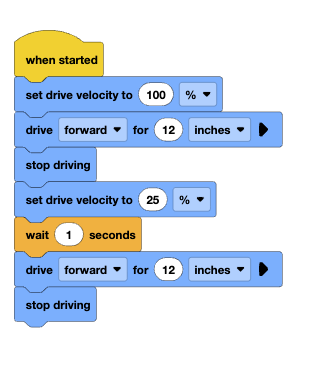
I have a very basic program for a drive base. Bot is set-up with a 2-motor drivetrain. No controllers are being used.
Goal: A program that will drive forward at full speed and then drive forward at 1/4 speed.
I have placed velocity blocks before each drive command, but when running the program, the robot drives at the same speed during both stages.
Why is the velocity block having any effect on the bot’s performance?
Thanks,
A2
Maybe try to have a wait 1 second or whatever between the drive forward block and the stop driving block
try deleting the stop driving block, because it is redundant. Since you already used the block that goes for a certain distance, it might be waiting for it to start driving before it stops, maybe.
Okay, so with some more troubleshooting, here’s what I’ve discovered.
As built, the drive train gear ratio was 1:5. When this was entered in the DriveTrain set-up, the velocity blocks didn’t change the velocity as expected.
If I changed the DriveTrain set-up back to the 1:1 default setting, then the blocks started to work. It would also work if 5:1 was entered.
I can’t think of a rationale why this is happening other than to conclude that there’s some kind of bug in the back end code. But as far as I can tell, there’s not a way to actually view the back end code for the device set-up components.
Does anyone have any ideas to help solve this?
The gear ratio setting for the drivetrain has caused confusion in the past, what gear is on the motor and what is connected to the wheels ?
The input gear is the one attached to the motor, and the output one would be the one attached to the wheel. If you entered it correctly, you might just have to tweak the distances so that they work with a gear ratio that works with the velocity blocks.
The gear ratio is another issue that feels like its buggy. I have a 12T gear on the motor and a 60T gear on the wheel. Which should make it a 5:1 gear ratio. But when it’s set-up that way, the bot only moves a fraction of the correct distance. When it’s entered as 1:5, then the drive distance performs correctly.
In vexcode, you enter the ratios as driving gear : driven gear, instead of driven gear : driving gear. That is why the 1:5 was correct while the 5:1 was incorrect.