I changed my code some: Specifically my drivetrain speed. I changed it from 70% to 10% for tests, and it successfully downloaded, but when it finished downloading and had all normal indicators of doing so, it never actually changed speed, at all.
We tested several different wires for this.
What may be causing this, and how can it be fixed?
We’re going to need some more information.
I’ve given you all I have. What more do you want?
The code?
It does this with all programs i’ve made. Blocks, text, brand new codes, codes that have successfully updated previously, etc.
And…can we see a program?
int onauton_autonomous_0() {
  // settings
  Drivetrain.setDriveVelocity(10, percent);
  Drivetrain.setTurnVelocity(10, percent);
  intake.setVelocity(100, percent);
  catapult.setVelocity(100, percent);
  Drivetrain.setStopping(coast);
  return 0;
}

// "when driver control" hat block
int ondriver_drivercontrol_0() {
  Drivetrain.setDriveVelocity(10, percent);
  Drivetrain.setTurnVelocity(10, percent);
  intake.setVelocity(100, percent);
  catapult.setVelocity(100, percent);
  Drivetrain.setStopping(coast);
  while(true){
     repeat(999999) {
   Brain.Screen.setPenColor("#ff0000");
   Brain.Screen.setFillColor("#ff0000");
   Brain.Screen.drawRectangle(0, 0, 479, 239);
   Brain.Screen.setPenColor(black);
   Brain.Screen.print("Æ");
   wait(0.05, seconds);
   Brain.Screen.setPenColor("#ff4700");
   Brain.Screen.setFillColor("#ff4700");
   Brain.Screen.drawRectangle(0, 0, 479, 239);
   Brain.Screen.setPenColor(black);
   Brain.Screen.print("Æ");
   wait(0.05, seconds);
   Brain.Screen.setPenColor("#ff8d00");
   Brain.Screen.setFillColor("#ff8d00");
   Brain.Screen.drawRectangle(0, 0, 479, 239);
   Brain.Screen.setPenColor(black);
   Brain.Screen.print("Æ");
   wait(0.05, seconds);
   Brain.Screen.setPenColor("#ffd400");
   Brain.Screen.setFillColor("#ffd400");
   Brain.Screen.drawRectangle(0, 0, 479, 239);
   Brain.Screen.setPenColor(black);
   Brain.Screen.print("Æ");
   wait(0.05, seconds);
   Brain.Screen.setPenColor("#c6ff00");
   Brain.Screen.setFillColor("#c6ff00");
   Brain.Screen.drawRectangle(0, 0, 479, 239);
   Brain.Screen.setPenColor(black);
   Brain.Screen.print("Æ");
   wait(0.05, seconds);
   Brain.Screen.setPenColor("#39ff00");
   Brain.Screen.setFillColor("#39ff00");
   Brain.Screen.drawRectangle(0, 0, 479, 239);
   Brain.Screen.setPenColor(black);
   Brain.Screen.print("Æ");
   wait(0.05, seconds);
   Brain.Screen.setPenColor("#00ff55");
   Brain.Screen.setFillColor("#00ff55");
   Brain.Screen.drawRectangle(0, 0, 479, 239);
   Brain.Screen.setPenColor(black);
   Brain.Screen.print("Æ");
   wait(0.05, seconds);
   Brain.Screen.setPenColor("#00ffe3");
   Brain.Screen.setFillColor("#00ffe3");
   Brain.Screen.drawRectangle(0, 0, 479, 239);
   Brain.Screen.setPenColor(black);
   Brain.Screen.print("Æ");
   wait(0.05, seconds);
   Brain.Screen.setPenColor("#6f8eff");
   Brain.Screen.setFillColor("#6f8eff");
   Brain.Screen.drawRectangle(0, 0, 479, 239);
   Brain.Screen.setPenColor(black);
   Brain.Screen.print("Æ");
   wait(0.05, seconds);
   Brain.Screen.setPenColor("#fa00ff");
   Brain.Screen.setFillColor("#fa00ff");
   Brain.Screen.drawRectangle(0, 0, 479, 239);
   Brain.Screen.setPenColor(black);
   Brain.Screen.print("Æ");
   wait(0.05, seconds);
   Brain.Screen.setPenColor("#6f8eff");
   Brain.Screen.setFillColor("#6f8eff");
   Brain.Screen.drawRectangle(0, 0, 479, 239);
   Brain.Screen.setPenColor(black);
   Brain.Screen.print("Æ");
   wait(0.05, seconds);
   Brain.Screen.setPenColor("#00ffe3");
   Brain.Screen.setFillColor("#00ffe3");
   Brain.Screen.drawRectangle(0, 0, 479, 239);
   Brain.Screen.setPenColor(black);
   Brain.Screen.print("Æ");
   wait(0.05, seconds);
   Brain.Screen.setPenColor("#00ff55");
   Brain.Screen.setFillColor("#00ff55");
   Brain.Screen.drawRectangle(0, 0, 479, 239);
   Brain.Screen.setPenColor(black);
   Brain.Screen.print("Æ");
   wait(0.05, seconds);
   Brain.Screen.setPenColor("#39ff00");
   Brain.Screen.setFillColor("#39ff00");
   Brain.Screen.drawRectangle(0, 0, 479, 239);
   Brain.Screen.setPenColor(black);
   Brain.Screen.print("Æ");
   wait(0.05, seconds);
   Brain.Screen.setPenColor("#c6ff00");
   Brain.Screen.setFillColor("#c6ff00");
   Brain.Screen.drawRectangle(0, 0, 479, 239);
   Brain.Screen.setPenColor(black);
   Brain.Screen.print("Æ");
   wait(0.05, seconds);
   Brain.Screen.setPenColor("#ffd400");
   Brain.Screen.setFillColor("#ffd400");
   Brain.Screen.drawRectangle(0, 0, 479, 239);
   Brain.Screen.setPenColor(black);
   Brain.Screen.print("Æ");
   wait(0.05, seconds);
   Brain.Screen.setPenColor("#ff8d00");
   Brain.Screen.setFillColor("#ff8d00");
   Brain.Screen.drawRectangle(0, 0, 479, 239);
   Brain.Screen.setPenColor(black);
   Brain.Screen.print("Æ");
   wait(0.05, seconds);
   Brain.Screen.setPenColor("#ff4700");
   Brain.Screen.setFillColor("#ff4700");
   Brain.Screen.drawRectangle(0, 0, 479, 239);
   Brain.Screen.setPenColor(black);
   Brain.Screen.print("Æ");
   wait(0.05, seconds);
  }
  }
  return 0;
}```
This is the main code partThis code doesn’t move the robot.
It doesn’t have to. This code lets the robot drive and work mechanisms in driver control, but when I change anything about it (notably velocities) it changes nothing about the drive or mechanisms. For example, the drive is moving at 50% speed and has no change at all when it is redownloaded to 1%, 10%, 100%, and other speeds. The same applies to our intake, catapult, etc.
You should share the code that does this.
What @2775Josh is saying is that this code does not move the robot at all. We need to see the code where you actually tell the motors to move. The code that you currently has only sets the speed of the motors but doesn’t tell the motors to start moving. If your robot is moving then it is not running the code above. Is it possible that you are running the clawbot code that is on the controller when you just click drive?
An easy way to check that your program is running is to see if all the things you are printing on the brain are actually showing up on the brain.
I had a similar issue I recommend getting a new downloading cord and if that doesn’t work fully restart your computer.
If you have just assigned the drivetrain to a controller joystick in graphical setup, then this has no effect.
The code that’s auto generated by the graphical setup will simply send controller joystick values directly to motors (using setVelocity followed by spin).
Move away from graphical setup and write the control code directly.
How do you do this? (chars)
I have code to make the robot move in the side panel
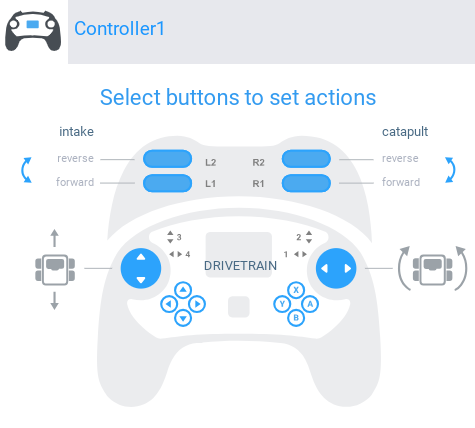
I’m using C++. (chars)
I’m sure you can find the same page for C++ with a google search.
I created a basic drivetrain that has a velocity switch so that every time you hit the up button it increases the velocity by 10% and every time you hit the down button the velocity goes down by 10%.
#pragma region VEXcode Generated Robot Configuration
// Make sure all required headers are included.
#include <stdio.h>
#include <stdlib.h>
#include <stdbool.h>
#include <math.h>
#include <string.h>


#include "vex.h"

using namespace vex;

// Brain should be defined by default
brain Brain;


// START V5 MACROS
#define waitUntil(condition)                                                   \
  do {                                                                         \
    wait(5, msec);                                                             \
  } while (!(condition))

#define repeat(iterations)                                                     \
  for (int iterator = 0; iterator < iterations; iterator++)
// END V5 MACROS


// Robot configuration code.
motor leftMotorA = motor(PORT1, ratio18_1, false);
motor leftMotorB = motor(PORT2, ratio18_1, false);
motor_group LeftDriveSmart = motor_group(leftMotorA, leftMotorB);
motor rightMotorA = motor(PORT3, ratio18_1, true);
motor rightMotorB = motor(PORT4, ratio18_1, true);
motor_group RightDriveSmart = motor_group(rightMotorA, rightMotorB);
drivetrain Drivetrain = drivetrain(LeftDriveSmart, RightDriveSmart, 319.19, 295, 40, mm, 1);

controller Controller1 = controller(primary);


// Helper to make playing sounds from the V5 in VEXcode easier and
// keeps the code cleaner by making it clear what is happening.
void playVexcodeSound(const char *soundName) {
  printf("VEXPlaySound:%s\n", soundName);
  wait(5, msec);
}


// define variable for remote controller enable/disable
bool RemoteControlCodeEnabled = true;
// define variables used for controlling motors based on controller inputs
bool DrivetrainLNeedsToBeStopped_Controller1 = true;
bool DrivetrainRNeedsToBeStopped_Controller1 = true;

// define a task that will handle monitoring inputs from Controller1
int rc_auto_loop_function_Controller1() {
  // process the controller input every 20 milliseconds
  // update the motors based on the input values
  while(true) {
    if(RemoteControlCodeEnabled) {

      // calculate the drivetrain motor velocities from the controller joystick axies
      // left = Axis3 + Axis1
      // right = Axis3 - Axis1
      int drivetrainLeftSideSpeed = Controller1.Axis3.position() + Controller1.Axis1.position();
      int drivetrainRightSideSpeed = Controller1.Axis3.position() - Controller1.Axis1.position();

      // check if the value is inside of the deadband range
      if (drivetrainLeftSideSpeed < 5 && drivetrainLeftSideSpeed > -5) {
        // check if the left motor has already been stopped
        if (DrivetrainLNeedsToBeStopped_Controller1) {
          // stop the left drive motor
          LeftDriveSmart.stop();
          // tell the code that the left motor has been stopped
          DrivetrainLNeedsToBeStopped_Controller1 = false;
        }
      } else {
        // reset the toggle so that the deadband code knows to stop the left motor nexttime the input is in the deadband range
        DrivetrainLNeedsToBeStopped_Controller1 = true;
      }
      // check if the value is inside of the deadband range
      if (drivetrainRightSideSpeed < 5 && drivetrainRightSideSpeed > -5) {
        // check if the right motor has already been stopped
        if (DrivetrainRNeedsToBeStopped_Controller1) {
          // stop the right drive motor
          RightDriveSmart.stop();
          // tell the code that the right motor has been stopped
          DrivetrainRNeedsToBeStopped_Controller1 = false;
        }
      } else {
        // reset the toggle so that the deadband code knows to stop the right motor next time the input is in the deadband range
        DrivetrainRNeedsToBeStopped_Controller1 = true;
      }

      // only tell the left drive motor to spin if the values are not in the deadband range
      if (DrivetrainLNeedsToBeStopped_Controller1) {
        LeftDriveSmart.setVelocity(drivetrainLeftSideSpeed, percent);
        LeftDriveSmart.spin(forward);
      }
      // only tell the right drive motor to spin if the values are not in the deadband range
      if (DrivetrainRNeedsToBeStopped_Controller1) {
        RightDriveSmart.setVelocity(drivetrainRightSideSpeed, percent);
        RightDriveSmart.spin(forward);
      }
    }
    // wait before repeating the process
    wait(20, msec);
  }
  return 0;
}

task rc_auto_loop_task_Controller1(rc_auto_loop_function_Controller1);

#pragma endregion VEXcode Generated Robot Configuration
// Include the V5 Library
#include "vex.h"

// Allows for easier use of the VEX Library
using namespace vex;

int Brain_precision = 0, Console_precision = 0, Controller1_precision = 0;

float myVariable, Clicks;

// "when started" hat block
int whenStarted1() {
  while (true) {
    if (Clicks == 1.0) {
      Drivetrain.setDriveVelocity(10.0, percent);
    }
    if (Clicks == 2.0) {
      Drivetrain.setDriveVelocity(20.0, percent);
    }
    if (Clicks == 3.0) {
      Drivetrain.setDriveVelocity(30.0, percent);
    }
    if (Clicks == 4.0) {
      Drivetrain.setDriveVelocity(40.0, percent);
    }
    if (Clicks == 5.0) {
      Drivetrain.setDriveVelocity(50.0, percent);
    }
    if (Clicks == 6.0) {
      Drivetrain.setDriveVelocity(60.0, percent);
    }
    if (Clicks == 7.0) {
      Drivetrain.setDriveVelocity(70.0, percent);
    }
    if (Clicks == 8.0) {
      Drivetrain.setDriveVelocity(80.0, percent);
    }
    if (Clicks == 9.0) {
      Drivetrain.setDriveVelocity(90.0, percent);
    }
    if (Clicks == 10.0) {
      Drivetrain.setDriveVelocity(100.0, percent);
    }
  wait(5, msec);
  }
  return 0;
}

// Used to find the format string for printing numbers with the
// desired number of decimal places
const char* printToBrain_numberFormat() {
  // look at the current precision setting to find the format string
  switch(Brain_precision){
    case 0:  return "%.0f"; // 0 decimal places (1)
    case 1:  return "%.1f"; // 1 decimal place  (0.1)
    case 2:  return "%.2f"; // 2 decimal places (0.01)
    case 3:  return "%.3f"; // 3 decimal places (0.001)
    default: return "%f"; // use the print system default for everthing else
  }
}

// "when Controller1 ButtonUp pressed" hat block
void onevent_Controller1ButtonUp_pressed_0() {
  Clicks = Clicks + 1.0;
  Brain.Screen.clearScreen();
  Brain.Screen.print(printToBrain_numberFormat(), static_cast<float>(Clicks));
}

// "when Controller1 ButtonDown pressed" hat block
void onevent_Controller1ButtonDown_pressed_0() {
  Clicks = Clicks + -1.0;
  Brain.Screen.clearScreen();
  Brain.Screen.print(printToBrain_numberFormat(), static_cast<float>(Clicks));
}


int main() {
  // register event handlers
  Controller1.ButtonUp.pressed(onevent_Controller1ButtonUp_pressed_0);
  Controller1.ButtonDown.pressed(onevent_Controller1ButtonDown_pressed_0);

  wait(15, msec);
  // post event registration

  // set default print color to black
  printf("\033[30m");

  // wait for rotation sensor to fully initialize
  wait(30, msec);

  whenStarted1();
}
edit: code tags added by the moderators, please remember to use them.