Older iPads can sometimes run into memory issues. You can try force quitting Safari and reload the page afterwards. If you continue to have issues, I’d encourage you to have your students use the Feedback tool and let us know so we can look at diagnostic info there.
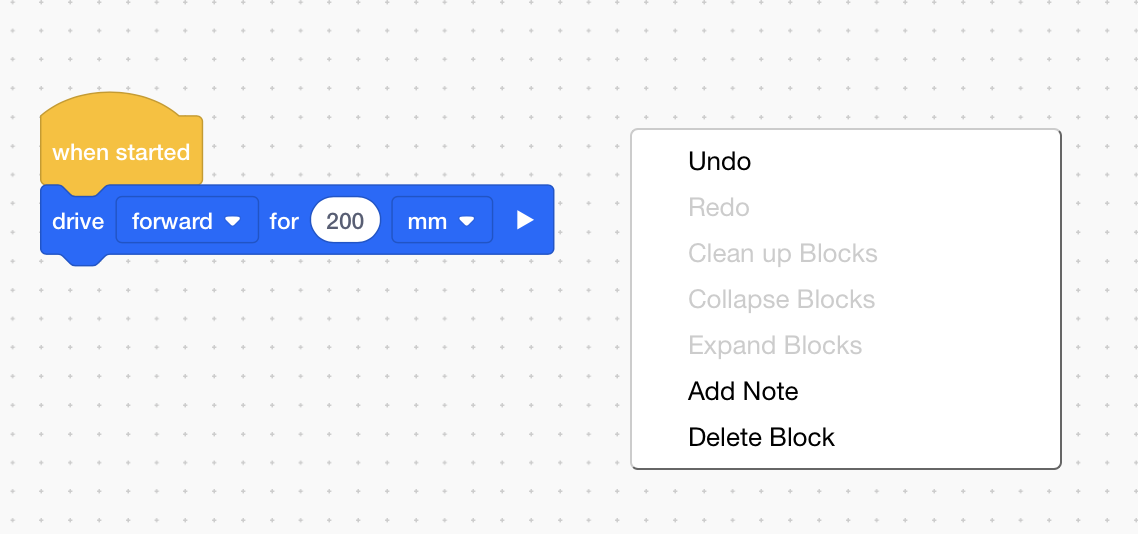
There is already an undo function. If you long press or right click in the workspace, you will get a menu that has undo and redo. If you have a keyboard, you can also use the standard undo/redo keyboard shortcuts.
We are aware that a lot of users do not know that this exists, and plan to implement a change to make it easier to use the undo/redo features, but we do not yet have a timeline for this.
There is not a way to manually position the robot (beyond programming it) as of today. There may be multiple "starting points " in the future for different Playgrounds.
You can’t export the My Blocks from one project to another, but you can save a copy of your project and then modify it from there for additional projects… think about making a base or template program that has your MyBlocks in it for future use.
It probably is actually downloading the file as filename.vrblocks.txt, because Safari.
If that is indeed the case, you can simply remove the .txt to be left with the correct filename.vrblocks. I am not sure how or even if you can do that on an iPad, though.
Students were told not to use Safari because of the problems reported. File that is downloaded is literally “document.txt”. I have opened those files in a text reader and it is a VR Block file which I verified by changing the extension on my laptop to “.vrblocks” . I have also duplicated what my students have done on my iPad using Chrome. Even if I change the name of the program on the website from “VEXcode Project” to something else it still downloads as Document.txt
On iPads, you should use Safari. Chrome’s implementation makes it (currently) impossible for us to save the .vrblocks file type correctly. This is something we’re continuing to investigate, however.
I’m not currently aware of any issues on Safari - can you describe what you’re seeing that is causing the problems?
Just the issues that you have eluded to in the past couple of days concerning older iPads. My students school issued iPad are approximately 3-4 years old. Along with Barin’s response which I now see have been edited. Plus the update post approximately 5-6 days ago.