Visual Studio Code is giving me error squiggles for all VEX-specific commands. I created this project through the VEX extension, why is this happening?

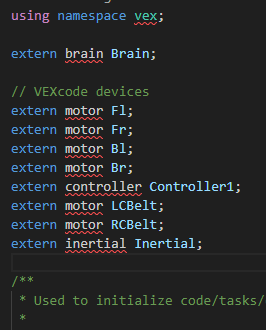
It’s always hard to tell from a couple of screenshots.
Does the project build ?
The red squiggles just come from the intellisense, do you have Microsoft C++ extension installed ?
Does this happen with a new blank project after clicking on “New Project” in the vex extension panel ?
I also encountered a similar problem. Did you finally solve it?
I had this problem with VSCode, but it was just intellisense and it compiled and worked fine.
Do you mean you can compile and use some files even if the software says it can’t find them? So far, I can’t use it normally, which is very distressing.
Uploading: image.png…
You need to install Microsoft’s C/C++ Extension.
Check out this KB article as well. It has a section on how to install the C/C++ Extension.
The VEX Extension generates the config file needed by the C/C++ extension, but it does not implement intellesense on your project. The C/C++ Extension does this.
If I remember correctly, I just started a new project and copied all the code in, but hphillips’ solution is probably better.

Are you using the official “VAIC_24_25-main” file? I downloaded it from https://github.com/
Other than intellisense showing issues, does it build ? That’s all that really matters.
Things you can try.
delete the c_cpp_properties.json file, quit and relaunch VSCode, that file should get rebuilt.
disable any other language server/intellisense extensions such as clangd.
Looks like you are on windows, any other extensions installed in VSCode ? Anything odd about where the project is located ?


I’m in VRC (sorry for not marking that category), so I created my file through the VEX VSCode extension


looks like you used the wrong build button.
use the build/download on the statusbar.