ConVEX - open source firmware for the cortex

I added the functions discussed yesterday.

Get a flag indicating reset was caused by the watchdog timer.

int16_t     vexWatchdogResetFlagGet(void);

Backup register access.

void        vexBkupInit(void);
void        vexBkupRegisterWrite( int16_t index, uint16_t data );
uint16_t    vexBkupRegisterRead( int16_t index );
void        vexBkupDebug(vexStream *chp, int argc, char *argv]);

Yesterday I suggested uncommenting VEX_WATCHDOG_ENABLE from vex.h to enable the watchdog timer. A better way that is project specific rather than global is to modify the makefile user define options like this. (makefile line 213).

# List all user C define here, like -D_DEBUG=1
UDEFS = -DVEX_WATCHDOG_ENABLE

Updated files are pushed to github.

Wow that was fast.

Thank you so much for all your hard work!

I added some functionality today that I had implemented in ROBOTC last year but did not release for various reasons. The new functionality allows a small amount of data (32 bytes) to be stored in flash which is persistent when the cortex is power cycled. The idea is to be able to save state information, things like autonomous modes.

The code uses one page of flash in high memory, the page is divided into an index section and a user data section. Each time user data is written the index is updated to point at the area containing the most recent parameters. A page erase only occurs after the entire flash page has been used (56 write operations of all 32 bytes, a flash page is 2K bytes).

There are a couple of safety features implemented so you don’t destroy the flash. A maximum of 32 writes may be performed after the cortex is powered, write is then disabled. Only one page erase may be performed after the cortex is powered.

In normal use perhaps only one or two write operations would ever be needed. Change something in a menu on the LCD and then write that data to flash.

During flash write operations, interrupts may be lost, a full write of all 32 bytes takes approximately 1mS. If a page erase is needed this can take up to 40mS, so don’t use write when the robot is running, bad things may happen, spi comms may be lost, motor operation may stop. The real use is to be able to set some type of operation mode (ie. autonomous mode) before going to the competition field and have that mode remembered when the robot is turned on.

The two functions used are:

user_param *vexFlashUserParamRead( void );
int16_t     vexFlashUserParamWrite( user_param *u );

The user parameter structure looks like this.


// Number of user parameter words
// Do not change !!
#define USER_PARAM_WORDS    8

// Structure to hold user parameters
typedef struct _user_param {
    // storage for the NV data
    unsigned char data[USER_PARAM_WORDS * 4];

    // useful debug data
             int  offset;
    void          *addr;
    } user_param;

There’s a new example project called TestProject-flash you can look at to see how these functions are used. This new code is not part of the core firmware but included with the optional code in the “opt” directory. You need to specify the “vexflash.h” header to use these functions.

Edit: I should add that this user data is lost when new code is downloaded as generally the entire flash is erased at that time.

I also added a function to check for a button release on the gamepad.

void        vexControllerReleaseWait( tCtlIndex index );

I was getting tired of always writing the same code to check for this. There is a 5 second timeout if for some reason the button gets stuck.

New code is pushed to github but I did not update the doxygen documentation yet.

A few small changes.

Added USER_UART1_ENABLE and USER_UART2_ENABLE conditional compile definitions in vexcortex.c. These would be used if the LCD was not required to be initialized on a UART port to allow user serial control code. Add in the makefile as follows.

for both
UDEFS = -DUSER_UART1_ENABLE -DUSER_UART2_ENABLE

for just one
UDEFS = -DUSER_UART1_ENABLE
or
UDEFS = -DUSER_UART2_ENABLE

Fixed the basic test project, tank drive code was forwards only :frowning: I need to fix the default code generated by the new project plugin, same bug, will do that on Monday.

Minor typo’s fixed in a couple of files.

Is there any way to run things at regular intervals like described in “A better solution” at ChibiOS free embedded RTOS - This topic does not exist yet ? I assume that code will work since it’s ChibiOS but would it break the additions you’ve made to task management?

Using chThdSleepUntil won’t break anything, the thread will not terminate automatically but you can also program around that. I used chThdSleepUntil in the sonar code, that thread does not need to terminate.

In the VexSleep code I use chEvtWaitAnyTimeout, either the thread receives the terminate event or the timeout occurs, this has the effect of sleeping the thread. I did this in case a large delay was requested (say several seconds), I wanted to be able to still terminate the task. chThdSleepUntil could be followed by chEvtWaitAnyTimeout with the timeout set to TIME_IMMEDIATE, something like this perhaps (off the top of my head, probably doesn’t work).

MyFunc()
{
    systime_t time = chTimeNow();
    
    // Must call this
    vexTaskRegister("myfunc");
    
    while(1)
        {
        time += MS2ST(1000);            // Next deadline
        do_something();
        chThdSleepUntil(time);

        // this would check for the kill event
        VexSleep( TIME_IMMEADIATE ); // this may not work, I need to check, TIME_IMMEDIATE is 0
        }
}

A bit more about Daniel’s requirement for a “sleep until” function.

The beauty of both ConVEX and the underlying ChibiOS/RT code being open source is that if you want to understand how things work under the hood you have all the source code. I wanted to see what chThdSleepUntil actually did compared to the chThdSleep and VexSleep functions. Here is the source for chThdSleepUntil (from chthreads.c).

void chThdSleepUntil(systime_t time) {

  chSysLock();
  if ((time -= chTimeNow()) > 0)
    chThdSleepS(time);
  chSysUnlock();
}

and chThdSleep

void chThdSleep(systime_t time) {

  chDbgCheck(time != TIME_IMMEDIATE, "chThdSleep");

  chSysLock();
  chThdSleepS(time);
  chSysUnlock();
}

Not much difference, both call chThdSleepS with a delay time, chThdSleepUntil simply calculates the delay based on the current time. Now lets see what chThdSleepS is all about, here is the source (from chthreads.h)

#define chThdSleepS(time) chSchGoSleepTimeoutS(THD_STATE_SLEEPING, time)

So all it does is tell the scheduler to put the thread into the THD_STATE_SLEEPING state with a timeout of “time”. You can dig down another level if you want but this call changes the state of the thread and then starts a virtual timer for the timeout.

Now lets look to see what I do in VexSleep, here is the beginning of that code.

void
vexSleep( int32_t msec )
{
    if( chEvtWaitAnyTimeout( ALL_EVENTS, MS2ST(msec) ) != 0 )
        {
<<snip>>

Don’t worry about what comes next, the important call is chEvtWaitAnyTimeout, lets see what that code is all about.

eventmask_t chEvtWaitAnyTimeout(eventmask_t mask, systime_t time) {
  Thread *ctp = currp;
  eventmask_t m;

  chSysLock();

  if ((m = (ctp->p_epending & mask)) == 0) {
    if (TIME_IMMEDIATE == time) {
      chSysUnlock();
      return (eventmask_t)0;
    }
    ctp->p_u.ewmask = mask;
    if (chSchGoSleepTimeoutS(THD_STATE_WTOREVT, time) < RDY_OK) {
      chSysUnlock();
      return (eventmask_t)0;
    }
    m = ctp->p_epending & mask;
  }
  ctp->p_epending &= ~m;

  chSysUnlock();
  return m;
}

It checks to see if an event is pending then, if the timeout is not 0 (TIME_IMMEDIATE) it calls chSchGoSleepTimeoutS but using a new thread state of THD_STATE_WTOREVT. The interesting thing is that it’s basically the same call as the chThdSleep function was using but with a different thread state, the timeout will be handled in exactly the same way but the scheduler may also wake the thread if the event fires.

So with this new information we could comfortably create a new VexSleepUntil function as follows knowing that the timeout will behave the same way as chThdSleepUntil. (time should really be systime_t, which is an uint32_t, but it really will not matter).

void vexSleepUntil(int32_t time)
{
    if ((time -= chTimeNow()) > 0)
        VexSleep(time);
}

Hopefully that makes sense. I will add as a standard feature the next time I do an update and can verify through testing that all is good to go.

Edit:
When you think about it even more you realize that “sleep until” is sort of pointless. The function in the previous post can be rewritten as.

MyFunc()
{
    systime_t time = chTimeNow();
    
    // Must call this
    vexTaskRegister("myfunc");
    
    while(1)
        {
        time += MS2ST(1000);            // Next deadline
        do_something();

        // normal sleep, assume time > chTimeNow()
        // also assumes systime counts in milliseconds which, with our default setup, it does.
        VexSleep( time - chTimeNow() );
        }
}

Yesterday we touched on using the signal splitter in another thread.

https://vexforum.com/t/receiver-connector-color-coded-pinouts-from-ask-the-staff/24340/1

So I figured that it may be fun to create the ppm waveform on the cortex and allow additional motors to be used with convex (not competition legal of course).

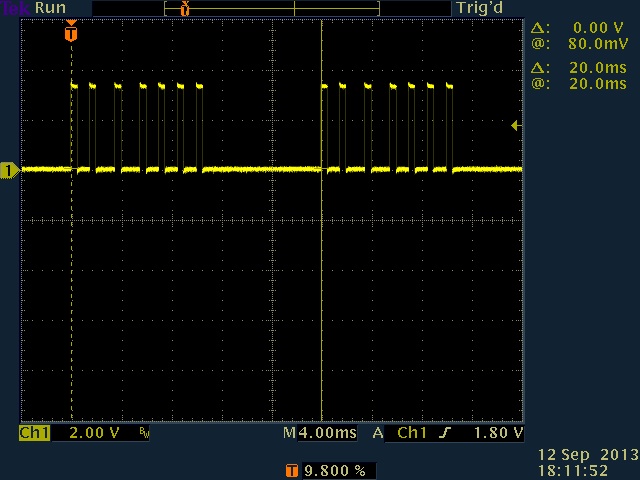
Timer 1 on the STM32 happens to have outputs that align with several of the digital output ports. Using it in PWM mode and changing the parameters for each cycle under interrupt control allows a pretty stable waveform to be generated.

[ATTACH]7617[/ATTACH]

Here two motors are running at maximum speed whilst the other are stopped. I may need to flip polarity of the waveform for the signal splitter, but that’s an option when the init function for this is called.

So now you could have 16 motors on the cortex and perhaps ( using one further timer or more complex timer 1 control) 22 would be possible.

I will include this code at some point as part of an “extras” release.

user code for motor control ends up looking something like this.

vexPpmSet( 1, vexControllerGet( Ch1 ));

Channel 1 joystick controlling ppm motor 1.

.
ppm_waveform.jpg

You’d have to watch the current limit for the LM2490 regulator though wouldn’t you? or perhaps provide an alternate source for the battery supply to these motors?

https://vexforum.com/showpost.php?p=326053&postcount=1

Looks fun. Kb

I believe that he intends to run the motors through another motor controller with its own supply, which would not strain the internal LM2940 regulator.

PROS has PWM drivers utilizing Timer 1 that can perform this task (and many others), but they are not compiled into the released version to save on code space, as high school teams would have no use for them. We have found potential uses for college teams to achieve 12 independent motor channels (legally, we believe) by running these PWM drivers to generate motor control signals through the power expander.

With a sufficient number of power expanders, up to 8 additional motors could be controlled on top of the 10 already plugged in, more if Y cables are used. This is obviously ludicrous overkill but a fun diversion for “what if?” designs.

Correct, plan was using the signal splitter.

For standard RC PWM, it looks like all four timer 1 channels are run to digital ports and, with clever enabling and disabling of the normal and negated outputs, you should be able to get 7 pwm channels running. Timer 3 is available on 2 more digital outputs, so perhaps 9 total pwm channels. I don’t think that using a power expander would be competition legal as the motors could not be disabled by field control without intervention of the user software.

What I had done is combine 6 channels of “normal” pwm into one PPM signal, so all 6 motors are controlled by the one digital output, this keeps the digital ports available for normal IO use.

Timer 2 and Timer 3 are connected to the RX1 and RX2 connectors, they were inputs for PPM signals originally but are not supported anymore (officially) by ROBOTC or EasyC. They could also be run as outputs so that may be a better way to connect, I’m not sure about the need for a crossover cable in that case though.

I have no plan to actually use this, but some other hobbyist may have a use in the future.

Oh I see now, Thanks for pointing this out, and to Quazar for the informative link on the Signal splitter details.

Cheers Kb

Sure thing - here is a thread from a few years back doing the same thing on the PIC microcontroller (using MPLAB).

Cheers,

  • Dean

I wanted to respond to John’s post in the thread discussing programming options for the cortex. I’m happy that VEX supports the creation of both PROS and ConVEX and also understand that they can not be liable for any damage that this unofficial software may cause. Of course, code written in both EasyC and ROBOTC can also damage the cortex, access to the source code is not necessary to do this. Any embedded system that runs a language where pointers are available and relies on the firmware to play nice with it’s hardware is at risk.

So lets take a look at what is at risk, what may cause that and how to avoid it.

**Motor ports 1 and 10
**
Jumping straight in, it’s the control of motor ports 1 & 10 that poses the most serious risk for damage. I explained in some detail in this thread the problems of shoot through with a H-bridge circuit. The control of the four FETs in the H-Bridge is completely under control of the user firmware in the cortex (unless the competition switch or field control has disabled them). If the high side and low side FETs are enabled at the same time the battery is essentially shorted. The FETs are rated somewhere around 8A so, in a short time, if the cortex is being powered from a VEX battery, they will overheat and magic smoke will be produced. If the battery is low on charge a different situation may happen where the short causes the battery voltage to drop enough that the cortex resets, an endless loop of reset and firmware causing a short will now occur, this can make it near impossible to load new code that does not have the bug.

So how to avoid this problem.

  1. Don’t mess with the low level motor control firmware, leave the file vexmotor.c alone, there’s nothing to be gained by trying to change the built in firmware in this area so just keep on using vexMotorSet (or SetMotor if using the smart motor library) function.

  2. Don’t reconfigure the GPIO ports on the processor, especially port D. The initial conditions for these ports are part of the board support files, board.c and board.h, leave these files alone.

When I was developing the ConVEX library there was obviously a period where I had to control the H-bridge for the first time. I did several things to avoid damage when doing this. First, I tested the code on a different hardware platform that had a similar micro-controller (the same but with less memory and IO), this allowed the control signals to be monitored with an oscilloscope with no potential risk to anything. Secondly, I use a current limiting power supply. If by mistake I had a bug in the code that shorted the power, the power supply would limit the current to safe levels by dropping it’s voltage, no damage would occur. Thirdly, I always use some safety bypass features at the beginning of the code where I can stop all code from running using a switch. If the code were to go into the endless reset, bug, shorted FET condition I have a way to break out from that cycle. Anyway, being the coding guru that I am ( :slight_smile: ) none of these secondary and tertiary measures were needed and everything ported from the eval card to the cortex without drama. I did all this so you don’t have to, however, I still released the source as it’s worth studying and may help you with something in the future at college or work.

I see no other significant areas of risk, the IO ports are protected by series resistors so misconfiguring them (even as open collector) should not be a problem. The I2C and UART ports pose no risk beyond that of connecting devices with an incompatible electrical interface, this is no different in ConVEX than any other language including EasyC and ROBOTC. So it’s completely safe to bypass the existing ime or lcd code, you may crash the firmware by adding new code that has bugs, but that happens to me all the time with ROBOTC and would be expected.

So I can’t argue with John’s position but I would say the following.

ConVEX is safe when used appropriately, remember I advertise this as being suitable for the advanced user. I have tested ConVEX extensively but there may be some bugs left, testing can only exercise a limited number of conditions and you may attempt something that I could not test (five ultrasonic sensors perhaps). I am an experienced engineer who has worked on embedded systems like this (amongst many other things) for 30+ years, I know what I am doing but also remember that I did this by reverse engineering the cortex, I have no access to schematics or any technical information from VEX and it is possible there are unknown hardware problems I did not discover.

To teams experimenting with ConVEX, if you have any concerns over the code you have written or want input on how to improve it, send me a PM or post publicly and I will help.

**Adding a non-VEX I2C device
**
I’m going to talk a little about how to add a non VEX I2C device to the cortex and control it with ConVEX. For this example I’m assuming that there are no IMEs, to have the code co-exist with IMEs would mean either modifying the IME task or creating a duplicate version that both polls the IMEs as well as the new I2C device.

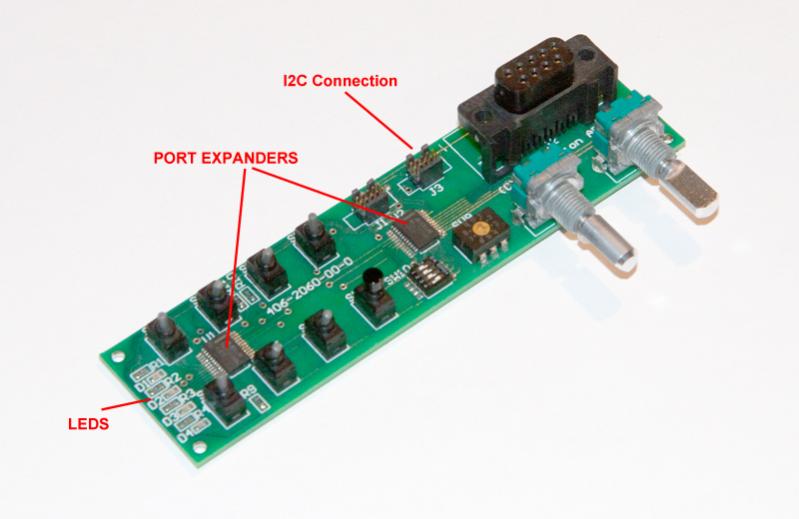
The only thing I had laying around for this example was a small switch board with a MAX7311 I2C port expander on it (actually two but only one was used in the code). This particular part adds 16 digital inputs or outputs for controlling switches, leds and anything else needing a single bit control port (it cannot be used for quad encoders or sonars). The datasheet for this part can be seen here.

Picture of my test board.
[ATTACH]7656[/ATTACH]

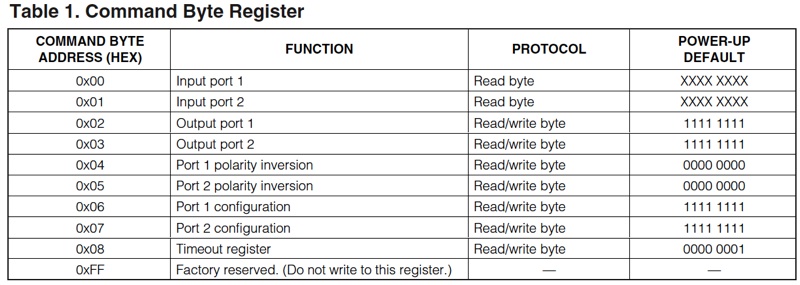
The part of the datasheet most relevant to this post is table 1.
[ATTACH]7655[/ATTACH]

This shows the internal registers, the general case for most I2C commands will be to send a register address followed by a read or write transaction. You can read the datasheet for details on the protocol and may also wish to refer to my previous explanation of the I2C bus.

https://vexforum.com/showpost.php?p=327819&postcount=1

In normal operation, ConVEX initializes the I2C bus and then starts a task polling the IMEs. This is done from the main initialization function which is called vexCortexInit and is in the vexcortex.c file, the init code looks like this.

    // Init I2C bus
    i2cInit();
    // Init IMEs
    vexImeInit( &I2CD1, (vexStream *)SD_CONSOLE );

The variable called I2CD1 is a structure with details about the I2C port on the cortex, this is passed to the IME code which stores it in a variable for later use but we can use it directly. The IME initialization function sets the I2C bus speed at 100KHz and then starts the poll task. For this example, I decided to let the normal initialization occur and then terminate the IME task in the user code. This is not really part of the I2C control but I show it here for completeness.

/*-----------------------------------------------------------------------------*/
/** @brief      User setup                                                     */
/*-----------------------------------------------------------------------------*/
/** @details
 *  The digital and motor ports can (should) be configured here.
 */
void
vexUserSetup()
{
    Thread *tp;

    vexDigitalConfigure( dConfig, DIG_CONFIG_SIZE( dConfig ) );
    vexMotorConfigure( mConfig, MOT_CONFIG_SIZE( mConfig ) );

    // find IME task
    tp = chRegFirstThread();
    do
        {
        if( !strcmp( tp->p_name, "ime" ) )
            break;

        tp = chRegNextThread(tp);
        } while (tp != NULL);

    // If we found the ime thread then terminate it
    if( tp != NULL )
        {
        // terminate the IME task
        chThdTerminate(tp);
        chThdWait(tp);
        vex_printf("IME thread terminated\r\n");
        }

    // We have some input and some output ports on the port expander
    // so call a setup function
    I2CPortExpanderSetup();
}

What I’m doing here is searching through all the current threads looking for a thread with the name of “ime”, when I find that thread I’m sending a terminate message to it and then waiting for termination. The IME task is able to receive this message (well, it’s not really a message but you get the idea) and terminates itself.

Once the IME task is terminated we can have exclusive access to the I2C bus without any other interference (I need to check on whether I2C control is thread safe, will deal with that in another post). The general form of an I2C transaction will look like the function below, this one reads from the port expander.

msg_t
I2CPortExpanderPoll( uint8_t device, uint8_t *buf )
{
    msg_t status = RDY_OK;
    i2cflags_t errors = 0;
    uint8_t txbuf = 0x00; // read from register 0

    // acquire bus
    i2cAcquireBus(&I2CD1);
    // send 1 byte and then read 2 bytes from the port expander
    status = i2cMasterTransmitTimeout(&I2CD1, device>>1, &txbuf, 1, buf, 2, MS2ST(4));
    // release bus
    i2cReleaseBus(&I2CD1);

    // Ignore status for now in this demo
    if (status != RDY_OK){
	errors = i2cGetErrors(&I2CD1);
	}

    return(status);
}

i2cMasterTransmitTimeout is the function that does most of the work, this sends bytes to the I2C device and then reads a response if necessary. For devices that do not need to be sent any bytes before reading the i2cMasterReceiveTimeout function can be used.

The above function is used to read two bytes from the port expander registers 0 and 1. A single byte containing the starting register is sent, two bytes are then received.

Similar functions are used for other purposes. Here is the setup function that configures the port expander so that bits 12 through 15 are outputs (see the datasheet on the port expander for more details)


#define	PORT_EXP_ADDR	0x4C

msg_t
I2CPortExpanderSetup()
{
    msg_t status = RDY_OK;
    i2cflags_t errors = 0;

    // two bytes sent to port expander starting at register 6
    uint8_t txbuf[3] = { 0x06, 0x0F, 0xFF };

    // acquire bus
    i2cAcquireBus(&I2CD1);
    // send 3 bytes
    status = i2cMasterTransmitTimeout(&I2CD1, PORT_EXP_ADDR>>1, txbuf, 3, NULL, 0, MS2ST(4));
    // release bus
    i2cReleaseBus(&I2CD1);

    // Ignore status for now in this demo
    if (status != RDY_OK){
	errors = i2cGetErrors(&I2CD1);
	}
}

This function sends two bytes to the port expander registers 6 and 7, it does not read anything.

The final function I used was for writing to the port expander output bits to turn on and off some leds. I used this function to write two bytes to port expander registers 2 and 3 (the data was also inverted as 0 turns the led on).

msg_t
I2CPortExpanderLeds( uint8_t device, uint8_t data )
{
    msg_t status = RDY_OK;
    i2cflags_t errors = 0;

    // two bytes sent to port expander starting at register 2
    uint8_t txbuf[3] = { 0x02, 0xFF, 0xFF };

    txbuf[1] = ~data;

    // acquire bus
    i2cAcquireBus(&I2CD1);
    // send 3 bytes
    status = i2cMasterTransmitTimeout(&I2CD1, PORT_EXP_ADDR>>1, txbuf, 3, NULL, 0, MS2ST(4));
    // release bus
    i2cReleaseBus(&I2CD1);

    // Ignore status for now in this demo
    if (status != RDY_OK){
	errors = i2cGetErrors(&I2CD1);
	}
}

Here is the user code that was polling for input switches and flashing the leds.

msg_t
vexOperator( void *arg )
{
    uint8_t     port_data[8];
    uint8_t     led_data = 0x10;

    (void)arg;

    // Must call this
    vexTaskRegister("operator");

    // Run until asked to terminate
    while(!chThdShouldTerminate())
        {
        // status on LCD of input ports
        vexLcdPrintf( VEX_LCD_DISPLAY_2, VEX_LCD_LINE_1, "%4.2fV   %8.1f", vexSpiGetMainBattery() / 1000.0, chTimeNow() / 1000.0 );
        vexLcdPrintf( VEX_LCD_DISPLAY_2, VEX_LCD_LINE_2, "%2X %2X ", port_data[0], port_data[1] );

        // get status from the I2C port expander
        I2CPortExpanderPoll( PORT_EXP_ADDR, port_data );

        // Flash leds for fun
        I2CPortExpanderLeds( PORT_EXP_ADDR, led_data );
        if((led_data <<= 1)==0)
           led_data = 0x10;

        // Don't hog cpu
        vexSleep( 25 );
        }

    return (msg_t)0;
}

So there’s not much point in posting the complete example as the code is dependent on my switch board which you don’t have. However, I hope it gives you a sense of how easy it is to communicate with an I2C device. Read up on the I2C functions on the chibiOS documentation page here;
http://chibios.sourceforge.net/docs/kernel_hal_rm/group___i2_c.html#ga57039ea5e6f70691b667a14248618967

Also look at vexime.c to see how I was communicating with the IMEs.


**Adding a non-VEX I2C device - follow up
**

I wrote last nights post in a bit of a hurry and left a few loose ends.

1. Are the I2C functions thread safe?
Yes, if you use the two functions


i2cAcquireBus(&I2CD1);

and


i2cReleaseBus(&I2CD1);

i2cAcquireBus and i2cReleaseBus allow exclusive access to the I2C bus using a mutex. Here is the documentation for these functions. (I2C_USE_MUTUAL_EXCLUSION is enabled in ConVEX)

void i2cAcquireBus(I2CDriver *i2cp)

/**
 * @brief   Gains exclusive access to the I2C bus.
 * @details This function tries to gain ownership to the I2C bus, if the bus
 *          is already being used then the invoking thread is queued.
 * @pre     In order to use this function the option @p I2C_USE_MUTUAL_EXCLUSION
 *          must be enabled.
 *
 * @param[in] i2cp      pointer to the @p I2CDriver object
 *
 * @api
 */

void i2cReleaseBus(I2CDriver *i2cp)

/**
 * @brief   Releases exclusive access to the I2C bus.
 * @pre     In order to use this function the option @p I2C_USE_MUTUAL_EXCLUSION
 *          must be enabled.
 *
 * @param[in] i2cp      pointer to the @p I2CDriver object
 *
 * @api
 */

These are used by the IME code and also the code I was posting yesterday. Surround any other I2C bus transactions with these two functions.

2. Do I really have to kill the IME task?
No, it’s really quite safe to leave it running. If you have no IMEs connected then every 10mS the IME task will try and discover them by sending one I2C message. This will possibly cause your thread to be queued for a few hundred micro seconds every time the message is sent if you also try and use the I2C bus at that time.

3. How do I use IMEs and third party sensors?
There are two problems to overcome when doing this. Firstly, make sure that the I2C address of the third party device is different from any of the IMEs. By default the IMEs have an address of 0x60, when they are discovered they will be assigned addresses starting at 0x20 and incrementing by 2 (remember that the lsb of an address means read or write). Secondly, because the IMEs are daisy chained together and use auto discovery, each IME has the ability to terminate the bus and disable it’s output port. The normal operation of the IME code is to leave the last IME in the chain terminated, this needs to be disabled so as to allow devices connected after the last IME to be addressed. The following code placed in vexUserInit will accomplish that. This code also initializes the port expander I was using for test yesterday, this now has to be done after the bus is unterminated, it needs to be done in vexUserInit rather than vexUserSetup so as to give the IME task time to detect them all before this is run. In extreme cases a small delay may be necessary at the beginning of this function, that’s hard for me to test, it’s only a maybe.

/*-----------------------------------------------------------------------------*/
/** @brief      User initialize                                                */
/*-----------------------------------------------------------------------------*/
/** @details
 *  This function is called after all setup is complete and communication has
 *  been established with the master processor.
 *  Start other tasks and initialize user variables here
 */
void
vexUserInit()
{
    // If we have IMEs then disable termination on the last one
    // in the chain.
    if( vexImeGetChannelMax() > 0 )
        {
        // Get pointer to the data structure for the last ime.
        // ime channels are 0 based so deduct 1 from the total number of imes
        imeData *ime = vexImeGetPtr( vexImeGetChannelMax()-1 );
        // If we have a valid pointer then disable termination
        // this allows more non vex devices to be used at the end of the
        // chain.
        if(ime != NULL)
            vexIMEDisableTermination( ime->address );
        }

    // We have some input and output ports on the port expander
    // so call a setup function now we can access it
    I2CPortExpanderSetup();
}

Jpearman,

I’m trying to figure out the creation of custom commands through the terminal and I’m at a loss as to how to prompt for user input after the command has been issued.

Could you possibly write an example demonstrating the use of most of the features? A pretty simple one I just came up with is called with “mean #” where # is the number of numbers to ask for. Then it prompts the user for that many numbers and finds the mean of them:

ch> mean 5
Number 1: 10
Number 2: 12
Number 3: 11
Number 4: 15
Number 5: 22
Mean: 14
ch>

I tried looking through some of the included code and the closest I found fr recieving input from the user was within Apollo which just recognizes that any key was pressed and then within vexshell.c but most of that code is lost on me.

So if you could provide such an example it would be super helpful to myself and I’m sure also others who may be trying to do the same.

Thanks!
~Dan

I will put something together later, the command handler is going to have to block and wait for more input, but if that’s what you want then life is good.

That is indeed what I want - to be able to continue to receive input from within a function until I return from that function, at which point vexshell takes over again.

Glad to hear that life is g:cool::cool:d!

This should do what you want.

In the file main.c

Add the new command “mean” as so.

// Shell command
static const ShellCommand commands] = {
  {"adc",     vexAdcDebug },
  {"spi",     vexSpiDebug },
  {"motor",   vexMotorDebug},
  {"lcd",     vexLcdDebug},
  {"enc",     vexEncoderDebug},
  {"son",     vexSonarDebug},
  {"ime",     vexIMEDebug},
  {"test",    vexTestDebug},
  {"mean",    cmd_mean},
  {NULL, NULL}
};

Then earlier in the file add this function (or in another source file but then you need a prototype declared somewhere as well as adding to the makefile).

static void
cmd_mean( vexStream *chp, int argc, char *argv])
{
    // make these static as we have limited stack
    static  char line[SHELL_MAX_LINE_LENGTH]; // maximum line length
    static  long numbers[16];                 // this is a demo so we just save the numbers

    int  n, i;
    long mean;

    // number of lines to read is passed as argument
    if (argc > 0 )
        {
        // get number
        n = strtol( argv[0], NULL, 10 );

        // bounds check n
        if(n > 16)
            {
            chprintf(chp, "N too large\r\n");
            return;
            }

        // loop n times
        for(i=0;i<n;i++)
            {
            // we are using chprintf due to small bug(perhaps) in vex_printf when used on the shell
            // I will sort that later
            chprintf(chp, "Number %d: ", i);

            // get line of input
            if (shellGetLine(chp, line, sizeof(line)))
                {
                // <CTRL>D aborts
                chprintf(chp, "\r\naborted\r\n");
                return;
                }

            // we will assume simple case and a correct number is entered
            numbers* = strtol(line, NULL, 10);
            }

        // calculate mean
        for(i=0, mean=0;i<n;i++)
            mean += numbers*;
        mean /= n;

        // display
        chprintf(chp, "Mean %ld\r\n",mean);
        }
}

shellGetLine is used to get input, this is not a thread safe function (to reduce stack needs) presently but is ok to call from here as we are in the shell thread anyway. CTRL-D is used to abort input. I’m using chprintf as opposed to vex_printf as entering numbers too quickly seems to have exposed a bug in vex_printf which I need to look into (basically vex_printf is writing directly to the serial port when it should have been writing to a stream, an issue I think that was made worse when I ported to ChiciOS 2.6.0). Don’t worry about that, I wrote vex_printf as the older version of chprintf (from ChibiOS 2.4.3) did not handle floats which it does now.

Actually no bug in vex_printf, although I do need to revise the line of code that outputs to the serial port to be consistent with other code. It’s just a stack problem, vex_printf uses more stack that chprintf. If you want to do more processing inside this thread it would be worth increasing the stack to perhaps 512 or 1024 bytes. Change this line of code in main as follows to increase from default 256 bytes to 512.

#define SHELL_WA_SIZE   THD_WA_SIZE(512)

Edit:
One more thing, add “stdlib.h” to main.c so strtol doesn’t throw warnings.**