from the command prompt, change into the project/bin directory. There are a number of files there, output.dmp and output.lst will show lots of useful info about memory usage.
Also, from the command line use the size command, this will show your program usage, for example.
$arm-none-eabi-size output.elf
   text	   data	    bss	    dec	    hex	filename
  35188	   2184	   8740	  46112	   b420	output.elf
PROS uses this in the makefile every time you compile, you could add it to the ConVEX makefile if you wanted.
I assume lots of data in flash as static variables.
Yes, I’ve never pushed that to the limit to see what happens but as far as I can tell that’s free RAM.
I pushed a couple of changes to the git archive.
Improved version of vex_printf that is now completely thread safe and also somewhat optimized. The old version was ok but based on someone else’s code and had some static buffers, you had to try really hard to cause problems when using vex_printf (or vex_sprintf) from more than one thread, but it was possible for the static buffer to be overwritten. Anyway, added mutex so that it’s completely thread safe and also separated vex_sprintf and vex_printf for optimum performance.
Increased the size of the shell thread stack in a couple of the examples to 512 bytes, 256 was near the limit.
Increased the stack size for the IME task, it was working fine but I added a bit more in case anyone adds code in that task.
bumped version to 1.0.1
For other people’s reference, according to this, flash consumption is text+data and ram usage is data+bss
Well it’s a few static variables that get updated regularly based on stored values in code. Kind of a kludge since we can’t store files (easily).
It appears that if at any point the code could exceed the maximum amount of RAM then the compiler complains saying “region ‘flash’ overflowed by x bytes”
Which is why an RTOS that statically allocates memory for tasks and avoids using dynamic memory allocation is better suited for embedded systems.
I pushed a small update that adds compatibility with ChibiOS V2.6.1 (which just removes a couple of warnings due to additional fields in an initialized data structure).
I also added code to the shell “mem” command that shows how much flash was used by the program. You can update vex_shell manually if you want by changing the mem command function as follows (new code in red).
[FONT="Fixedsys"]/*-----------------------------------------------------------------------------*/
// external symbols used to calculate flash usage
#define SYMVAL(sym) (uint32_t)(((uint8_t *)&(sym)) - ((uint8_t *)0))

extern uint32_t _textdata;
extern uint32_t _data;
extern uint32_t _edata;

static void
cmd_mem(vexStream *chp, int argc, char *argv])
{
    size_t n, size;
    uint32_t flash;

    (void)argv;
    if (argc > 0)
        {
        chprintf(chp, "Usage: mem\r\n");
        return;
        }

    n = chHeapStatus(NULL, &size);
    chprintf(chp, "core free memory : %u bytes\r\n", chCoreStatus());
    chprintf(chp, "heap fragments   : %u\r\n", n);
    chprintf(chp, "heap free total  : %u bytes\r\n", size);

    flash = (SYMVAL(_textdata) - 0x08000000) + (SYMVAL(_edata) - SYMVAL(_data));
    chprintf(chp, "flash used       : %lu (0x%05X) bytes\r\n", flash, flash);
}[/FONT]
**Debugging
**
Debugging either PROS or ConVEX code is hard, the only real facility is the use of the vex_printf (or printf in PROS) function to send useful information to the console. There are ways to debug directly on the cortex, however, this involves opening it up and connecting to undocumented ports that are best left secret.
When I was developing ConVEX, I used another evaluation board with a micro-controller from the same family as the SM32F103 used in the cortex. The version I used had less flash and RAM but still enough for most of the development. The specific board I used was from a company called Olimex called the STM32-P103 and looks like this.
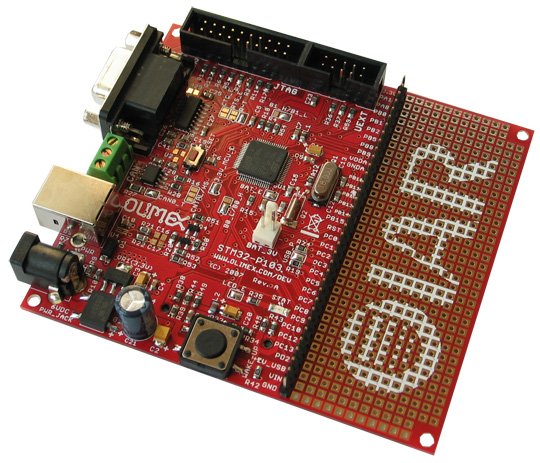
It can be purchased from digikey and other places for about $34.
http://www.digikey.com/product-search/en?mpart=STM32-P103&vendor=1188
In addition to the eval board a JTAG debugging probe is needed. I used the ST-Link/V2 from ST micro, also available from digikey for $21.
http://www.digikey.com/product-search/en?vendor=0&keywords=stlink
The STlink connects to the STM32-P103 using a supplied cable and to the PC with USB (I’ve only used this under windows for various reasons). The software driver I eventually settled on using is called OpenOCD, it’s supposed to be compatible with Linux and OSX in addition to Windows but I cannot guarantee that it will work.
So for about $60 you can now single step through code, set breakpoints, view registers and all the other good things that a debugger will give you. Obviously the Olimex board is different from the VEX cortex so not all functionality is available. You will not be driving motors or communicating with the joystick, however, if you just want to play with embedded development and perhaps develop standalone C libraries that could be linked with PROS or ConVEX then this may be one solution.
There are many other similar eval boards and alternative JTAG probes on the market, however, these are the ones I used and there is a board support file included in ConVEX that maps the IO in a useful way.
In vexgyro.c ( https://github.com/jpearman/convex/blob/master/convex/cortex/opt/vexgyro.c ) on lines 99 and 118 you are setting digital port 1 on and off. Shouldn’t this be removed and perhaps optionally enabled via a debug parameter? I assume it’s just for a debug LED - correct me if I’m wrong.
You are correct, an oversight on my part. I often toggle pins like this so I can see how much bandwidth a thread or calculation is using. vexgyro was pretty much the last thing I wrote before releasing ConVEX. I decided that it would not be part of the core firmware as I wasn’t that happy with the implementation and wanted to improve on it at some point. Anyway, no excuse, they should not be there. I pushed an update to github. Thanks for finding that.
I’m going to push another update out later tonight unless I find issues over the next couple of hours. This update improves thread handling using the robotc_glue functions StartTask and StopTask. Lets do a quick recap of how threads work in ConVEX and ChibiOS.
Threads can be started in several ways.
1. Static threads
An area of memory is statically declared that is used for the thread internal structures and stack as follows (an example from the gyro code).
static WORKING_AREA(waVexGyroTask, USER_TASK_STACK_SIZE);
A callback function is declared as follows.
static msg_t
vexGyroTask(void *arg)
{
    while(!chThdShouldTerminate())
        {
        // Thread code

        chThdSleepMilliseconds(1);
        }

    return( (msg_t) 0);
}
The thread is then started as follows.
chThdCreateStatic(waVexGyroTask, sizeof(waVexGyroTask), USER_THREAD_PRIORITY, vexGyroTask, NULL);
This type of thread cannot easily be stopped by the competition monitor control unless the thread choses to register itself with the monitoring code and uses vexSleep in place of the built in sleep functions. A modified version of the above function that plays nice with ConVEX would be.
static msg_t
vexGyroTask(void *arg)
{
    vexTaskRegister("gyro");

    while(!chThdShouldTerminate())
        {
        // Thread code

        vexSleep(1);
        }

    return( (msg_t) 0);
}
The process of registering allows the thread to accept an event that the competition control sends when going into the disabled state. vexSleep waits for the terminate event as well as implementing a timeout of the requested sleep time.
**2. Dynamic threads
**
The memory for a thread can also be allocated from the heap (or using memory pools but I’m not covering those here). The thread callback function is declared in the same way but instead of a static memory buffer being used the thread is started in the following way.
chThdCreateFromHeap(NULL, THD_WA_SIZE(USER_TASK_STACK_SIZE), priority, vexGyroTask, NULL );
The advantage of a dynamic thread is that memory is not allocated at compile time. If a thread is not used it will not consume any memory.
The disadvantage of a dynamic thread is that memory is not allocated at compile time. If memory is not available then the thread cannot be run.
So most of the system threads in ConVEX use static memory, they need to run and memory is allocated at compile time. The only thread that uses dynamic memory allocation is the one that handles audio output, we don’t use sound much so it allocates memory when the first sound is played.
**3. ROBOTC threads.
**
I added the glue code that gives a ROBOTC style of thread to simplify porting existing ROBOTC code to ConVEX. It was mostly for my own convenience as I didn’t want to have to rewrite everything from my old libraries. A ROBOTC thread uses the same type of function as a regular ChibiOS thread but is started using a single call, for example.
StartTask( vexGyroTask );
ROBOTC threads use dynamic memory with (currently) a user stack of 512 bytes.
There are a couple of problems with the existing implementation.
- You still need to register the thread if you want competition control to automatically stop it for you.
- Using StopTask can be an issue if the thread does not check for termination using the chThdShouldTerminate() function.
So to improve this I have slightly reworked the robotc glue code in a couple of ways.
- A ROBOTC thread is now automatically registered with competition control
- StopTask will now terminate ROBOTC threads if chThdShouldTerminate() is not used in the main while loop
- Calling StopTask from the thread being stopped does not cause issues
- Calling StartThread more than once with the same callback function does not create the thread several times.
A ROBOTC thread is now given a generic name as part of the automatic registration process, however, you can modify this by registering the thread in the existing way.
A ROBOTC thread can now be simplified and written as follows (using the gyro thread as an example again). This makes porting even easier as forgetting to add the registration step does not cause the thread to run when the robot is disabled (unless you want it to :), that’s another topic).
task
vexGyroTask(void *arg)
{
    while(TRUE)
        {
        // Thread code

        wait1Msec(1);
        }

    return( (msg_t) 0);
}
wait1Msec is/was defined to be the same as vexSleep. For now I’m leaving the requirement to return a “msg_t” from this function and also accept the void pointer as an argument, may remove that later but I wanted to keep compatibility with this round of changes.
Thanks for this! The new way definitely makes task handling less cumbersome while affording flexibility if it’s needed.
On an unrelated note, is there currently a built in way in the smart motor library to disable current limiting on a single motor other than removing the encoder from the vexMotorCfg array?
This applies if current monitoring is enabled with SmartMotorCurrentMonitorEnable(); For disabling if using PTC temperatures see the next post.
Sure, same for both the ROBOTC and ConVEX versions, just set the current limit for that individual motor to an unreasonably high value. For example, set limit on motor 1 to 100 Amps.
SmartMotorSetLimitCurent( kVexMotor_1, 100.0 );
The calculated current for that motor will never be that high (will not be over the current for motor stall which is 4.8A on a 393) so the current limit will never trip. You may also wish to just set the current to a more reasonable value for you application, say 2.0A.
SmartMotorSetLimitCurent( kVexMotor_1, 2.0 );
Some background those that care to read it.
The SmartMotorSetLimitCurent function sets a variable in the smart motor data structure, the library function looks like this.
/*-----------------------------------------------------------------------------*/
/** @brief      Set Motor current limit                                        */
/** @param[in]  index The motor index                                          */
/** @param[in]  current The maximum motor current                              */
/*-----------------------------------------------------------------------------*/
/** @note
 *  Do not use this function directly, instead use the macro
 *  SmartMotorSetLimitCurent which allows a default value for current of 1.0A
 */
void
//SmartMotorSetLimitCurent( tVexMotor index, float current = 1.0 )
_SmartMotorSetLimitCurent( tVexMotor index, float current, ... )
{
    // bounds check index
    if((index < 0) || (index >= kVexMotorNum))
        return;

    sMotors index ].limit_current = current;
}
To keep backwards compatibility with the ROBOTC version a macro is used to call this, this allows a default value of 1.0A to be used if the current parameter is not supplied, this is the macro.
#define          SmartMotorSetLimitCurent(index, ... ) \
                 _SmartMotorSetLimitCurent( index, ##__VA_ARGS__, 1.0 )
Lookup variable args in macros to understand what ##VA_ARGS is all about.
And here is the code that checks to see if motor current is above the limit.
/*-----------------------------------------------------------------------------*/
/** @brief      Monitor Motor Current                                          */
/** @param[in]  m Pointer to smartMotor structure                              */
/** @param[in]  v_battery The battery voltage in volts                         */
/** @warning    Internal smartMotorLibrary function, do not call, ref only     */
/*-----------------------------------------------------------------------------*/

void
SmartMotorMonitorCurrent( smartMotor *m, float v_battery )
{
    m->target_current = m->limit_current;

    // The way this is setup is that if the limit is tripped you
    // will probably need to back off the controls or allow the motor to speed up
    // before the limit is cancelled.  This is to stop oscilation.
    // The 0.9 below controls this behavior.
    if( !m->limit_tripped ) {
        if( fabs(m->filtered_current) > m->target_current )
            m->limit_tripped = TRUE;
    }
    else {
        if( fabs(m->filtered_current) < (m->target_current * 0.9) )
            m->limit_tripped = FALSE;
    }

    if( m->limit_tripped )
        // maximum cmd value
        m->limit_cmd = SmartMotorSafeCommand( m, v_battery);
    else
        m->limit_cmd = SMLIB_MOTOR_MAX_CMD_UNDEFINED;
}
Disabling a motor from being used by the smart motor library when in PTC monitoring mode is a little more difficult. The trip temperature for the PTC is a constant in the library, the best way is to probably just disable that motor from being used in any calculations. You can do this by getting a pointer to the smartMotor data structure for that motor and then setting the type to undefined.
smartMotor *s = SmartMotorGetPtr( kVexMotor_1 );
s->type = kVexMotorUndefined;
This should also stop it being used in the current calculation for the cortex as well.
Obviously do this after the smart motor library has been initialized but before calling SmartMotorRun();
I pushed another small update, this bumps the ConVEX firmware version to 1.0.2
Added team name functionality, new function is
void vexSpiTeamnameSet( char *name );
and also aliased as
#define vexTeamnameSet(name) vexSpiTeamnameSet( name )
You can use this in the code prior to initialization in main() as follows.
    ...

    // Init the serial port associated with the console
    vexConsoleInit();

    // Set the team name
    vexTeamnameSet("TEAM8888");

    // init VEX
    vexCortexInit();

    ...
This does change the initial SPI communications handshake with the master processor, hopefully I did not introduce any bugs. Anyway, I had skipped this before as it did not seem necessary but this makes ConVEX work the same way as EasyC and ROBOTC, the team name would be displayed, for example, in the ROBOTC software inspection window. The default team name is "CONVEX ". It really is sort of useless but now it’s included.
Added checksum verification to LCD display reply messages.
Small changes to banner and info display in vex_shell.c to display ConVEX firmware version.
Is there any way I could simulate competition control using a command (ie ‘ch> auton’)? I realize I could just start the thread myself but how could I simulate ending all the old threads the same way it will behave with a competition switch?
There are ways to simulate competition control, flashing leds and all, not sure if I want to add that functionality though.
We could add an override for the competition control state read from the joystick if you just want a way to test, game led would not flash in this case, let me have a think about the best way to incorporate this.
Any reason you cannot just use a competition switch?
I’m writing a gui for controlling the cortex which uses the serial communication as the backend and I was hoping to have buttons in it for activating the different modes.
The flashing leds don’t really matter to me I really just want it for convenience during testing so I don’t have to have one more part. If something like this would require significant restructuring then please don’t bother, I just supposed that you may have had something in the backend that I couldn’t find.
Could an override work just by having some extra variable and if it’s set to 0 then use the real competition and 1, 2, and 3 could be disable, driver, auton?
If you have control of the serial port using your own GUI, then there are commands that may be sent that do not go to the user processor but are either picked up by the serial programming kit or the master processor. There are several commands for querying the status of the cortex, these all start 0xc9 0x36 0xB8 0x47 followed by a command byte. I was hoping I had notes indicating that one of these could also control competition modes, however, if one does then I lost that information.
What we usually do is play with the RTS line of the serial port and send a special command sequence that is picked up by the programming adapter, this is what ROBOTC and EasyC do, and also the code I released last year (vexcon). The sequence is as follows.
Edit: Daniel, I sent you a PM with this instead. Decided not to make this public, I may have in the past but for now nobody really needs to know this.
No, nothing hidden in ConVEX and I’ve decided that for now the “special” control I mentioned will not be implemented.
This, however, can be done, just not tonight. I need to think of a reasonable way to do this that is well integrated, there’s more than one place that comp control could be overridden (and to clarify, it would be no different than using a different competition template in ROBOTC, nothing that would affect the integrity of field control).
Thanks - it worked perfectly!! I’ll release the project when I’m done but it’s still got some work to go.
Well I’m impressed that you were able to use that information and get something working in one day, well done. I checked the forums and I did release that information before, it was well over two years ago and buried in the middle of a long thread, it was hard to find but it is out there. I may repost sometime.
I will add some functionality to allow ConVEX to run the auton or driver control tasks for debugging, I’ve decided how to do this, it will only work if a competition switch is not connected. It will also help clean up the code when I’m running on the Olimex debug board I talked about a couple of weeks ago so it’s worth doing (and really quite simple anyway).
Btw, what language and IDE are you using to develop your GUI?