Another question, will the “active field” functionality be able to be disabled for smaller events? At an average 24-32 team event in AZ we aren’t usually struggling for competition channels, so we wouldn’t be getting much benefit from that behavior.
3 Likes
@Foster that is totally up to you. Both the legacy and new smart field control will be valid for next year. I will say that the plan for VEX is to move forward with the smart field controllers and eventually stop producing the legacy field control components at some point in the future. I don’t see that we will make the legacy field control illegal for competitions to use any time soon. But, future revisions of the VRC control system will most likely not support the legacy system.
As for hardware, you will need 1 Field control brain per field. You will have to connect the field control brain to your TM Rpi or your TM laptop via USB if you are using TM. If you are not using TM to run your fields you can use the interface on the V5 Field controller screen.
We will be selling a kit that will have the brain, power adapter and long (~8m) smart cables in the future (whenever we can get parts to build them). We will also be selling those parts individually if you have your own brain to use and only need the power adapter or cables.
15 Likes
Is this the final GUI layout for the field brain? It seems somewhat strange to me to have robots on the same alliance be plugged into opposite corners of the brain rather than the same end or same side.
11 Likes
So no tower controller, just two cables that come back to the brain from each alliance driver area?
Will we still use the metal towers to help with cable management?
Yes, for now, because of this.
(from Event Partner Summit 2020 Day One)
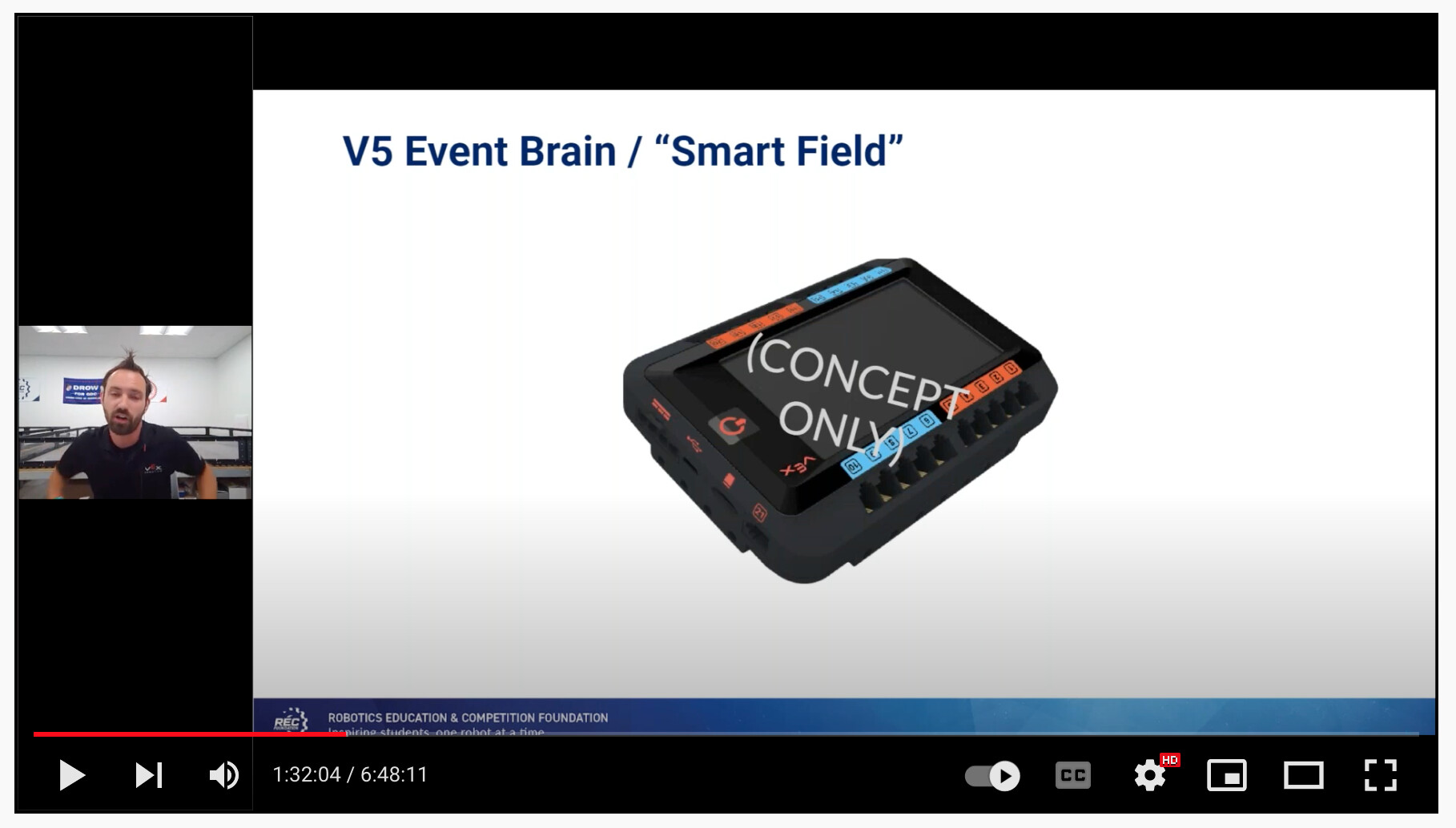
If the “concept” changes, so will the UI.
10 Likes
I’d be good without the metal towers…a dozen of them gets mighty heavy in our case, and they are a pain: too floppy when attached to a field wall on the floor, a pain to zip-tie to the field when on a riser. Depending on how it shakes out, I’d probably make/use a bracket that attaches to the outside of the field wall to hold the brain, and maybe some clips to “hang up” the cables between matches.
7 Likes
If you want to use the metal towers you can. The brain can mount directly to the towers. We are also looking to build a bracket to mount the brain on the field parameter as well.
6 Likes
Most information, including a match clock, was already being sent back from the controller to the brain for the last couple of vexos versions, it was just generated locally inside the controller. The match clock is used to synchronize the timer display on controller and brain.
We do send a few new things from the FC that were not available before.
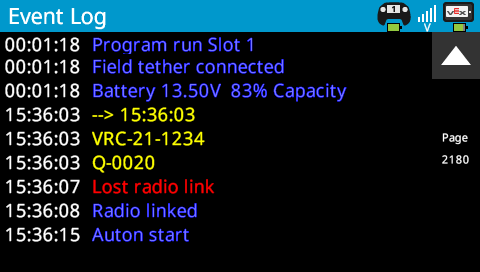
When using TM, we can synchronize the internal time for the FC (field controller) and robot with actual time. We use that so any log entries now have a real absolute time stamp rather than just relative from when the robot was turned on. We can also send event and match information to the robot brain, this is added to the log and can help with debugging, it will make it far easier to see if a robot had issues during a match, for example, did a motor become disconnected.
Here’s a screen shot from yesterday, clock was to to 4:01pm and qualification match 15 was run.
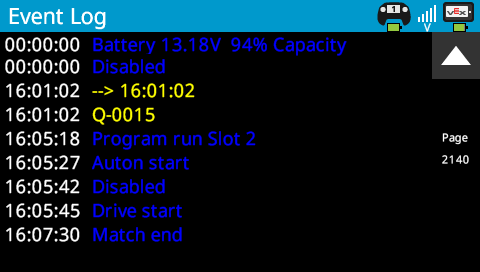
More information is being sent back to TM than is being sent to the robots. We can detect not only that the controller has received the match control information, but that it has also been sent over to the robot brain and received, there should be no more doubt about whether a robot was enabled by field control.
We verify the robot is running correct firmware, that the radio is set correctly and which program is running on the robot.
As the GDC would say, No.
yes, TM will currently allow matches to be run even if it detects connection errors.
Yes.
10 Likes
Will the New Field Control brain be a new packaging? If so, will you change the interface to USB-C which is more robust - EPs generally don’t want accidental breakage.
If it is a new package, hopefully the CAD can be released sooner so we can make mounting cases for the brain and pi for field mount.
10 Likes
I agree, that Micro USB will not hold up in this application. Out of all the USB variations. Micro has proven itself to be the worst.
Will the power adapter be available separately? It seems like it could be a very helpful thing for teams testing parts of a robot without needing to cycle batteries…
8 Likes
If it doesn’t get changed, I’ll be permanently attaching these to the field control brain (probably with epoxy or something, so “helpful” volunteers don’t pull it out during tear-down): Micro USB Male to USB A Female Adapter for VEX Robotics V5 - Robosource.net
5 Likes
But the power adapter will only be sufficient to power the brain and controllers plugged into it. You will not have enough power for motors, so it could be useful when just programming, but it will not run a full robot.
8 Likes
Understood. Unfortunate but makes sense.
2 Likes
The Field Control brain will be the exact same packaging as the current V5 brain. We are not planning on any other changes other than the pad printing at this point.
1 Like
It’s worth nothing that the new portable perimeter doesn’t appear to have a way of mounting the metal field towers, so maybe vex is planning on phasing them out? I know here in AZ we mostly just taped the driver interface to the field perimeter, as the metal towers had the potential to cause interference with attempts to climb the platform this year, and overall seem to be more trouble than they are worth.
Is there any way this could change? For instance, it seems to me like it would be quite useful to access the match time in user code to e.g. rumble the controller once the 15 second mark is reached.
11 Likes
I guess it could, but I have no plans for that. The match timer is just a display number. When not using field control (of any type) it counts up until the program is stopped. In match mode, it counts down. It’s sort of trivial to create a timer in user code that starts at the beginning of the driver or autonomous part of a match and triggers something at any desired preset time.
8 Likes
You just have to have a separate operation running in the background that starts when driver control starts, all I had to do was count up instead of counting down and play a rumble at that time.
5 Likes
Out of curiosity, is there enough of the data being sent back and forth that will help identify white screen conditions? Or even enough data that would help identify conditions that could lead to fixes for some white screen conditions?
1 Like
The only thing that field control will know is that the controller has lost radio connection with the brain, there’s no way to distinguish that from say a radio cable being removed from the brain.
I still believe that white screen is caused by an intermittent battery situation, an issue with either brain, battery or cable connectors being damaged, loose or not properly seated (based on my tests and anecdotal evidence, there may be other causes). It’s hard to actually distinguish this from a battery shutting down due to low voltage or a complete disconnection from the point of view of the FC.
We do have status of the robot battery capacity, but we have decided for the time being not to show low battery as an error on the TM field queue display, it’s difficult to set an exact threshold for where there’s not enough battery capacity to run the robot for the match.
Battery capacity and voltage is logged at the beginning of every match in the student robot, it’s been that way for a while.
I would also say that at the last in person worlds in 2019 where V5 was used, I don’t remember white screen being an issue, perhaps one or two instances throughout the event that were brought to the attention of tech support.
9 Likes