Is the power source the v5 battery or something else?
usually the 5V power from the 3 wire port (so indirectly from the battery).
Given R9e
Internal power sources (e.g., for a small blinking light) are permitted, provided that no other rules are violated and this source only provides power to the non-functional decoration (i.e., does not directly or indirectly influence any functional portions of the Robot).
You could hook up an external power source if your robot’s battery is being drained too fast. Most WS2812B strips from Ali Express come with 2 extra wires for inputting power. These are designed for use when daisy chaining many strips but could be used for this purpose.
I’m not an electrical expert so I would seek advice before hooking up an external batter to something your expensive robot brain is also attached to.
Hope this helps. 
I would highly advise not connecting batter to your robot brain, leave the batter in the kitchen.
I connect batter to my brain all the time.
How else was I supposed to make a pancake bot last season?
What diode did you use? It makes sense I’ve just gotta check my shop to see if I have them.
I don’t remember what specific diodes I used, but you should still use a logic level shifter if you can. It was one of the rectifier diodes from this though. Amazon.com: Chanzon 200pcs Diode Assorted Kit (1N4001 1N4004 1N4007 RL207 1N5404 1N5406 1N5408 UF4007 FR107 FR207 1N5817 1N5819 1N5822 1N4148) Fast Switching/Schottky/Rectifier Electronic Assortment 14 Values : Industrial & Scientific
We ended up having our wires wrong so that was the problem, no diode needed
Hello, I was referred to this post for using LEDs with the v5 system. However, when I try to run the program, I get a “Memory Permission Error ! 034146DC” One thing I’m considering is that I might need to cut the LEDs to the minimum size (64 LEDs or lower), please let me know if this is what I need to do to fix this issue.
Try to run which program ?
Sorry for not being specific, I set up the Sylib library in Vexcode (with visual studio), but when I #include Sylib, and just add the ** auto = sylib::Addrled(22, 1, 64);** into main.cpp, it throws try memory error. I’m wondering if it’s because the LED Strip I am connecting has 150 LEDs.
I didn’t figure it out but its not an issue with the amount of LEDs, I have a 16 long strip of them connected but the memory error still happens.
Are you declaring any sylib class instances as global variables? If so, this isn’t supported and will result in UB if you try to initialize a sylib class before the sylib daemon starts. See Ability to construct `sylib::Motor` instances before the daemon is started. · Issue #3 · sy1vi3/sylib · GitHub
The LED length is (probably) not a problem, it will just cut off at 64. The main issue is that they are being declared in the global namespace. This causes a memory permission error for some complicated reason involving the order files are read. To fix this, simply declare the LEDs inside of a function. In my case, I used a thread to manage all LEDs and the rest of the code interacted with it by modifying variables.
alright yeah that fixed the error on the screen.
void testLed() {
  auto myLights = sylib::Addrled(22, 1, 15);
  myLights.set_all(0x00FF00);
}
I did this (not sure if its right) but the LEDs don’t turn on. So do i need to power them separate from the brain or do you think my wiring is wrong? I’m going off this diagram…
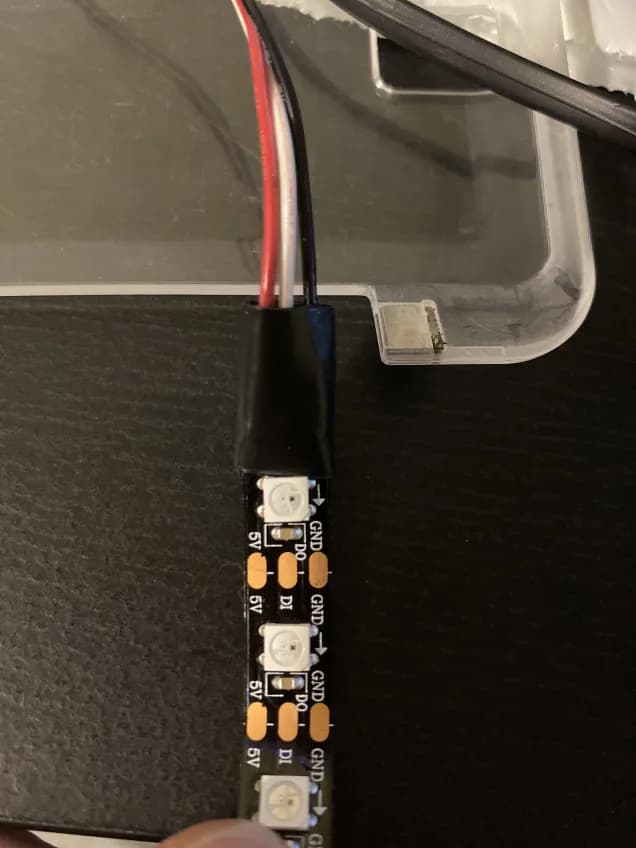
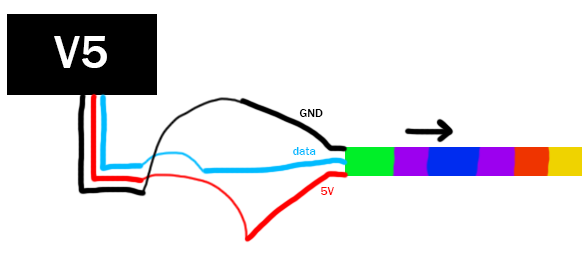
could be issues described here.
That looks to be the wrong strip type. Due to the issue jpearman mentioned getting the strips to work is iffy. In my expierence (and many others) the strips that work the best are the 144 LEDs/3.2ft ones.
In your other post, you didn’t mention running sylib::initialize(); in initialize so I want to double check that you are. Also, want to make sure you have the lights in port A on the brain. You probably have, just want to make sure we aren’t missing something simple.
If possible, could you post your whole main.cpp and where you brought the strip so we can check the specs.
Hope this helps
Yes, I do run the initialize function in the pre-auton. I do also have the lights plugged into port A on the brain. I’m assuming it is most likely the issue jpearman mentioned above, but here is my main.cpp file:
#include "vex.h"
#include "sylib/sylib.hpp"

using namespace vex;

competition Competition;


void testLed() {
  auto myLights = sylib::Addrled(22, 1, 15);
  myLights.set_all(0x00FF00);
}

void pre_auton(void) {
  vexcodeInit();
  sylib::initialize();
}

// Autonomous funtion
void autonomous(void) {

}

void usercontrol(void) {
  Controller.ButtonB.pressed(testLed);
  while (1) {
    wait(20, msec);
  }
}

int main() {
  // Setup Bot for Match
  Competition.autonomous(autonomous);
  Competition.drivercontrol(usercontrol);
  pre_auton();

  while (true) {
    wait(100, msec);
  }
}
I’m not sure about this, but maybe if no field control is connected, the usercontrol function might run before the pre_auton, given the order in which they are in main.