Hello, we are using Vexcode and I’ve been working on the programming skills but we need an autonomous but the skills and game field are different, so how do I work on autonomous? Sorry if this is very simple, it’s my first year coding
No worries! For starters, I would check out path.jerryIo to see the regular field and the skills field. The skills auton period is a full minute on the skills field, and the auton for matches on the regular/game field is 15 seconds (followed by 1:45 of driver control). Then I would go to Explore VEXcode V5 API Reference Guide - Learn Coding in Blocks, Python & C++ — VEXcode Documentation to see the different options VEXCODE has to offer, and how to use them. After you choose which version, read the docs and look on YouTube for tutorials (For example, I suggest this video if you are going to use C++). If you have any other questions, let me know, and I or someone else can help!
Are you talking about the extra octoblocks shown in VEX VR or something?
If so- It’s been a pretty known problem, if I were you I’d likely just code on the normal Vexcode website (not the VR as there are some different blocks and functions in that one and you can’t download it to your robot) and then try some variations of the same code on your real robot on a real field- and just trial and error till it works.
If you need a simple code I’d consider taking that starter block you get at the start of the match and put it into one of the goals.
Please tell me if none of that made sense- I can talk more about it soon, I’m just rushing this 
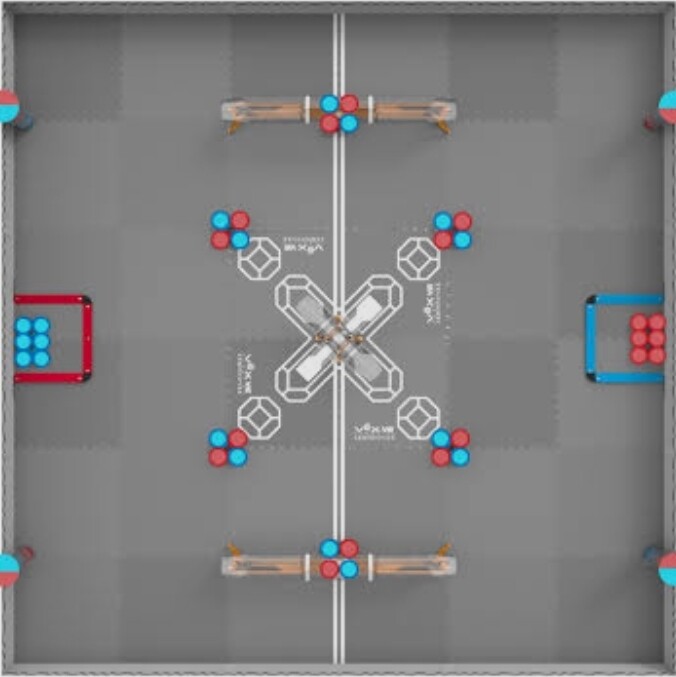

Pardon my misunderstanding, but are you telling us that you have no physical field or that there isn’t an option for the normal field on the field on your coding website?
2nd field is the correct and official game field setup, 1st field you provided is what the VEX VR coding website displays, which is usually wrong when it comes to the setup of the field.
IF you do have a physical field please try to use that to your advantage and code based off of THAT, and not the VEX VR website, IF NOT, then I recommend trying to use the VEX VR and score off of what you KNOW is accurate ( Which most parts usually are)
And the octoblocks- You’re gonna hear a lot of different terms  , there’s octoballs, blocks, polyballs, dorbs, etc-
Hello, no it’s my fault haha, I realized I was using VR not V5 for everything and messed something up, thanks, but I was just wrong in general. Is there a way to close this post? I’ve figured it out lol (also yeah I thought they were just cubes )