VEX products have a 90 day waranty.

thanks this will help my team a lot
ok, so charging completed and now the battery is powering the V5. The charger is still connected so if capacity reaches 80% it will start charging again. Disconnect the charger to see how the battery discharges all the way to shutdown.
Once charging stops, the voltage drops quickly in the first 30 seconds, you can see that in the graph in this post.
All cells seem well balanced (ie. they all read the same voltage), so I don’t really see anything wrong. It should last 10 to 15 minutes or so when driving around a competition robot.
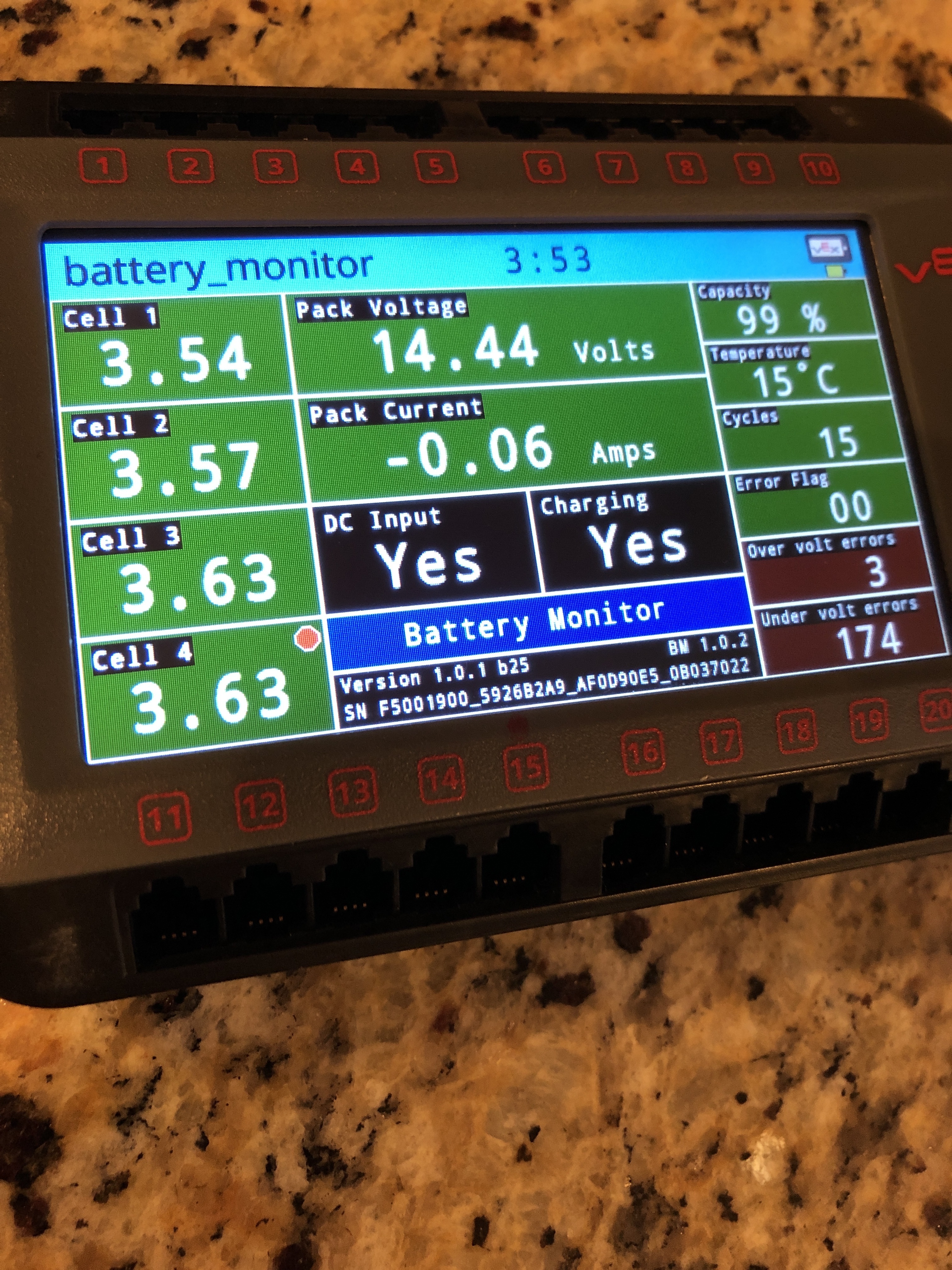
I don’t see any problem, should finish charge soon.
What does the little red dot on cell 4 mean?
The red dot means the cell is being balanced, charge is being withheld from that cell to allow others with lower voltage to charge more.
Ok thank you. I don’t think I should bother you much more. Thank you. I do have one last question. Is there a way I can download the code of the battery medic so I can just use it whenever. Sense the medic requires wifi and I can’t acces it school it is kind of annoying. We might even need it at comps also.
The battery medic program is part of the V5 firmware utility, it should work when there’s no internet access. The utility can also update vexos on a V5 brain without internet access if it was previously used to update a brain, it caches any downloads of vexos for that purpose.
The battery medic program is only allowing you to view the internal battery state, it does not change how the battery is charged, so it wouldn’t be needed that often if the batteries are known to be good. Just make sure to charge batteries until all four LEDs turn off indicating charge is complete.
Oh ok then. Thank you. I mis understood how it worked. Thanks. That should be it then
Do overvolt errors effect the battery at all because that battery did have 3 over volt errors and 174 undervolt errors
Nothing to be concerned about.
An over volt error can occur during charging if one cell has a state of charge that’s not balanced with the others and causes charging to be terminated. As the battery is used, the firmware will try and balance that cell with the other three, usually that will stop any further over volt errors occurring.
The battery above has many under volt errors, these occur if one cell drops below a certain voltage during discharge, again usually caused by slight differences in the state of charge of the four cells or by one cell having slightly less charge capacity than the others. If you keep trying to use a discharged battery on the robot you will just add to the under volt errors.
These batteries are being used in a high current application, there’s a lot of demand on the battery, if they start mis-behaving then allow a full charge and perhaps discharge under a lighter load (just run the brain for a couple of hours).
So wait. Will just letting them die on slowly fix it? Or should we only use them for that now. Because like 90 percent of our batteries do this.
Ok, @jpearman, yesterday I did the charge and drain with just the brain plugged in and it did everything perfect, charged at about 0.75A, hit 14.44 V and 3.62 V about for the cells. I unplugged it and the battery ran down to 21%, at which point I had to get some sleep and I turned it off. I charged the battery not plugged in to the brain today and the battery worked great afterward with everything plugged in (motors etc.). This is great (and thank you so much!), because I know the batteries work and they can get fixed if this happens again, but I just have a question, mainly:
Do you have any suggestions for minimizing high demand on the battery? It is great to have a solution, but it does take a decent amount of time.
Not sure what your question is really, the battery from yesterday seemed ok. 90% of your batteries do what ?
They just break on random. Or they will just die in like 2 second. But i think the way you told me may have fixed 2 of them. Not sure about the other two I brought back home
High demand is expected, we are running motors after all.
All you really did yesterday was let the battery charge correctly, not sure what else to say.
So get some data to back this up. Make sure the batteries are actually charged, plug them into the charger until the 4 green LEDs turn off.
Yah that is what I did and they seem to be fine now. I will try the other two batteries another time on the robot and will have to fix even more batteries I think.