We have a student that is trying to use the VEX extension in VS Code on Linux (Ubuntu) but gets an error when trying to build any project.
vex/mkrules.mk:11: recipe for target 'build/src/main.o' failed
clang: No such file or directory make: [build/src/main.o] Error 127
The build directory is created, but is empty. Seems like a Make config issue, but I’m not sure how to troubleshoot. I tried it on a different Linux machine with the same issue. Anyone know how to fix this?
Ubuntu 24.04
It successfully creates the directories, but does not build the main.o file (I’m just compiling the competition template - unmodified), so no .elf or .bin either.
As a side note: I also just tried building the comp template on Mac (which was working) and it says “Toolchain Folder not defined”. Everything still works fine on Windows.
ok, so I installed 24.04 in a VM, and here’s why we don’t support Linux.
The full error message when the project doesn’t build is (which would have been useful to have before)
Log
unix build for platform vexv5 on Linux x86_64
CXX src/main.cpp
clang: error while loading shared libraries: libtinfo.so.5: cannot open shared object file: No such file or directory
make: *** [build/src/main.o] Error 127
vex/mkrules.mk:11: recipe for target 'build/src/main.o' failed

Make process closed with exit code: 2
So the real error is that clang (the compiler) is failing due to a missing shared library
The library in question is libncurses5
trying to install on 24.04 throws errors, you have to jump through hoops (when you are not a Linux expert) and install other stuff first, I don’t have full instructions because it took me an hour of messing with stuff, but summary is that package manager needed updates
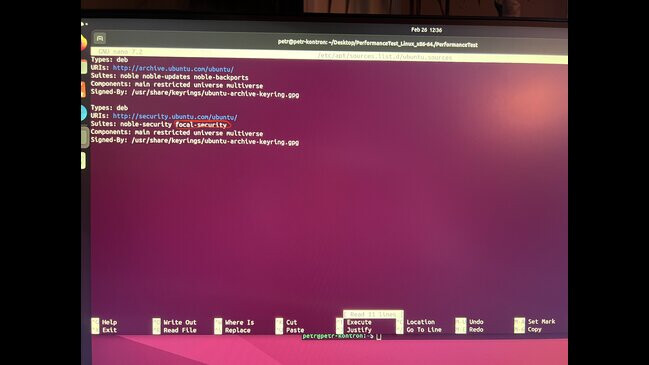
I had to add “focal-security” and “universe” to /etc/apt/sources.list.d/ubuntu.sources
and finally
more info
after installing libncurses5 that way, you probably want to revert the changes to /etc/apt/sources.list.d/ubuntu.sources, not sure what that will affect when future security updates are applied.
an alternative way seems to be this, grabbing the deb packages and installing manually (for 64bit intel)