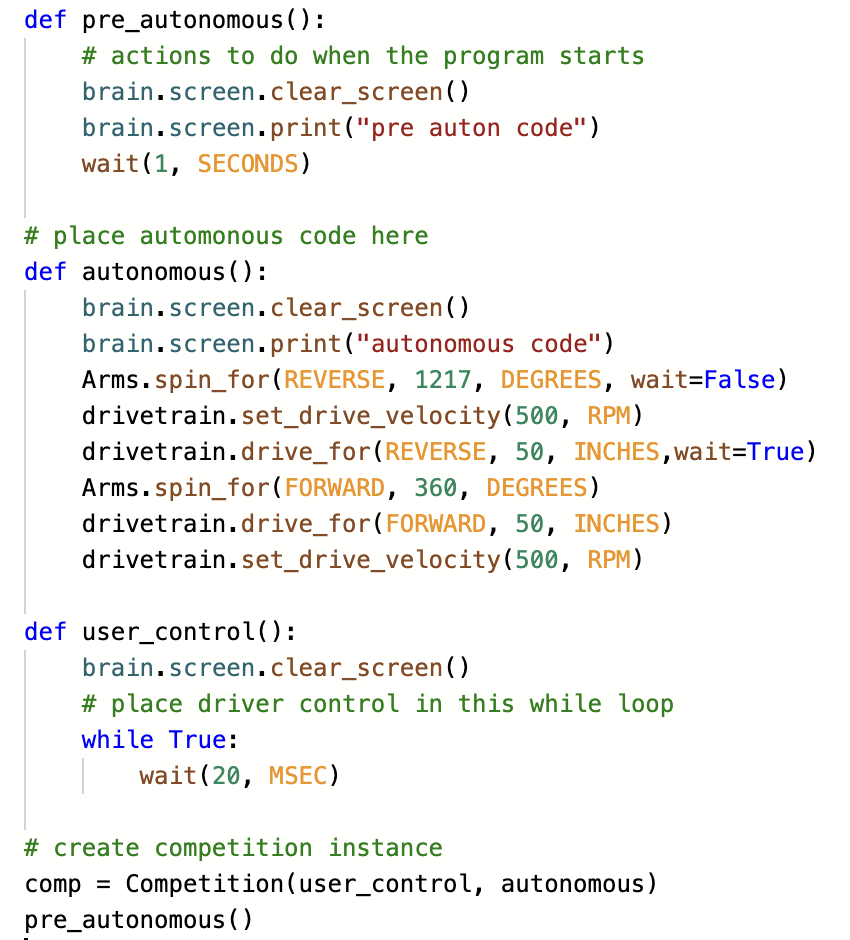
For auton I am having trouble for making my robot’s arm faster in auton. Any suggestions help.
Here is my code:
If you have set max speed to 100% (Default, I think), you will need to physically make the gear ratio faster
Right! You must remember, the pre-designed builds from VEX are intended to be useful for training in sound building practice (like having proper bearing flats) and demonstrate basic principles of design. They are, by intent, “OK” but not “great” designs for competition. If you wish to compete seriously, you will need to modify the basic build or better, go through the design process and create your own robot once you have mastered the basics of the Vex robotic system.
So there isn’t any way to make it via code like increase the RPM like I did for the drivetrain.
There is a way to change the speed in code, but I believe that the default is max speed
i believe default is like 75% speed, you can change the velocity if you use
Arms.setVelocity(100, percent); this is what vexcode v5 pro (C++) uses, it might be different depending on what you use to program
The default speed for all motors, motor groups and drivetrains is 50 rpm (assuming gear cartridge is correctly configured).
To change the speed of motors in Python, you follow the same pattern as I explained in your topic from a few days ago.
either, set the velocity for commands that do not include a velocity.
Arms.set_velocity(100, RPM)
or better, just specify in the command.
Arms.spin_for(FORWARD, 360, DEGREES, 100, RPM )
If you fire up the Python REPL, it’s easy to play with these commands and see what options you have.
I tried what you said last time but didn’t work for me
A handy way I learned the vex coding was to sit down with 1 motor and a large gear attached. Place a sharpie mark on the gear so you can clearly see it rotate.
Then, go through ALL the commands in vex using simple 1-2 line programs to learn every single one.
You can add sensors, etc as you need to.
So if your programming ‘did not work’ then you are using 1) the wrong command 2) right command but wrong values 3) code is not executing in the order it needs to.
You can run through all the vex code commands in a couple of hours. It’s time WELL spent.
I would recommend using blocks… then check the translation to python/c.